Aggiungi dati alla cache
Dopo esserti connesso correttamente alla cache e aver ottenuto un handle di cache valido, puoi aggiungere dati alla cache. NCache fornisce il Add e i suoi overload per facilitare l'aggiunta di oggetti alla cache per la prima volta senza sovrascrivere le voci esistenti.
Prerequisiti
Prima di usare il NCache Le API lato client devono garantire il rispetto dei seguenti prerequisiti:
- Installa i seguenti pacchetti NuGet nella tua applicazione client .NET:
- Includere i seguenti spazi dei nomi nell'applicazione:
- La cache deve essere in esecuzione.
- Assicurati che i dati aggiunti lo siano serializzabile.
- Per i dettagli dell'API, fare riferimento a: ICache, Aggiungi, CacheItemVersion, Contare, contiene.
- Aggiungi le seguenti dipendenze Maven per la tua applicazione client Java in pom.xml file:
<dependency>
    <groupId>com.alachisoft.ncache</groupId>
    <!--for NCache-->
    <artifactId>ncache-client</artifactId>
    <version>x.x.x</version>
</dependency>
- Importa i seguenti pacchetti nell'applicazione client Java:
- La cache deve essere in esecuzione.
- Assicurati che i dati aggiunti lo siano serializzabile.
- Per i dettagli dell'API, fare riferimento a: Cache, aggiungere, CacheItem, CacheItemVersion, getCount.
- Installa i seguenti pacchetti nella tua applicazione client Python:
- Importa i seguenti pacchetti nella tua applicazione:
- La cache deve essere in esecuzione.
- Assicurati che i dati aggiunti lo siano serializzabile.
- Per i dettagli dell'API, fare riferimento a: Cache, CacheItem, CacheItemVersion, aggiungere.
- Installa e includi il seguente modulo nella tua applicazione client Node.js:
- Includi la seguente classe nella tua applicazione:
- La cache deve essere in esecuzione.
- Assicurati che i dati aggiunti lo siano serializzabile.
- Per i dettagli dell'API, fare riferimento a: Cache, CacheItem, CacheItemVersion, aggiungere.
- Installa uno dei seguenti pacchetti NuGet nella tua applicazione client .NET:
- NCache:
Install-Package Alachisoft.NCache.SDK -Version 4.9.1.0
- Crea una nuova applicazione console.
- Assicurati che i dati aggiunti lo siano serializzabile.
- Aggiungi NCache Referenze individuando
%NCHOME%\NCache\bin\assembly\4.0 e aggiungendo Alachisoft.NCache.Web and Alachisoft.NCache.Runtime come appropriato.
- Includi il
Alachisoft.NCache.Web.Caching spazio dei nomi nell'applicazione.
- Per saperne di più sul NCache API legacy, scaricala NCache 4.9 documenti disponibili come file .zip file sul Alachisoft Sito web.
Aggiungi oggetto alla cache
Puoi aggiungere un oggetto di una classe personalizzata alla cache usando vari overload di Add metodo.
Avvertenza
Se la chiave esiste già, verrà generata l'eccezione "La chiave specificata esiste già".
L'esempio seguente aggiunge un oggetto di Prodotto classe e la chiave associata nella cache.
Note:
Un modo rapido per verificare se un elemento è stato aggiunto è utilizzare il Count proprietà o Contains metodo della cache:
Count restituisce il numero di elementi presenti nella cache.Contains verifica se nella cache esiste una chiave specificata.
try
{
    // Precondition: Cache is already connected
    // Get customer from database
    string customerKey = $"Customer:ALFKI";
    Customer customer = FetchCustomerFromDB(customerKey);

    cache.Add(customerKey, customer);
    // Item added in cache successfully
}
catch (OperationFailedException ex)
{
    // NCache specific exception

    if(ex.ErrorCode == NCacheErrorCodes.KEY_ALREADY_EXISTS)
    {
        // An item with the same key already exists
    }
    else
    {
        // Exception can occur due to:
        // Connection Failures
        // Operation Timeout
        // Operation performed during state transfer
    }
}
catch (Exception ex)
{
    // Any generic exception like ArgumentNullException or ArgumentException
}
try
{
    // Precondition: Cache is already connected
    // Get customer from database
    String customerKey = "ALFKI";
    Customer customer = fetchCustomerFromDB(customerKey);

    // Get product from database against given product ID

    cache.add(customerKey, customer);
    // Item added in cache successfully
}
catch (OperationFailedException ex)
{
    // NCache specific exception

    if (ex.getErrorCode() == NCacheErrorCodes.KEY_ALREADY_EXISTS)
    {
        // An item with the same key already exists
    }
    else
    {
        // Exception can occur due to:
        // Connection Failures
        // Operation Timeout
        // Operation performed during state transfer
    }
}
catch (Exception ex)
{
    // Any generic exception like NullPointerException or IllegalArgumentException
}
try:
    # Precondition: Cache is already connected

    # Get product from database against given product ID
    product = fetch_product_from_db(1001)

    # Generate a unique cache key for this product
    key = "Product:" + product.get_product_id()

    # Add Product object to cache
    version = cache.add(key, product)

    # Item added in cache successfully

except Exception as error:
    # Handle errors
    print(f"An error occurred: {error}")
try
{
    // This is an async method
    // Precondition: Cache is already connected

    // Get product from database against given product ID
    product = await this.fetchProductFromDB(1001);

    // Generate a unique cache key for this product
    var key = "Product:" + product.getProductID();

    // Add Product object to cache
    var version = await this.cache.add(key, product);

    // Item added in cache successfully
}
catch(error)
{
    // Handle errors
}
// Using NCache 4.9.1

try
{
    // Precondition: Cache is already connected

    // Get customer from database
    string customerKey = $"Customer:ALFKI";
    Customer customer = FetchCustomerFromDB(customerKey);

    // Get customer from database if not found in cache
    if (customer == null)
    {
        // Get customer from database
        customer = FetchCustomerFromDB("ALFKI");
        cache.Add(customerKey, customer);
    }
    // Item added in cache successfully
}
catch (OperationFailedException ex)
{
    // NCache specific exception

    if(ex.ErrorCode == NCacheErrorCodes.KEY_ALREADY_EXISTS)
    {
        // An item with the same key already exists
    }
    else
    {
        // Exception can occur due to:
        // Connection Failures
        // Operation Timeout
        // Operation performed during state transfer
    }
}
catch (Exception ex)
{
    // Any generic exception like ArgumentNullException or ArgumentException
}
Note:
Per garantire che l'operazione sia a prova di errore, si consiglia di gestire eventuali potenziali eccezioni all'interno dell'applicazione, come spiegato in Gestione dei guasti.
Aggiungi un oggetto con scadenza
Puoi aggiungere dati con metadati alla cache incapsulandoli nel file NCache CacheItem classe. L'esempio seguente aggiunge una classe di base CacheItem contenente la oggetto nella cache. Ulteriori proprietà verranno impostate rispetto al CacheItem nei capitoli successivi.
// Precondition: Cache is already connected
// Get customer from database if not found in cache

string customerKey = $"Customer:ALFKI";
Customer customer = FetchCustomerFromDB(customerKey);
// You can use CacheItem object to add metadata along with data to cache
// CacheItem comprises of certain properties such as Expiration which are explained in successive chapters
CacheItem customerCacheItem = new CacheItem(customer);
customerCacheItem.Expiration = new Expiration(ExpirationType.Sliding, TimeSpan.FromMinutes(5));
cache.Add(customerKey, customerCacheItem);
// Precondition: Cache is already connected
// Get customer from database if not found in cache
String customerKey = "ALFKI";
Customer customer = fetchCustomerFromDB(customerKey);
// You can use CacheItem object to add metadata along with data to cache
// CacheItem comprises of certain properties such as Expiration which are explained in successive chapters
CacheItem customerCacheItem = new CacheItem(customer);
customerCacheItem.setExpiration(new Expiration(ExpirationType.Sliding, TimeSpan.FromMinutes(5)));
cache.add(customerKey, customerCacheItem);
# Precondition: Cache is already connected
# Get customer from database if not found in cache
customer = fetch_customer_from_db(ALFKI)
key = "Customer:" + customer.get_customer_id()

# You can use CacheItem object to add metadata along with data to cache
# CacheItem comprises of certain properties such as Expiration which are explained in successive chapters
cache_item = ncache.CacheItem(customer)
version = cache.add(key, cache_item)
// Precondition: Cache is already connected
// This is an async method
// Get customer from database against given customer ID
customer = await this.fetchCustomerFromDB(ALFKI);
var key = "Customer:" + customer.getCustomerID();

// You can use CacheItem object to add metadata along with data to cache
// CacheItem comprises of certain properties such as Expiration which are explained in successive chapters
var cacheItem = new ncache.CacheItem(customer);
var version = await this.cache.add(key,cacheItem);
// Using NCache 4.9.1
// Precondition: Cache is already connected
if (customer == null)
{
    // Get customer from database if not found in cache
    string customerKey = $"Customer:ALFKI";
    Customer customer = FetchCustomerFromDB(customerKey);
    // You can use CacheItem object to add metadata along with data to cache
    // CacheItem comprises of certain properties such as Expiration which are explained in successive chapters
    CacheItem customerCacheItem = new CacheItem(customer);
    cache.Add(customerKey, customer, null, Cache.NoAbsoluteExpiration, new TimeSpan(0, 5, 0), CacheItemPriority.Default);
}
Utilizzo di ICache.Add per il blocco distribuito
Grazie alla sua versatilità, un altro ampio utilizzo dell'operazione Add consiste nel bloccare la cache quando viene utilizzata da più applicazioni. Ad esempio, si può configurare un ambiente in modo tale che, non appena un'applicazione si connette alla cache, aggiunga una chiave specifica nota a tutte le altre applicazioni. Una volta terminato l'utilizzo della cache, l'applicazione rimuove la chiave. Se la chiave viene aggiunta correttamente, l'applicazione può procedere all'utilizzo della cache secondo la propria logica. Tuttavia, se la chiave esiste già, significa che la cache è già in uso da un'applicazione e viene "bloccata". Questo processo è descritto in passaggi nel diagramma seguente:
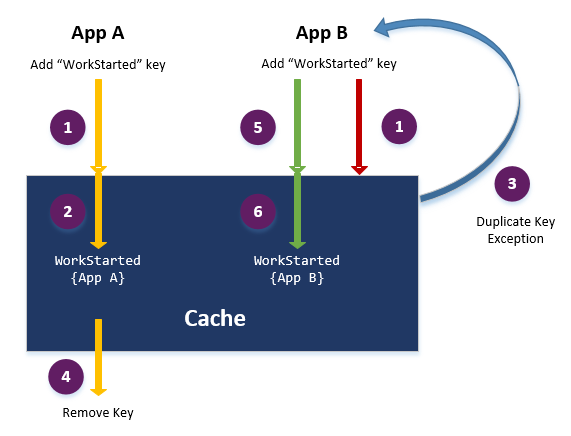
App A e App B aggiungono la chiave "WorkStarted" non appena l'applicazione viene avviata.
La chiave passata dall'App A viene aggiunta alla cache prima di quella passata dall'App B.
L'app B riceve un'eccezione "La chiave specificata esiste già". In questo scenario, l'App B attenderà che l'App A finisca il suo lavoro, ovvero finché non potrà aggiungere con successo la chiave "WorkStarted".
L'app A rimuove la chiave dalla cache una volta terminato il suo lavoro.
L'app B aggiunge nuovamente la chiave alla cache.
La chiave viene aggiunta correttamente dall'App B, bloccando la cache per altre applicazioni.
Risorse addizionali
NCache fornisce l'applicazione di esempio per Operazioni di base su GitHub.
Vedere anche
.NETTO: Alachisoft.NCache.Cliente spazio dei nomi.
Giava: com.alachisoft.ncache.client spazio dei nomi.
Pitone: ncache.cliente classe.
Node.js: Cache classe.


