将数据添加到缓存
在成功连接到缓存并获得有效的缓存句柄后,您可以将数据添加到缓存中。 NCache 提供 Add 该方法及其重载,以便首次向缓存中添加对象而不会覆盖现有条目。
硬件需求
使用前 NCache 客户端 API 应确保满足以下先决条件:
- 在您的 .NET 客户端应用程序中安装以下 NuGet 包:
- 在您的应用程序中包含以下命名空间:
- 缓存必须正在运行。
- 确保要添加的数据是 可序列化.
- 有关 API 详细信息,请参阅: 缓存, 添加, 缓存项版本, 计数, 包含.
- 为您的 Java 客户端应用程序添加以下 Maven 依赖项: pom.xml 文件:
<dependency>
    <groupId>com.alachisoft.ncache</groupId>
    <!--for NCache-->
    <artifactId>ncache-client</artifactId>
    <version>x.x.x</version>
</dependency>
- 在 Java 客户端应用程序中导入以下包:
- 缓存必须正在运行。
- 确保要添加的数据是 可序列化.
- 有关 API 详细信息,请参阅: 缓存, 加, 缓存项, 缓存项版本, 获取计数.
- 在您的 Python 客户端应用程序中安装以下软件包:
- 在您的应用程序中导入以下包:
- 缓存必须正在运行。
- 确保要添加的数据是 可序列化.
- 有关 API 详细信息,请参阅: 缓存, 缓存项, 缓存项版本, 加.
- 在您的Node.js客户端应用程序中安装并包含以下模块:
- 在您的应用程序中包含以下类:
- 缓存必须正在运行。
- 确保要添加的数据是 可序列化.
- 有关 API 详细信息,请参阅: 缓存, 缓存项, 缓存项版本, 加.
- 在您的 .NET 客户端应用程序中安装以下任一 NuGet 包:
- NCache:
Install-Package Alachisoft.NCache.SDK -Version 4.9.1.0
- 创建一个新的控制台应用程序。
- 确保要添加的数据是 可序列化.
- 添加 NCache 案例 通过定位
%NCHOME%\NCache\bin\assembly\4.0 并添加 Alachisoft.NCache.Web 和 Alachisoft.NCache.Runtime 作为适当的。
- 包括
Alachisoft.NCache.Web.Caching 应用程序中的命名空间。
- 要了解更多关于 NCache 旧版 API,请下载 NCache 4.9 可作为 邮编 文件在 Alachisoft 官方网站.
将对象添加到缓存
您可以使用各种重载将自定义类的对象添加到缓存中 Add 方法。
警告
如果键已经存在,会抛出“指定的键已经存在”异常。
下面的例子添加了一个对象 产品 类及其关联键放入缓存中。
注意:
验证项目是否已添加的一种快捷方法是使用…… Count 财产或 Contains 缓存方法:
Count 返回缓存中存在的项目数。Contains 验证缓存中是否存在指定的键。
try
{
    // Precondition: Cache is already connected
    // Get customer from database
    string customerKey = $"Customer:ALFKI";
    Customer customer = FetchCustomerFromDB(customerKey);

    cache.Add(customerKey, customer);
    // Item added in cache successfully
}
catch (OperationFailedException ex)
{
    // NCache specific exception

    if(ex.ErrorCode == NCacheErrorCodes.KEY_ALREADY_EXISTS)
    {
        // An item with the same key already exists
    }
    else
    {
        // Exception can occur due to:
        // Connection Failures
        // Operation Timeout
        // Operation performed during state transfer
    }
}
catch (Exception ex)
{
    // Any generic exception like ArgumentNullException or ArgumentException
}
try
{
    // Precondition: Cache is already connected
    // Get customer from database
    String customerKey = "ALFKI";
    Customer customer = fetchCustomerFromDB(customerKey);

    // Get product from database against given product ID

    cache.add(customerKey, customer);
    // Item added in cache successfully
}
catch (OperationFailedException ex)
{
    // NCache specific exception

    if (ex.getErrorCode() == NCacheErrorCodes.KEY_ALREADY_EXISTS)
    {
        // An item with the same key already exists
    }
    else
    {
        // Exception can occur due to:
        // Connection Failures
        // Operation Timeout
        // Operation performed during state transfer
    }
}
catch (Exception ex)
{
    // Any generic exception like NullPointerException or IllegalArgumentException
}
try:
    # Precondition: Cache is already connected

    # Get product from database against given product ID
    product = fetch_product_from_db(1001)

    # Generate a unique cache key for this product
    key = "Product:" + product.get_product_id()

    # Add Product object to cache
    version = cache.add(key, product)

    # Item added in cache successfully

except Exception as error:
    # Handle errors
    print(f"An error occurred: {error}")
try
{
    // This is an async method
    // Precondition: Cache is already connected

    // Get product from database against given product ID
    product = await this.fetchProductFromDB(1001);

    // Generate a unique cache key for this product
    var key = "Product:" + product.getProductID();

    // Add Product object to cache
    var version = await this.cache.add(key, product);

    // Item added in cache successfully
}
catch(error)
{
    // Handle errors
}
// Using NCache 4.9.1

try
{
    // Precondition: Cache is already connected

    // Get customer from database
    string customerKey = $"Customer:ALFKI";
    Customer customer = FetchCustomerFromDB(customerKey);

    // Get customer from database if not found in cache
    if (customer == null)
    {
        // Get customer from database
        customer = FetchCustomerFromDB("ALFKI");
        cache.Add(customerKey, customer);
    }
    // Item added in cache successfully
}
catch (OperationFailedException ex)
{
    // NCache specific exception

    if(ex.ErrorCode == NCacheErrorCodes.KEY_ALREADY_EXISTS)
    {
        // An item with the same key already exists
    }
    else
    {
        // Exception can occur due to:
        // Connection Failures
        // Operation Timeout
        // Operation performed during state transfer
    }
}
catch (Exception ex)
{
    // Any generic exception like ArgumentNullException or ArgumentException
}
注意:
为确保操作是故障安全的,建议处理应用程序中的任何潜在异常,如中所述 处理故障.
添加过期对象
您可以通过将带有元数据的数据封装在缓存中来将其添加到缓存中 NCache CacheItem 类。以下示例添加了一个基本类 CacheItem 含 客户 对象进入缓存。 将针对 CacheItem 在后续章节中。
// Precondition: Cache is already connected
// Get customer from database if not found in cache

string customerKey = $"Customer:ALFKI";
Customer customer = FetchCustomerFromDB(customerKey);
// You can use CacheItem object to add metadata along with data to cache
// CacheItem comprises of certain properties such as Expiration which are explained in successive chapters
CacheItem customerCacheItem = new CacheItem(customer);
customerCacheItem.Expiration = new Expiration(ExpirationType.Sliding, TimeSpan.FromMinutes(5));
cache.Add(customerKey, customerCacheItem);
// Precondition: Cache is already connected
// Get customer from database if not found in cache
String customerKey = "ALFKI";
Customer customer = fetchCustomerFromDB(customerKey);
// You can use CacheItem object to add metadata along with data to cache
// CacheItem comprises of certain properties such as Expiration which are explained in successive chapters
CacheItem customerCacheItem = new CacheItem(customer);
customerCacheItem.setExpiration(new Expiration(ExpirationType.Sliding, TimeSpan.FromMinutes(5)));
cache.add(customerKey, customerCacheItem);
# Precondition: Cache is already connected
# Get customer from database if not found in cache
customer = fetch_customer_from_db(ALFKI)
key = "Customer:" + customer.get_customer_id()

# You can use CacheItem object to add metadata along with data to cache
# CacheItem comprises of certain properties such as Expiration which are explained in successive chapters
cache_item = ncache.CacheItem(customer)
version = cache.add(key, cache_item)
// Precondition: Cache is already connected
// This is an async method
// Get customer from database against given customer ID
customer = await this.fetchCustomerFromDB(ALFKI);
var key = "Customer:" + customer.getCustomerID();

// You can use CacheItem object to add metadata along with data to cache
// CacheItem comprises of certain properties such as Expiration which are explained in successive chapters
var cacheItem = new ncache.CacheItem(customer);
var version = await this.cache.add(key,cacheItem);
// Using NCache 4.9.1
// Precondition: Cache is already connected
if (customer == null)
{
    // Get customer from database if not found in cache
    string customerKey = $"Customer:ALFKI";
    Customer customer = FetchCustomerFromDB(customerKey);
    // You can use CacheItem object to add metadata along with data to cache
    // CacheItem comprises of certain properties such as Expiration which are explained in successive chapters
    CacheItem customerCacheItem = new CacheItem(customer);
    cache.Add(customerKey, customer, null, Cache.NoAbsoluteExpiration, new TimeSpan(0, 5, 0), CacheItemPriority.Default);
}
使用 ICache.Add 进行分布式锁定
由于其多功能性,Add 操作的另一个广泛用途是锁定被多个应用程序使用的缓存。例如,可以设置一个环境,当任何应用程序连接到缓存时,它都会添加一个所有应用程序都知道的特定键。应用程序使用完缓存后,会从缓存中移除该键。如果键添加成功,应用程序就可以按照其逻辑继续使用缓存。但是,如果键已存在,则表示缓存已被应用程序使用,并已被“锁定”。下图分步骤描述了这一过程:
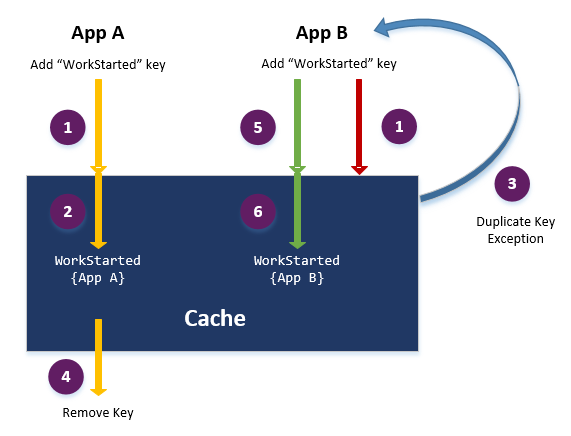
应用程序 A 和应用程序 B 在应用程序启动后立即添加“WorkStarted”键。
App A 传递的 key 在 App B 传递的 key 之前被添加到缓存中。
应用程序 B 收到“指定的密钥已存在”异常。 在这种情况下,应用程序 B 将等待应用程序 A 完成其工作,即直到它可以成功添加“WorkStarted”键。
应用程序 A 完成工作后从缓存中删除密钥。
App B 再次将密钥添加到缓存中。
App B 成功添加密钥,锁定其他应用程序的缓存。
更多资讯
NCache 提供基本操作的示例应用程序 GitHub上.
参见
.NET: Alachisoft.NCache。客户 命名空间。
Java的: com.alachisoft.ncache.client 命名空间。
Python: ncache.客户端 类。
节点.js: 缓存 类。


