
现代问题需要现代解决方案。 而对快速性能的需求一直是个问题。 NCache 是对关键问题(例如性能和可扩展性)的快速修复。 它有效地工作并涵盖了应用程序中的所有问题区域,尽管缓存的主要目的是用于读取密集型应用程序。 这个博客彻底解释了如何 NCache 是您阅读密集型应用程序的最佳选择。
缓存的需要
让我们从头开始,看看为什么需要缓存? 其简单的答案是数据库的响应时间。 假设在一个地方包含所有数据的主存储(您的数据库)可能会由于更高的响应率而阻塞。 什么解决它? 缓存——因为它提供内存存储和更快的响应时间。
其次,与数据库不同,分布式缓存本质上没有单点故障,负载被分配,因此请求使服务器阻塞的机会更少。
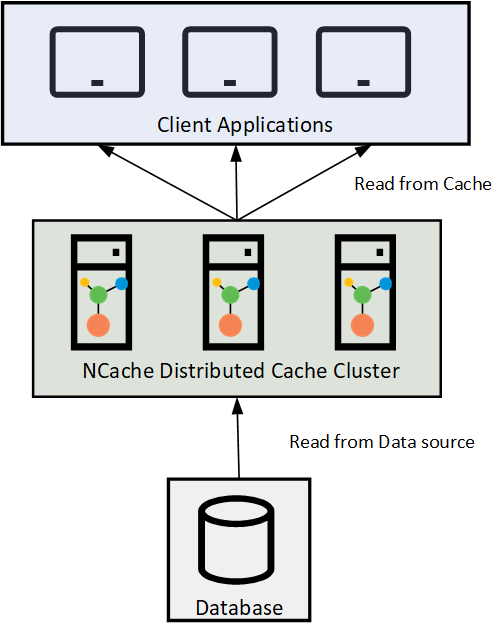
图 1:阅读密集型应用程序 NCache
鉴于我们刚刚讨论的上述事实,我们已经确定缓存最适合您的写入强度不是很高但读取强度相对较高的情况。
让我们考虑一个包含有关运输系统信息的网站。 公共汽车票价和时间通常是静态的,这意味着不会经常变化。 此类具有更多读取密集数据的应用程序具有丰富的功能集 NCache 用于执行更快的读取操作。
NCache 作为读取密集型缓存存储
具有阅读密集型性质的应用程序具有 NCache 尽可能快地执行所有读取操作。 NCache 具有丰富的功能集,可满足各种读取操作,例如获取单个或批量项目。 一旦缓存从数据库接收到数据,所有的提取操作都会直接进入缓存,以获得更高的性能和可扩展性。
获取操作 NCache
NCache 提供了各种重载 得到() 根据特定键从缓存中获取数据的方法。 这些操作本质上是同步的,并根据您的自定义逻辑返回一个类型对象。 如果缓存中不存在任何项目,则返回 null。
查看下面的代码,客户希望查看地址详细信息,以确保它们使用正常 得到() 方法:
|
1 2 3 4 5 6 7 8 9 10 11 12 13 14 15 |
// Pre-condition: Cache is already running // Items are already present in the cache // Initialize Cache ICache cache = CacheManager.GetCache("demoCache"); string customerKey = "Customer:ALFKI"; // Retrieve the Customer object Customer customer = cache.Get<Customer>(customerKey); if (customer != null) { Console.WriteLine($"Customer: {customer.ContactName}, Address : {customer.Address}"); } |
NCache 还允许用户 添加, 更新和 删除 缓存中的数据。
从缓存中获取批量项目
同样,您也可以使用 批量获取() 方法。 使用它,您可以使用单个调用从缓存中获取大量项目。
下面的示例显示了如何使用单个操作从缓存中获取多个客户。
|
1 2 3 4 5 6 7 8 9 10 11 12 13 14 15 16 17 |
// Pre-condition: Items are already present in the cache // Create an array of all keys to fetch String[] keys = new String[] { "Customer:ALFKI", "Customer:ANATR", "Customer:ANTON", "Customer:AROUT", "Customer:BERGS" }; // Get items from cache IDictionary<string, Customer> retrievedItems = cache.GetBulk<Customer>(keys); // Retrieve customers and their addresses from dictionary foreach (KeyValuePair<string, Customer> retrievedItem in retrievedItems) { Console.WriteLine($"Customer: {retrievedItem.Value.ContactName}, Address : { retrievedItem.Value.Address}"); } |
此外, NCache 为用户提供 添加, 更新和 删除 一次调用中的批量数据。
使用关键字获取项目
您还可以使用附加的关键字来获取项目以进行有效搜索。 您使用某些基于字符串的关键字标记您的数据,并在这些关键字的帮助下检索项目。 例如,您希望使用他们所属的区域(例如东海岸或西海岸)对某些客户进行分组。 提供的特定功能集 NCache 为此目的是:
| 命名标签 | 标签 | 群 |
|---|---|---|
| 以字典的形式提供 | 以标签数组的形式提供 | 以字符串形式提供 |
| 可以是任何原始数据类型 | 仅基于字符串 | 仅基于字符串 |
在下面给出的示例中,用户希望使用 SQL 查询查看所有拥有 12% VIP 会员折扣的客户的详细信息。
|
1 2 3 4 5 6 7 8 9 10 11 12 13 14 15 16 17 18 19 20 21 22 23 24 25 26 27 28 29 30 31 |
// Pre-conditions: Items are already present in the cache with named tags // Custom class is query indexed through NCache Web Manager or config.ncconf // Create SQL Query with the specified criteria // Make sure to use the Fully Qualified Name for custom class string query = "SELECT CustomerID, ContactName FROM Alachisoft.NCache.Samples.Data.Customer WHERE VIP_Membership_Discount = 0.12"; // Use QueryCommand for query execution var queryCommand = new QueryCommand(query); // Executing Query ICacheReader reader = cache.SearchService.ExecuteReader(queryCommand); // Read results if result set is not empty if (reader.FieldCount > 0) { while (reader.Read()) { // Get the value of the result set string customerID = reader.GetValue<string>("CustomerID"); string customerName = reader.GetValue<string>("ContactName"); Console.WriteLine($"Customer '{customerName}' with ID '{customerID}' has VIP membership discount."); } } else { Console.WriteLine($"No VIP members found"); } |
其他使用命名标签的操作,请参考 NCache 文档.
使用 SQL 搜索缓存
对于从特定数据库中获取项目,查询是使用特定标准进行搜索的一种有效方式。 NCache 完全理解查询的需求,让您使用从缓存中获取项目 类 SQL 查询。 此外,您需要 指数 缓存中的特定项目,因为它不像数据库那样自行创建索引。 但是一旦数据被索引,您就可以使用 SQL 查询。
它提供了与 ADO.NET 兼容的 API,例如 执行阅读器, 执行标量和 执行非查询 从缓存中搜索 (SELECT) 和删除 (DELETE) 数据。
以下是支持的东西 NCache 查询:
查看下面的代码,了解类似 SQL 的查询如何通过缓存进行搜索。以下示例显示了应用过滤器以仅显示单价小于 100 的产品的用户。
|
1 2 3 4 5 6 7 8 9 10 11 12 13 14 15 16 17 18 19 20 21 22 23 24 25 26 27 28 29 30 31 32 33 |
//Pre-condition: Items are already present in the cache // Use the Fully Qualified Name (FQN) of your own custom class string query = "SELECT * FROM Alachisoft.NCache.Samples.Data.Product WHERE UnitPrice < ?"; // Use QueryCommand for query execution var queryCommand = new QueryCommand(query); // Providing parameters for query queryCommand.Parameters.Add("UnitPrice", 100.0); // Executing QueryCommand through ICacheReader ICacheReader reader = cache.SearchService.ExecuteReader(queryCommand); // Read results if result set is not empty if (reader.FieldCount > 0) { while (reader.Read()) { // Get key of product item in cache string productKey = reader.GetValue<string>("$KEY$"); // Get product attributes string productName = reader.GetValue<string>("ProductName"); double unitPrice = reader.GetValue<double>("UnitPrice"); Console.WriteLine($"Product '{productName}' with key '{productKey}' has UnitPrice {unitPrice}"); } } else { Console.WriteLine($"No product found with price less than 100"); } |
使用 LINQ 搜索缓存
像 SQL 一样, NCache 提供对编写查询的支持 LINQ 搜索缓存。 NCache LINQ 提供程序转换 LINQ 相关查询 成 NCache的扩展 SQL 格式,并在将其转换为 LINQ 格式后相应地返回结果。 编写 LINQ 查询的语法有两种类型:
- Lambda 表达式
- 简单的 LINQ 查询表达式
但是,就像 SQL 一样,您需要为可搜索的缓存数据定义索引,以便您的查询顺利运行。
查看下面的代码示例,了解 LINQ 查询如何从缓存中获取对象。 用户已应用过滤器以显示至少有 10 件库存的饮料或乳制品。
|
1 2 3 4 5 6 7 8 9 10 11 12 13 14 15 16 17 18 19 20 21 22 23 24 |
// Pre-condition: Items are already present in the cache // Create custom class LINQ object IQueryable<Product> products = new NCacheQuery<Product>(cache); // LINQ query to search cache IQueryable<Product> result = from prod in products where (prod.Category == "Beverages" || prod.Category == "Dairy") && prod.UnitsInStock > 10 select prod; if (result != null) { foreach (Product product in result) { Console.WriteLine($"Product '{product.ProductName}' in Category '{product.Category}' has stock of '{product.UnitsInStock}' units"); } } else { Console.WriteLine($"No product found"); } |
结束博客
NCache 实际上是一个强大的缓存解决方案,用于提高读取密集型应用程序的性能。 它通过一组丰富的功能提高了速度并增强了性能、可扩展性和可靠性。 请查看其他 NCache 功能 从我们的网站。