Azure Cosmos DB 是由 Microsoft Azure 提供的完全托管的 NoSQL 数据库。它因其高数据可用性而广受欢迎。 可扩展性以及它提供的低延迟访问。然而,如此频繁的数据库访问可能会导致性能瓶颈和成本增加,因为 Azure 会为每个数据库事务向用户收费。缓存对于优化性能和降低成本至关重要。本文探讨了如何 NCache 可以将开源的内存分布式缓存解决方案与此数据库集成在一起 .NET 8 应用程序.
关键精华
- 降低成本: 缓存通过从内存中读取数据来减少 Azure Cosmos DB 请求单元 (RU)。
- 降低延迟: 使用内存缓存 NCache 与 Cosmos DB 的毫秒级响应相比,延迟仅为微秒级。
- 可扩展性: 卸载功能可以读取数据库中的流量,从而在高峰负载期间提高吞吐量。
为什么 Azure Cosmos DB 需要缓存
延迟和成本挑战: Azure Cosmos DB 的分布式特性可能会增加延迟,并且大查询量会产生较高的 RU(数据库事务)成本。
性能和可扩展性: NCache 通过减少数据库访问次数来优化性能,节省成本,并提高可扩展性。
高可用性: NCache 通过从内存中提供频繁访问的数据,提供高可用性、高效加载工作负载并加快响应时间。
客户端缓存: NCache的客户端缓存它可以对应用服务器执行 InProc,并通过避免缓存数据的网络传输来提高速度。
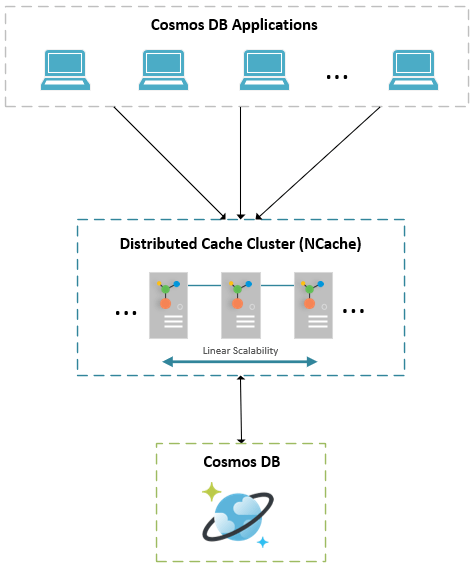
数字: NCache 使用 Azure Cosmos DB 的分布式缓存架构
如何使用 Azure Cosmos DB (.NET 8) 实现缓存?
以下是实现的优化方法 NCache 有了这个数据库 在 .NET 8 中。此示例假设应用程序检索客户数据并缓存它以优化性能。但是,请确保您拥有 Azure Cosmos DB 和 NCache (开源或企业) 安装并设置后再继续。您还需要 .NET 8 SDK 和 Azure SDK for .NET。
缓存单个 Cosmos DB 项
以下代码片段显示如何缓存来自 Azure Cosmos数据库 使用 NCache.
|
1 2 3 4 5 6 7 8 9 10 11 12 13 14 15 16 17 18 19 20 21 22 23 24 25 26 27 28 29 30 31 32 33 34 35 36 37 38 39 40 41 42 43 44 45 46 |
using Alachisoft.NCache.Client; using Alachisoft.NCache.Runtime.Caching; using Microsoft.Azure.Cosmos; using System; using System.Threading.Tasks; class Program { private static readonly string cosmosConnectionString = ""; private static readonly string cacheName = "myClusteredCache"; static async Task Main(string[] args) { string customerId = "ALFKI"; string cacheKey = $"Customer:{customerId}"; ICache cache = CacheManager.GetCache(cacheName); var cachedCustomer = cache.Get(cacheKey); if (cachedCustomer == null) { Console.WriteLine("Cache miss. Fetching from Cosmos DB..."); var client = new CosmosClient(cosmosConnectionString); var container = client.GetContainer("Northwind", "Customer"); PartitionKey partitionKey = new PartitionKey("Seattle"); var itemResponse = await container.ReadItemAsync(customerId, partitionKey); cachedCustomer = itemResponse.Resource; var cacheItem = new CacheItem(cachedCustomer) { Expiration = new Expiration(ExpirationType.Absolute, TimeSpan.FromMinutes(10)) }; cache.Insert(cacheKey, cacheItem); Console.WriteLine("Customer data cached successfully."); } else { Console.WriteLine("Cache hit! Fetching from NCache..."); } } } |
缓存数据库项集合
缓存多个数据库记录可提高效率 查询 大型数据集。下面是从数据库缓存客户列表的优化方法。
|
1 2 3 4 5 6 7 8 9 10 11 12 13 14 15 16 17 18 19 20 21 22 23 24 25 26 27 |
string key = "CustomersFromGermany"; IDistributedList germanCustomers = cache.DataTypeManager.GetList(key); if (germanCustomers == null) { var container = cosmosClient.GetContainer("Northwind", "Customer"); var query = new QueryDefinition("SELECT * FROM Customers c WHERE c.Country = 'Germany'"); var feedIterator = container.GetItemQueryIterator(query); var attributes = new DataTypeAttributes() { Expiration = new Expiration(ExpirationType.Absolute, TimeSpan.FromMinutes(10)) }; germanCustomers = cache.DataTypeManager.CreateList(key, attributes); while (feedIterator.HasMoreResults) { var response = await feedIterator.ReadNextAsync(); foreach (var customer in response.Resource) { germanCustomers.Add(customer); } } } |
NCache 在 Azure 中部署
你可以部署 NCache 在 Azure 中使用多种方法:
- NCache Cloud:Azure Marketplace 上提供的完全托管缓存解决方案。
- 虚拟机: 部署 NCache 手动开启 Azure 虚拟机 实现类似现场控制。
- Azure Kubernetes 服务 (AKS): 运行 NCache 在容器中实现可扩展的架构。
- Azure应用服务: 主持人 NCache 作为 PaaS 部署的一部分。
有关详细信息 NCache Azure 部署,请访问 NCache 文件记录.
结语
整合 NCache 使用 Azure Cosmos DB 可以提高性能、降低成本、提供低延迟和高可用性。 分布式列表, 批量操作和 基于标签的缓存, NCache 最适合处理 .NET 8 应用程序的缓存。对于 电子商务, IoT或人工智能分析,它提供了可扩展且高效的缓存解决方案。
常见问题
问:Azure Cosmos DB 是否有内置缓存?
答:Azure Cosmos DB 具有集成缓存,但仅限于特定工作负载(例如点读取)。外部分布式缓存(例如) NCache 提供更多控制选项、复杂数据类型以及跨不同区域的同步功能。
问:缓存如何帮助 Azure Cosmos DB 节省成本?
答:Cosmos DB 按请求单元 (RU) 收费。通过处理来自 Cosmos DB 的频繁读取请求,Cosmos DB 会收取费用。 NCache 使用数据库而不是存储数据,可以减少资源占用,从而降低每月账单。
问:可以 NCache 将数据与 Cosmos DB 同步?
答:是的, NCache 支持缓存同步,以便在 Cosmos DB 后端数据更改时自动使缓存项失效或更新缓存项。