ASP.NET Session State Provider for NCache in Web Farms
For on-premises deployments, ASP.NET Session State provides three built-in storage options (InProc, StateServer, and SqlServer) and a fourth "Custom" option. The first two built-in options (InProc StateServer) have scalability problems, whereas, SqlServer option has both performance and scalability problems.
A much better strategy is to use the "Custom" option and plug-in NCache as your ASP.NET Session State Provider. NCache is an extremely fast and scalable Open Source distributed cache for .NET. It handles extreme transaction load by allowing you to add more cache servers at runtime and scale linearly. NCache also provides intelligent cache replication so you don't lose any ASP.NET Session State if a web server or a cache server goes down.
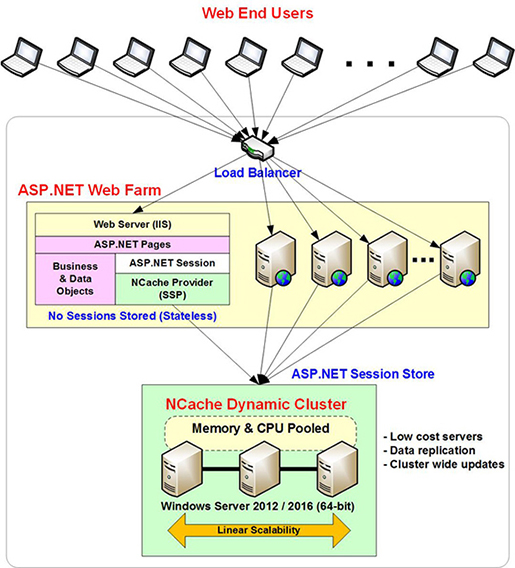
Benefits of NCache ASP.NET Session State Provider
Implementing NCache as your Session State Provider (SSP) requires zero code changes. You simply follow these steps:
- Install the NCache Session Provider NuGet package via NuGet Package Manager.
- Configure your web.config file to use the "Custom" session mode.
- Specify your NCache cluster name and settings in the provider configuration.
See details on configuring ASP.NET Session State Provider for NCache. Following are some of the benefits of using NCache as your ASP.NET Session State Provider:
- High Availability:NCache has a self-healing peer to peer clustering architecture with no single point of failure. This provides 100% uptime for your ASP.NET Session State storage, which is very important for business-critical applications. These high-availability features make NCache the preferred choice for mission-critical applications in E-commerce, Financial Services, and Healthcare, where session persistence is vital for transaction integrity.
- Linear Scalability:NCache allows you to scale your cache cluster linearly by adding more cache servers to the cluster. This increases your transaction capacity and also your storage capacity. This means ASP.NET Session State storage never becomes a bottleneck for your application under heavy transaction loads.
- Intelligent Session Replication:NCache provides rich caching topologies (Mirrored Cache, Replicated Cache, and Partition-Replica Cache) with intelligent session replication that does not compromise on performance and scalability. This ensures that you don't lose any session data when a web server or a cache server goes down.
- Fast Compact Serialization:NCache provides a Compact Serialization that is faster than a regular .NET serialization and requires no programming to use. Simply register your .NET classes with it, and NCache auto-generates and compiles serialization code at runtime for efficient use.
How to Manage ASP.NET Sessions Across Multiple Regions (Data Centers)?
NCache provides two ways for you to manage ASP.NET Session State for applications running in multiple regions (data centers) and still maintaining session consistency across them. They are as follows:
-
WAN Replication of ASP.NET Session State: NCache provides a Bridge Topology to let you replicate your entire ASP.NET Session State store (the distributed cache) to another region (data center) across the WAN. This ensures that your sessions always exist in multiple regions (data centers). You can use this in active-passive (for disaster recovery) or active-active modes. In active-active, you can even load balance traffic between multiple regions (data centers). All of this is done through configuration changes.
-
Multi-Region ASP.NET Session State: If you don't want to replicate ASP.NET Session State across the WAN because of bandwidth consumption cost, you can use Multi-site ASP.NET Session State feature of NCache. In this, the ASP.NET Session State is not replicated across sites and instead is kept at the location of its creation. But, if you move any traffic from one region (data center) to another, the ASP.NET Session State moves with it. This allows you to have two or more active regions (data centers), each keeping most of its traffic local, but occasionally overflowing to another region when needed.
And, you can also bring down one datacenter without causing any interruptions for the users because their sessions will be accessible by other datacenters.
Advanced Features in NCache ASP.NET Session State Provider
The NCache ASP.NET Session State provider implements all the standard ASP.NET Session State Provider features. Additionally, it provides various advanced features to let you handle complex situations in your applications.
- Share Sessions across Application Domains: If your application uses multiple application domains with separate web.config files, setting the same sessionAppId (e.g., "NCacheApp1") in all of them enables session sharing between those domains. If you use a different Session App ID, then sessions are not shared across application domains.
- Error logging: You can enable error logging to a log file on your web server (in
INSTALL_DIR\NCache\log-files\SessionStoreProviderfolder) by specifyingenableLogs = "true". You can also enable logging of errors to the Windows Event Log by specifyingwriteExceptionsToEventLog = "true". Standard Session Locking: The standard ASP.NET session locking behavior is that if a session is locked, another request for it waits for 90 seconds (configurable) and at the end force-unlocks the session. You can specify this option as follows:
enableSessionLocking = "true" sessionLockingRetry = "-1" emptySessionWhenLocked = "false"-
Enhanced Session Locking: If you have a high-traffic ASP.NET application where robots may be scraping data and using the same session ID for hundreds or thousands of requests simultaneously. You cannot afford the standard session locking option as waiting for 90 seconds could tie up all your available sockets. Instead, you want to return the request quickly to indicate a failure. You can specify this as follows:
enableSessionLocking = "true" sessionLockingRetry = "5" emptySessionWhenLocked = "false"This makes 5 retries at half-second intervals and then returns an empty session to signify a failure.
- Enterprise Use Case: This enhanced locking behavior was specifically engineered for a high-traffic airline website to prevent system-wide socket exhaustion during intense robot scraping and high-concurrency events.