Dynamic Cache Clustering for High Availability
NCache has self-healing dynamic cache clustering based on a peer-to-peer architecture to provide 100% uptime. This is a TCP-based cluster where there are no master/slave nodes and instead every server in the cluster is a peer. This allows you to add or remove any cache server at runtime from the cluster without stopping either the cache or your application.
Peer to Peer Architecture (Self-Healing)
NCache cluster has a peer-to-peer architecture. This means there are no Master/Slave nodes and each server is peer. There is a Cluster Coordinator node that is the oldest node in the cluster. If Cluster Coordinator node goes down, the next oldest one automatically becomes the coordinator.
Cluster Coordinator manages all cluster related operations including cluster membership when nodes are added or removed, distribution map for Partitioned Cache / Partition-Replica Cache topology, and other cache configuration information. Cluster Coordinator also managed cluster health and forcibly removes any cache servers that are partially connected to all other servers in the cluster.
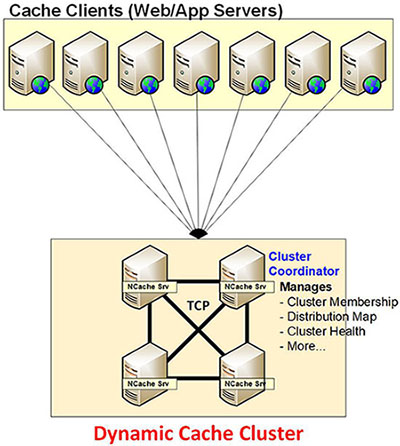
Dynamic Clustering
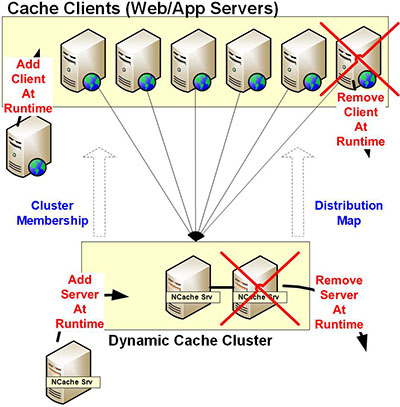
NCache has a dynamic clustering architecture. This means you can add or remove any cache server from the cluster without stopping the cache or the applications. Whenever you add or remove a cache server, the Cluster Membership is updated immediately at runtime and propagated to all the servers in the cluster as well as all the clients connected to the cluster. This runtime update and propagation allows NCache to always be up and running even when such changes are being made.
Dynamic clustering allows you to do the following:
- Add / Remove Cache Servers at Runtime: without stopping the cache or your application
- Cluster membership: is updated at runtime and propagated to all servers in the cluster and all clients connected to the cluster.
Dynamic Client Connections
NCache also lets you add or remove cache clients at runtime without stopping the cache or other clients. When you add a client, this client just needs to know about any one cache server in the cluster to connect to. Once it connects to that server, it receives cluster membership and caching topology information based on which it decides which other servers to connect to.
- Add / Remove Clients at Runtime: without stopping the cache or your application.
- Partitioned Cache / Partition-Replica Cache: the client connects to all the Partitions in all cache servers (not Replicas because Partitions talk to their Replicas). This allows the client to directly go where the data is for reads and writes. And, if a new server is added to the cluster, the client receives an updated cluster membership information and then connects to this newly added cache server as well.
- Replicated Cache: in case of Replicated Cache, the client just connects to one cache server in the cluster but in a load balanced manner to ensure that all cache servers have equal number of clients. The client obtains the load balancing information from this cache server and based on that then if needed it re-connects to the appropriate cache server. Client connects to only one cache server because each server has the entire cache so all reads and writes are possible right there.
- Mirrored Cache: in case of Mirrored Cache, the client just connects only to the active node in this 2-node cluster. If the client connects to the passive node, the passive node tells the client about the active node and the client automatically reconnects to the active node. If the active node goes down and the passive node becomes active, all clients automatically connect to the new active node.
Dynamic Configuration
NCache also provides dynamic configuration of the cache and clients. The purpose is to allow you to make changes later when the cache is running without stopping the cache or your application.
- Propagate to all Servers and Clients at Runtime: this includes all configuration and its changes and also the Distribution Map.
- Cache Configuration: when a cache configuration is created through admin tools, this config information is copied to all the cache servers known at that time. And, any new server that is added at runtime receives this entire cache config and copies it to its local disk.
- Hot Apply Config Changes: you can change some of cache configuration at runtime through a "Hot Apply" feature of NCache. When you do that, the updated configuration information is propagated to all the cache servers at runtime and saved on their disks. A part of this information is also sent to all the clients which is relevant to their needs.
- Distribution Map (Partitioned / Partition-Replica Cache): this is created when the cache is started and is then copied to all the cache servers and cache clients. This Distribution Map contains information about which buckets (out of a total of 1000 buckets in the clustered cache) are located on which partition.
Connection Failover within Cluster
All cache servers in the cluster are connected to each other through TCP. And, every cache server is connected to all other cache servers in the cluster including any new servers added at runtime. NCache provides various ways to ensure that any connections within the cluster are kept alive despite connection breakage. Connection breakage usually occurs due to a network glitch due to a router or firewall or an issue with the network card or network driver.
- Connection Retries: if connection between two cache servers breaks, NCache server automatically does multiple retries to establish this connection. These retries are done until the “timeout” period is used up. In most situations, this reestablishes the connection.
- Keep-Alive Heartbeat: NCache also has a feature to have each cache server keep sending some small data packages as heart-beat to all other servers. This ensure that if there is a network socket breakage issue, the cache servers will know about it and fix it through retries.
- Partially Connected Servers: despite retries, there are times when a connection is not restored within the timeout period and a cache server assumes that one or more of the other cache servers are down. So, it continues working without them. But, in reality the other servers are not down and are in fact seen by some other servers in the cluster. This is called Partially Connected servers. When this happens, the Cluster Coordinator takes a note of this and forcibly removes the "Partially Connected" server from the cluster. By doing this, the cluster becomes healthy again. And, the server that is removed can rejoin the cluster through manual intervention.
Connection Failover with Clients
All the cache clients are connected to one or more cache servers in the cluster through TCP depending on the caching topologies. For Partitioned / Partition-Replica Cache, each client is connected to all cache servers. For Replicated Cache, each client is connected to just one of the cache servers usually through a load-balancing algorithm used by the cache servers. And, for Mirrored Cache, all clients are connected only to the Active Node and only connect to the Passive Node when the Active Node goes down and the Passive Node becomes Active Node.
- Connection Retries: if a connection between a client and cache servers breaks, NCache client automatically does multiple connection retries to establish this connection. These retries are done until the "timeout" period is used up. In most situations, this reestablishes the connection without the client application even noticing it. If a connection cannot be established then an exception is thrown to the client application so it can handle it.
- Keep-Alive Heartbeat: NCache also has a feature to have each client keep sending some small data packages as heart-beat to all the cache servers it is connected to. This ensure that if there is a network socket breakage issue, the client will know about it and fix it through connection retries.
- Partially Connected Clients (Partitioned / Partition-Replica Cache): despite retries, there are times when a connection is not restored within the timeout period and a cache client assumes that it is unable to reach one or more of the other cache servers even though they may not be down. So, in case of Partitioned / Partition-Replica Cache, it interacts with other servers for reading or writing all data even though its Distribution Map tells it that the server which it cannot talk to has the data. In this case, the other cache server acts as an intermediary to successfully perform the operation.
- Disconnection with Server (Replicated / Mirrored Cache): in case of Replicated Cache, the client is only connected with one server and if this connection breaks, the client automatically connects to one of the other cache servers. In case of Mirrored Cache, if the client is unable to connect to the Active Node, then it assumes that it is down and tries to connect to the Passive Node.