Error Logging
Error logging can be helpful for diagnosing cache failures and replication issues in distributed environments. When Error Logging is enabled, a new timestamped log file is created by default in %NCHOME%\log-files on Windows or /opt/ncache/log-files on Linux. By default, logging is enabled. Enabling Error Logging records FATAL and NORMAL messages with minimal performance overhead and is suitable for production use, while enabling Detailed Error Logging additionally captures INFO, DEBUG, and WARNING messages, generating frequent log entries that may impact cache or cluster performance. In case of critical errors, messages are also reported to the system Event Log.
Using the NCache Management Center
Launch the NCache Management Center by browsing to http://localhost:8251 or
<server-ip>:8251.In the left navigation bar, click on Clustered Caches or Local Caches, based on the cache to configure.
Against the cache name, click on View Details.
Important
Ensure the cache is stopped before proceeding.
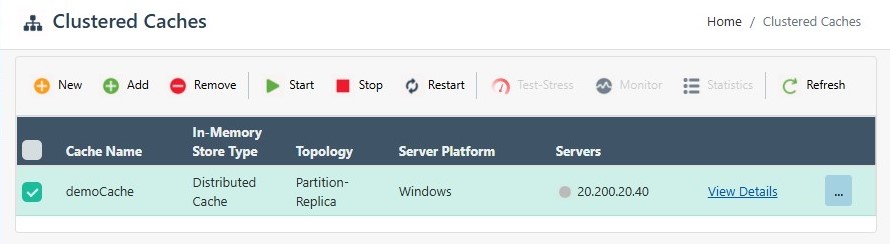
This opens up the detailed configuration page for the cache. Go to the Advanced Settings tab and click on Options in the left bar.
Select the Enable detailed error logging checkbox. Specify the Log File Path if you want to save these logs to a different path.
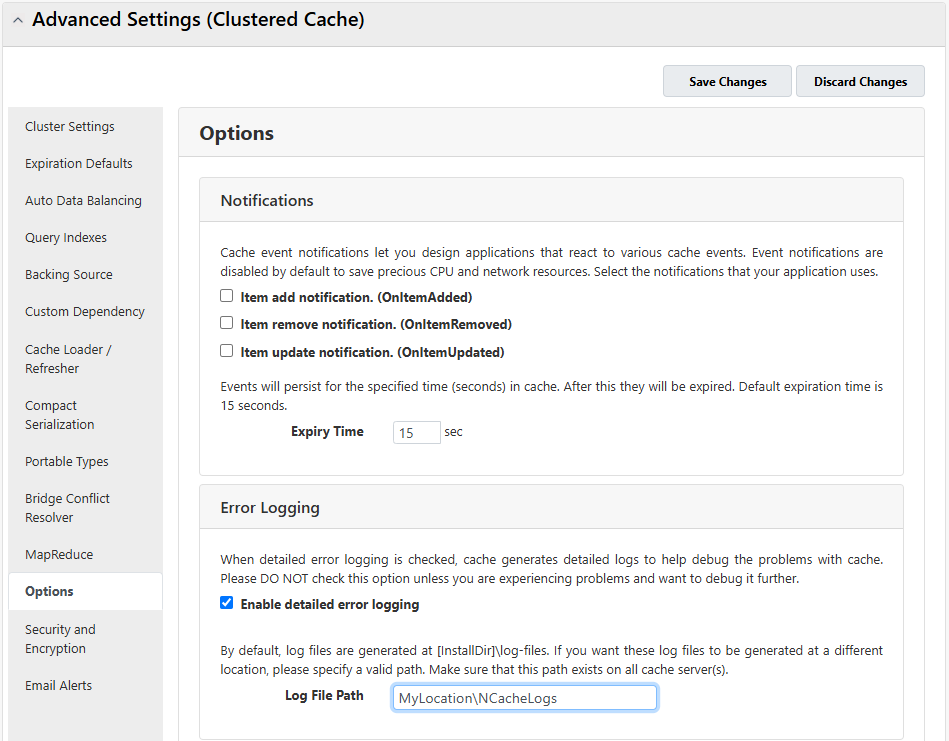
- Click on Save Changes at the bottom of the page to apply this configuration to the cache.
Manually Editing NCache Configuration
You can manually edit the NCache configuration file as explained below:
Important
Ensure the cache is stopped before making any configuration changes.
- For Server-side Logging, enable/disable the logs through the config.ncconf by specifying the
<logging>tag under the<cache-settings>tag:
<cache-settings ...>
   <logging enable-logs="True" trace-errors="True" trace-notices="False" trace-warnings="False" trace-debug="False" log-path=""/>
</cache-settings>
- For Client-side Logging, modify the values in client.ncconf of the client node:
<cache id="demoCache" load-balance="True" enable-client-logs="True" log-level="error">
      <server name="20.200.20.40"/>
</cache>
- Once the changes are made, restart the NCache Service, and then start the cache.
Enable Event Logging for Java Client
Logging in the NCache Java client can be controlled by setting the enableNCLogs property before initializing the cache.
System.setProperty("enableNCLogs", Level.INFO.toString());
The log file is generated in the application home directory. The above property will enable the logging of all INFO messages. It will also enable logging of SEVERE and WARNING messages.
The Level class (java.util.logging) defines a set of standard logging levels that can be used to control logging output. The logging Level objects are ordered and are specified by ordered integers. Enabling logging at a given level also enables logging at all higher levels. Clients should use the predefined Level constants such as Level.SEVERE. The levels in descending order are as follows:
- SEVERE (highest value)
- WARNING
- INFO
- CONFIG
- FINE
- FINER
- FINEST (lowest value)
In addition, there is a level OFF that can be used to turn off logging, and a level ALL that can be used to enable logging of all messages.
