Disable Cache Service Auto Restart
At times, it is necessary to disable the automatic restart of the NCache Service to ensure stability in a distributed cache environment. This is especially important during Windows patching, system reboots, or planned maintenance, where multiple restarts may occur in a short period of time. If not controlled, these repeated restarts can lead to unnecessary resource consumption and impact overall application performance.
In clustered deployments where caches are configured with Auto-Start enabled, each server reboot may cause cache instances to stop and start repeatedly. This can result in cache nodes leaving and rejoining the cluster unexpectedly, leading to inconsistent cluster membership states. In extreme cases, this behavior can cause Split Brain scenarios, where multiple nodes attempt to function as independent coordinators, compromising cache consistency and cluster stability.
Note
By default, the Startup type is set to Automatic.
To avoid these issues, it is recommended to temporarily set the NCache Service Startup Type to Manual or Disabled before initiating patching or maintenance activities. This prevents the service from starting automatically after a reboot and allows the cluster to be brought back online in a controlled manner. Once maintenance is finished, the startup type can be reverted to Automatic. This practice is essential for maintaining stability in production clustered environments.
Setting the Startup Type to Manual
When you set the NCache Service's "Startup type" to Manual, the service will not start automatically upon system boot. Instead, it will remain inactive until explicitly started by you. To do so:
Go to Start menu on the Taskbar and select Services.
Go to Open Services and then select NCache Service.
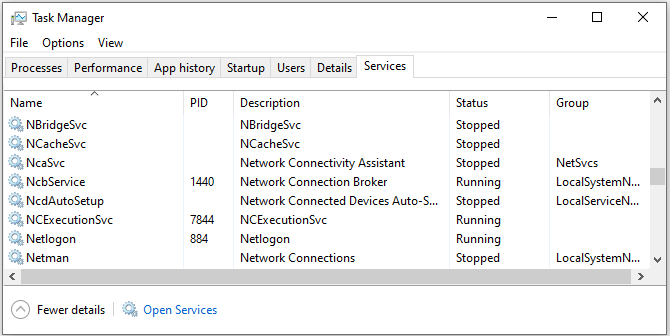
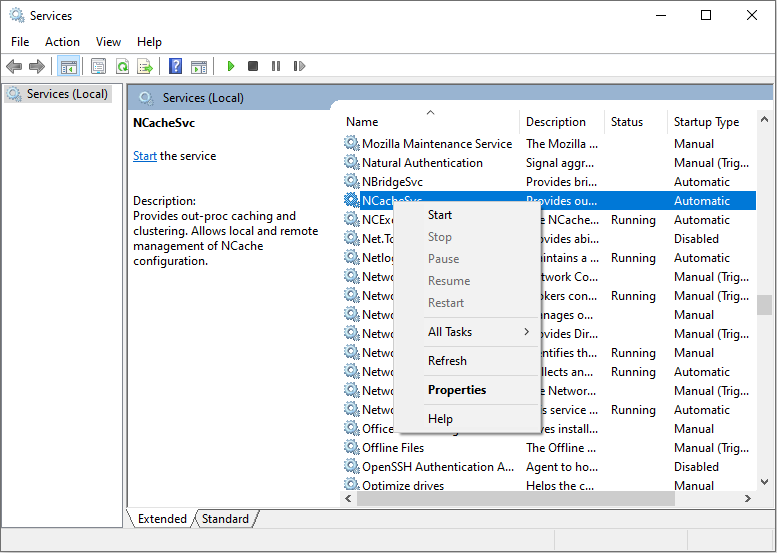
- Right-click on NCache Service and select Properties.
- In the General tab, locate the Startup type dropdown menu.
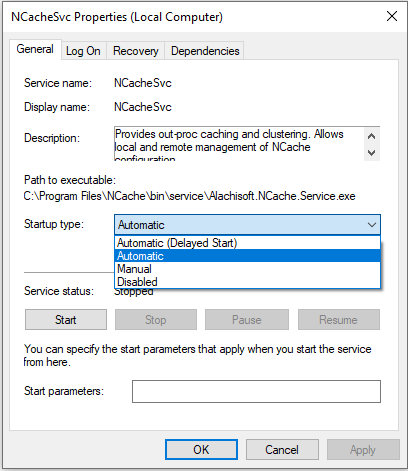
Change the Startup type to Manual.
Click Apply to save changes.
You can start the cache service manually through the task manager or Windows PowerShell.
Note
The main reason for starting the NCache Service manually is that some of the patches complete their operations after the system startup. It is a good practice to start NCache Service manually once all the patches are fully applied and maintenance work has been completed on your server.
Setting the Startup Type to Disabled
Setting the NCache Service's Startup type to Disabled ensures that the service won't start automatically during system boot-up or be manually started until reverting the Startup type to Manual or Automatic.
To do so, just change the Startup type to Disabled in the dropdown menu.
Note
Changing the Startup type should be handled carefully, as it can lead to cache unavailability if not appropriately managed. Make sure to revert the NCache Service Startup type to Automatic once all the steps have been completed.
