Monitor NCache Using OpenTelemetry
OpenTelemetry is an observability framework used for collecting and exporting telemetry data. NCache provides OpenTelemetry support for publishing metrics and NCache event logs to user-configured OpenTelemetry endpoints. NCache also supports client-side metrics, allowing clients to publish metrics through the OpenTelemetry endpoint provided by the NCache server.
Important
OpenTelemetry configuration is maintained at the node level. The settings in otel.ncconf apply to all relevant NCache processes running on that node.
Configure OpenTelemetry
NCache provides the following methods for configuring OpenTelemetry:
- Using Management Center
- Manually Editing otel.ncconf
- Using PowerShell
Using NCache Management Center
You can configure OpenTelemetry through the NCache Management Center.
- Launch the NCache Management Center by browsing to http://localhost:9801 or
<server-ip>:9801.
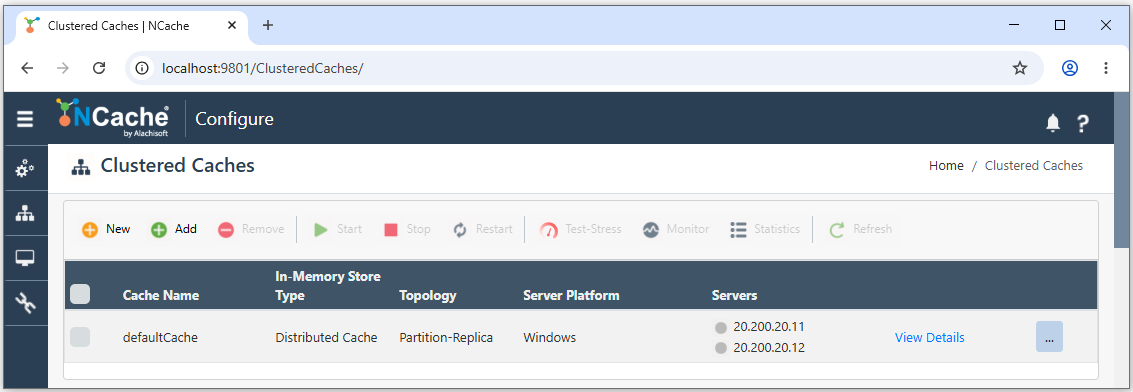
Click the Settings icon in the left navigation panel.
The Environment page appears. Select Open Telemetry from the left navigation panel.
Select the Enable OpenTelemetry checkbox.
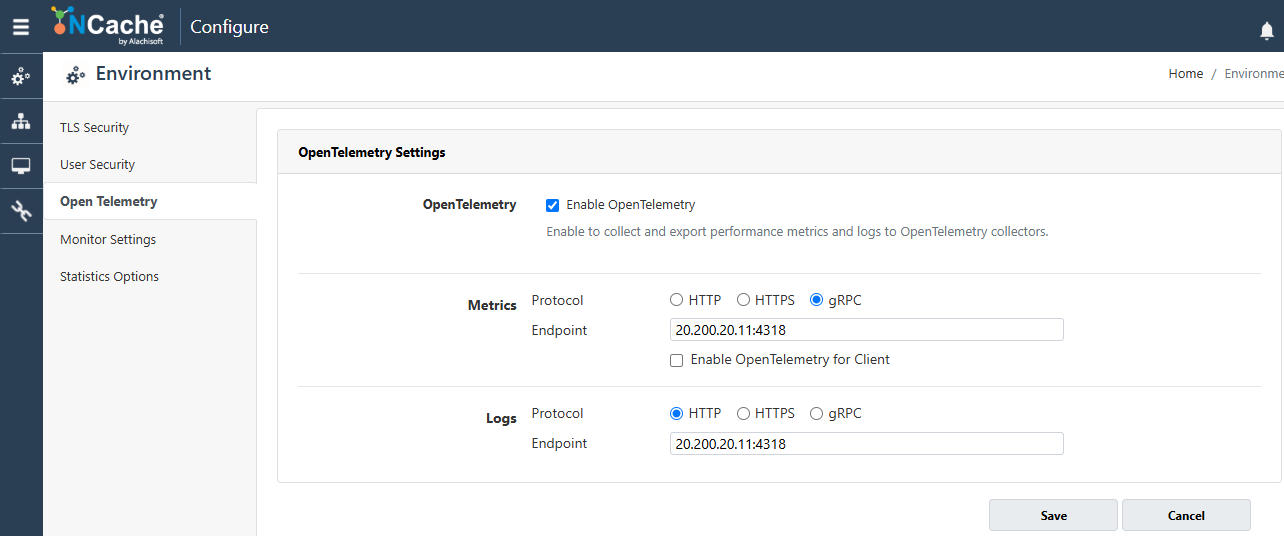
Under Metrics, select the desired protocol from HTTP, HTTPS, and gRPC, and then enter the endpoint using a valid, reachable IPv4 address followed by a port number where you want NCache to publish metrics.
Under Logs, select the desired protocol from HTTP, HTTPS, and gRPC, and then enter the endpoint using a valid, reachable IPv4 address followed by a port number where you want NCache to publish logs.
If you want NCache clients to publish metrics, select the Enable OpenTelemetry for Client checkbox.
Click Save to apply the configuration.
A confirmation message indicating that the configurations were saved successfully is displayed.
Important
The endpoint must contain a valid, reachable IPv4 address followed by a port number.
Note
Metrics and logs can be configured independently. If an endpoint is not configured for a telemetry signal, that signal is not published.
Using otel.ncconf
NCache stores OpenTelemetry configuration separately from the cache configuration in the otel.ncconf configuration file. The file is located at %NCHOME%\config\otel.ncconf on Windows and /opt/ncache/config/otel.ncconf on Linux. You can manually edit the NCache configuration file as follows:
To enable OpenTelemetry publishing on the NCache node, set the enabled attribute of the
<open-telemetry>element toTrue.<open-telemetry enabled="True" client-enabled="False"> <logs endpoint="" protocol="HttpProtobuf"/> <metrics endpoint="" protocol="HttpProtobuf"/> </open-telemetry>To enable client-side metrics publishing, set the
<client-enabled>attribute of the<open-telemetry>element to True.Specify the endpoint and protocol for publishing logs through the
<logs>tag:<logs endpoint="" protocol="HttpProtobuf"/>Specify the endpoint and protocol for publishing metrics through the
<metrics>tag:<metrics endpoint="" protocol="HttpProtobuf"/>- Once the required changes are made, save the
otel.ncconffile. Restart all relevant NCache processes for the updated configuration to take effect.
For information about the configuration file syntax, attributes, and supported settings, see OpenTelemetry Config (otel.ncconf).
Using PowerShell
You can configure OpenTelemetry using the Set-NCacheOpenTelemetry PowerShell cmdlet.
Examples
This command enables OpenTelemetry and configures metrics and logs to be exported to the specified OpenTelemetry endpoint using gRPC.
Set-NCacheOpenTelemetry -MetricsEndpoint 20.200.20.12:4318 -LogsEndpoint 20.200.20.12:4318 `
                        -LogsProtocol Grpc -MetricsProtocol Grpc `
                        -Enabled True
This command enables OpenTelemetry on the specified NCache server and configures metrics and logs to be exported to the specified endpoint using HTTP.
Set-NCacheOpenTelemetry -MetricsEndpoint 20.200.20.12:4318 -MetricsProtocol Http `
                        -LogsEndpoint 20.200.20.12:4318 -LogsProtocol Http `
                        -Server 20.200.20.11 -Enabled True
This command enables OpenTelemetry metrics on the server and also enables metrics publishing from connected clients. Clients receive the cache server's advertised IP address and configured metrics port when they connect.
Set-NCacheOpenTelemetry -MetricsEndpoint 20.200.20.56:4317 -MetricsProtocol Grpc `
                        -ClientEnabled -Enabled True
This command disables server-side OpenTelemetry on the local NCache server.
Set-NCacheOpenTelemetry -Enabled FalseThis command enables OpenTelemetry on the specified NCache server and configures metrics and logs to be exported using HTTP. It also provides a client certificate and password for the secure management connection.
Set-NCacheOpenTelemetry -MetricsEndpoint 20.200.20.12:4318 -MetricsProtocol Http `
                        -LogsEndpoint 20.200.20.12:4318 -LogsProtocol Http `
                        -Server 20.200.20.11 -Enabled True `
                        -TlsCertPath "C:\certs\client.pem" `
                        -TlsCertPassword "clientKeyPassword"
Important
To export OpenTelemetry metrics and logs over HTTPS, configure the OpenTelemetry Collector with a TLS certificate and private key (e.g., C:\OpenTelemetry\certs\). Specify their paths in the Collector configuration and ensure the NCache server trusts the certificate.
This command enables OpenTelemetry on NCache server
20.200.20.11and configures metrics and logs to be exported to the OpenTelemetry Collector at20.200.20.12:4318using HTTPS.Set-NCacheOpenTelemetry -Server 20.200.20.11 -MetricsEndpoint 20.200.20.12:4318 ` -MetricsProtocol Https -LogsEndpoint 20.200.20.12:4318 ` -LogsProtocol Https -Enabled True ` -TlsCertPath "C:\certs\client.pem" ` -TlsCertPassword "clientKeyPassword"
Note
NCache publishes NCache event logs through OpenTelemetry. Cache-server log files are not exported.
Configure the OpenTelemetry Collector
After configuring OpenTelemetry in NCache, configure the OpenTelemetry Collector to receive the telemetry data published by NCache. The Collector must be configured with a receiver that matches the protocol and endpoint configured in NCache. For example, if NCache is configured to publish metrics to an OTLP gRPC endpoint on port 4318, the Collector must be configured to listen for OTLP gRPC traffic on the corresponding port.
A Collector configuration can contain separate pipelines for metrics and logs. The receiver accepts telemetry published by NCache, and the configured exporters forward the telemetry to the selected monitoring backend. The following example shows a basic Collector configuration for receiving NCache metrics and logs:
receivers:
  otlp:
    protocols:
      grpc:
        endpoint: 0.0.0.0:4317

exporters:
  debug:
    verbosity: detailed

service:
  pipelines:
    metrics:
      receivers: [otlp]
      exporters: [debug]
    logs:
      receivers: [otlp]
      exporters: [debug]
In this example, the Collector listens for OTLP gRPC traffic on port 4317. The debug exporter is used to display the received telemetry and can be used to verify that NCache is successfully publishing data to the Collector.
For production monitoring, configure the Collector with the exporter required by your selected monitoring backend.
Note
The Collector configuration must use an endpoint and protocol that correspond to the settings configured in NCache. If NCache and the Collector are configured with different protocols or ports, the Collector cannot receive the published telemetry.
Monitoring Backend
After configuring the OpenTelemetry Collector to receive NCache telemetry, configure the monitoring backend that you want to use to store, process, or make the collected data available for visualization. Depending on your monitoring requirements, you can use OpenTelemetry-compatible backends such as Prometheus for metrics and Loki for logs.
The OpenTelemetry Collector forwards the telemetry received from NCache to the configured backend through its exporters. The backend and its configuration depend on the monitoring solution selected for your environment. Multiple collectors and monitoring backends can be used according to your monitoring requirements.
Note
The monitoring backend and visualization tool are selected according to your monitoring environment. NCache does not require a specific monitoring backend or visualization tool.
View NCache Telemetry
After NCache, the OpenTelemetry Collector, and the monitoring backend have been configured, use a compatible monitoring or visualization tool to view and analyze NCache telemetry. For example, Grafana can be used to visualize telemetry collected by backends such as Prometheus and Loki.
NCache publishes the following telemetry:
- Metrics: NCache performance and monitoring metrics.
- Event logs: NCache exports its generated event-log messages through OpenTelemetry. On Windows, these messages are recorded in the Windows Application Event Log, while on Linux, they are written to the NCache event-log file. Per-cache log files are not exported.
- Client-side metrics: Metrics published by NCache clients when client telemetry is enabled.
Important
Client-side telemetry publishing can introduce additional overhead in high-traffic environments. Evaluate the impact before enabling client telemetry for heavy workloads.
Client-Side Metrics
When client-side OpenTelemetry is enabled, NCache clients receive the cache server's IP address and configured metrics port as their telemetry endpoint. Therefore, the OpenTelemetry Collector must be running on the cache server to receive client metrics.
A remote OpenTelemetry Collector can receive server-side metrics, but client metrics are not exported to that remote Collector.
Configure a Receiver for Client Metrics
To collect NCache client metrics, configure the OpenTelemetry Collector on the cache server.
Configure the OpenTelemetry Collector: Configure the OpenTelemetry Collector on the cache server to receive client metrics.
Configure the Receiver: Configure an OTLP receiver using the metrics port specified in NCache's
otel.ncconf.Configure the Exporter: Specify the monitoring backend in the Collector configuration file to export the received metrics.
Start the Collector: Start the OpenTelemetry Collector by running its executable directly or through its configured system service.
Start the Cache: Start the NCache cache after the Collector is running.
Verify Metrics: Connect an NCache client, perform cache operations, and verify that client metrics appear in the configured monitoring backend.
Note
A remote Collector can receive NCache server-side metrics. However, client metrics require a Collector on the cache server because clients use the cache server's IP address and configured metrics port.
Verify Exported Metrics and Event Logs
After configuring OpenTelemetry, verify that NCache metrics and event logs are successfully exported to the OpenTelemetry Collector.
Verify Server Metrics: Start the OpenTelemetry Collector and ensure that the configured metrics endpoint is accessible. Perform cache operations to generate activity, then check the Collector output or connected monitoring backend for NCache server metrics.
Verify Client Metrics: If client telemetry is enabled, connect a client application to the cache and perform cache operations. Verify that client metrics appear in the Collector output or monitoring backend.
Verify Event Logs: Generate a relevant NCache event and verify that it appears in the Collector output or connected logging backend. On Windows, NCache events are recorded in the Application Event Log, while Linux uses the NCache event-log file.
Check Export Configuration: If telemetry data is missing, verify the configured endpoint, protocol, network connectivity, and Collector receiver settings. For client metrics, ensure that an OTLP receiver is accessible at the cache server's advertised IP address and configured metrics port.
Note
Verify server metrics, client metrics, and event logs separately, as their export behavior and configuration requirements differ.
