NCache for Kubernetes
Distributed Cache, Deploy with Helm and YAML
Deploy an NCache cluster on AKS, EKS, GKE, OpenShift, or on-prem Kubernetes with one Helm command or plain YAML manifests. Then connect from your application with a few lines of code.
helm install ncache oci://registry-1.docker.io/alachisoft/ncache-helm --version 5.3.8 \
  --namespace ncache --create-namespace \
  --set-string deployment.key="<deployment-key>" \
--set-string deployment.platform="AKS"Architecture
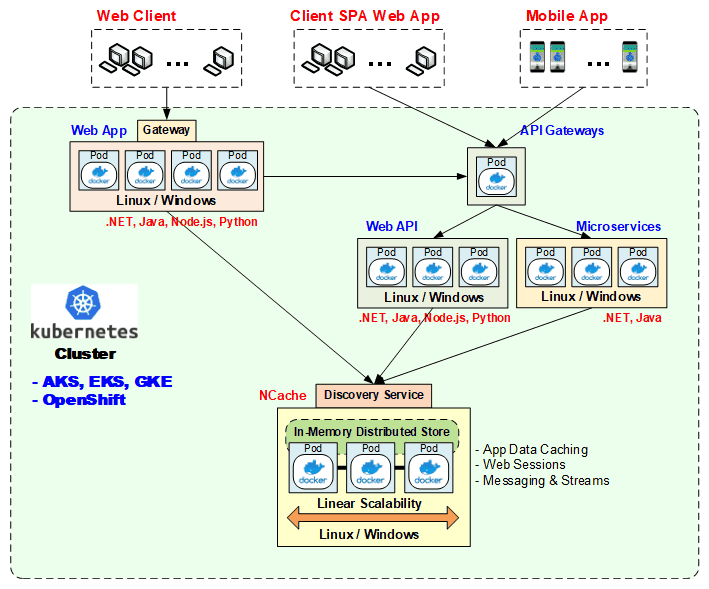
NCache Deployment in Azure Kubernetes Cluster
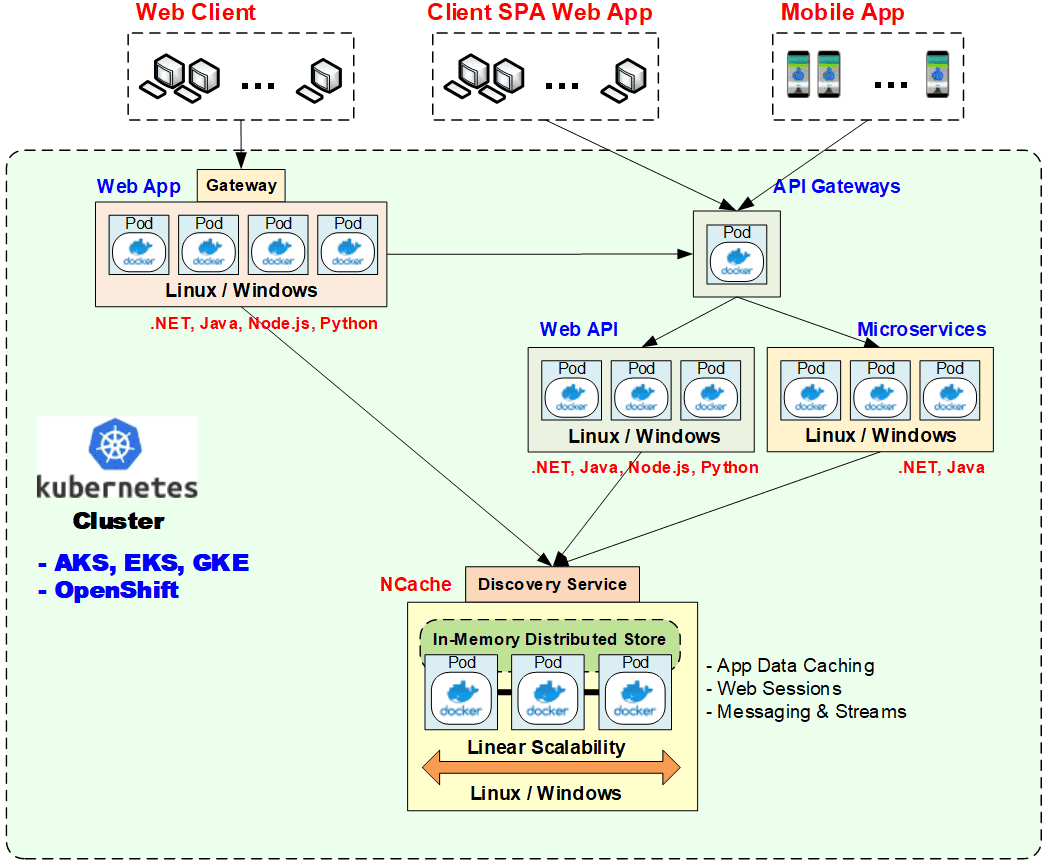
The Helm chart and the YAML manifests create the same Kubernetes objects:
| Component | Kubernetes object | Purpose |
|---|---|---|
| Cache servers | StatefulSet (ncache) | Server pods with stable identities. 2 by default, each on its own node. |
| Discovery service | Headless Service (ncache-cacheserver) | In-cluster clients find servers through DNS, with no static IPs. |
| Client gateway | LoadBalancer (ncache-client-gateway) | External app connections on 9800 and 9803-9997. |
| Management gateway | LoadBalancer (ncache-mgmt-gateway) | Management Center (9801/9802) and Cloud Portal (9998/9999), with session affinity. |
| State store | ConfigMap (ncache-store) | Licensing and lifecycle state shared across pods. |
| Client cache(optional) | DaemonSet (ncache-client) | Out-of-process client cache on each node, next to your app. |
NCache Open Source uses a server StatefulSet, a headless discovery service, and a NodePort gateway.
Connect Your Application
Inside the cluster, clients find the servers through the discovery service:
ICache cache = CacheManager.GetCache("defaultCache");Outside the cluster, connect through the client gateway:
var options = new ConnectionOptions
{
    IsInproc = false,
    Servers = new List<ServerInfo>
    {
        new ServerInfo(isLoadBalancer: true, name: "<client-gateway-endpoint>", port: 9800)
    }
};
ICache cache = CacheManager.GetCache("defaultCache", options);
The server sends connection tuning, load balancing, logging, and client cache settings to the client when it connects.
Choose Your Deployment Method
| NCache: Helm | NCache: YAML | NCache Open Source: YAML | |
|---|---|---|---|
| Files | Published OCI chart | ncache.yaml, client-gatewayservice.yaml, mgmt-gatewayservice.yaml | ncache.yaml, discoveryservice.yaml, client-gatewayservice.yaml |
| Install / change | helm install / helm upgrade | kubectl apply | kubectl apply |
| Cache setup | caches[N] values | Management Center | NCache Open Source tools |
| Version upgrades | Rolling and offline, built in | Manual, one pod at a time | Manual |
| Best for | Most teams | Full control, GitOps | Open-source projects |
Part A: Deploy with Helm
One chart covers every platform. You pick the platform with deployment.platform. You only need helm install, helm upgrade, and helm show values.
Prerequisites:
- Kubernetes 1.25.0+ with two or more schedulable Linux worker nodes.
- kubectl and Helm with OCI support, plus permission to create namespace resources and cluster-wide RBAC resources.
- A load balancer that supports LoadBalancer services (on bare metal, for example MetalLB).
- A deployment key. For production, also a license key and environment name.
Install
helm show values oci://registry-1.docker.io/alachisoft/ncache-helm --version 5.3.8

helm install ncache oci://registry-1.docker.io/alachisoft/ncache-helm --version 5.3.8 \
  --namespace ncache --create-namespace \
  --set-string deployment.key="<deployment-key>" \
  --set-string deployment.platform="on-prem"   # on-prem | AKS | EKS | GKE | OpenShift

kubectl get pods,jobs -n ncache
kubectl get svc -n ncache
A configuration job applies the cache and license settings. When it finishes, open Management Center at http://<management-gateway-endpoint>:9801.
Define Caches in values.yaml
There are four predefined entries: defaultCache (the only one enabled by default), sessionCache, pubsubCache (Pub/Sub), and dataCache.
caches:
  - name: defaultCache
    enabled: true
    topology: Partition-Replica
    size: 2048
    eviction: LRU
  - name: sessionCache
    enabled: true
    clientCache:
      enabled: true
      isolationLevel: inproc
size: 512| Setting | Default | Options |
|---|---|---|
| storeType | Distributed Cache | Distributed Cache, Pub/Sub |
| topology | Partition-Replica | Partition-Replica, Partitioned, Replicated |
| asyncReplica | true | Must stay true for Pub/Sub |
| size | 1024 MB | Minimum 100 |
| compression / threshold | false / 100 KB | Threshold applies when compression is on |
| eviction / evictionRatio | LRU / 5% | LRU, LFU, Priority |
| encryptionProvider | None | AES-128, AES-192, AES-256 (key of 16, 24, or 32 characters) |
| clientCache.isolationLevel | outproc | inproc, outproc |
Entries from caches[4] up are named cache<N>. Enable entries in order and disable them in reverse order.
Note: Disabling a cache deletes it. Changing a cache’s definition recreates it without preserving data.
Day-2 Operations with helm upgrade
helm upgrade ncache oci://registry-1.docker.io/alachisoft/ncache-helm --version 5.3.8 \
--namespace ncache --reuse-values <flags>| Task | Flags |
|---|---|
| Scale (scale-in removes one pod at a time, after the caches sync) | --set deployment.servers=3 |
| Activate or deactivate a license on all pods | --set-string license.licenseKey="<key>" license.envName="Production" license.action="activate" (or "deactivate") |
| Add or resize a cache | --set 'caches[1].enabled=true' · --set 'caches[1].size=2048' |
| Set the management endpoint | --set-string gateway.mgmtCenterEndpoint="<ip-or-dns>" |
Configuration changes can be combined in one upgrade. Image upgrades must run on their own. deployment.name, deployment.platform, and deployment.podAntiAffinity can only be set at install.
Version Upgrades
Rolling upgrade (minor and patch releases): pods are replaced one at a time, highest-numbered first. Each pod must stay ready for image.delayMinutes before the next one upgrades.
helm upgrade ncache ... --reuse-values \
  --set-string image.tag="<target-tag>" --set image.upgrade=rolling --set image.delayMinutes=2
If a pod fails, the chart restores the previous image. Then run helm rollback ncache <previous-revision> -n ncache, so the next upgrade doesn’t retry the failed image.
Offline upgrade (major releases): the chart backs up configuration and data, stops all pods, upgrades them, and restores the caches. Expect downtime. Stop application writes and take your own backup first.
helm upgrade ncache ... --reuse-values \
  --set-string image.tag="<target-tag>" --set image.upgrade=offline
A successful helm upgrade means the change was accepted. A configuration job then applies it. Follow the job with kubectl logs -n ncache -f "job/ncache-lifecycle-<revision>", then confirm the result in Management Center.
Platform Specifics
| Platform | deployment.platform | Load balancing | Notes |
|---|---|---|---|
| On-prem | on-prem | MetalLB or similar | Both gateways can share one address |
| Azure AKS | AKS | Azure Load Balancer | Management endpoint can use a reserved IPv4 |
| Amazon EKS | EKS | Internal NLB (client), internet-facing NLB (management) | The client gateway uses 196 TCP ports, so check the listener quota or narrow gateway.ports. A management hostname needs eks.publicSubnetIds="subnet-a\,subnet-b" (two or more Availability Zones). |
| Google GKE | GKE | Standard LoadBalancer | Follows the cluster's address configuration |
| Red Hat OpenShift | OpenShift | Standard LoadBalancer | Service account needs the anyuid SCC |
TLS and Mutual TLS
TLS is off by default. Turn it on at install or with helm upgrade. NCache uses its own certificate unless you supply one:
helm install ncache ... --set tls.enabled=true \
  --set-file tls.customCertificate=server.pem   # optional
For mutual TLS, create a Secret and point the chart to it:
kubectl create secret generic ncache-tls-secret -n ncache \
  --from-file=server-certificate=server.pem \
  --from-file=client-certificate=client.pem \
  --from-file=issuer=ca.crt

helm install ncache ... --set tls.enabled=true --set tls.mutualEnabled=true \
  --set-string tls.secretName="ncache-tls-secret" \
  --set tls.protocolVersion=tls13   # tls12 (default) | tls13 | auto
options.TLSCertPath = "/certs/client.pem";
options.TLSCertPassword = "<password>";   // only if the key is encrypted
To switch between tls12 and tls13 on a running cluster, set auto first.
Part B: Deploy with YAML
For GitOps pipelines or custom resources, use the manifests in Alachisoft/NCache-Kubernetes.
| File | Deploys |
|---|---|
| ncache.yaml | Server StatefulSet, RBAC, ncache-store ConfigMap, headless ncache-cacheserver service |
| client-gatewayservice.yaml | ncache-client-gateway for external clients |
| mgmt-gatewayservice.yaml | ncache-mgmt-gateway for Management Center and Cloud Portal |
Edit ncache.yaml before applying it:
spec:
  replicas: 2
  template:
    spec:
      containers:
        - name: ncache
          image: alachisoft/ncache:<tag>
          env:
            - name: NC_LICENSE_KEY      # production license key
              value: ""
            - name: NC_LICENSE_ENV      # license environment name
              value: ""
            - name: NC_KEY              # evaluation key
              value: "<deployment-key>"
            - name: NC_START_DEFAULT_CACHE
              value: "true"
            - name: NC_ENABLE_TLS       # also NC_MUTUAL_TLS, NC_TLS_PROTOCOL_VERSION
              value: "false"
Pod anti-affinity is required by default. For dev and test clusters, switch to the commented-out preferred block.
kubectl apply -f ncache.yaml
kubectl apply -f client-gatewayservice.yaml
kubectl apply -f mgmt-gatewayservice.yaml
To manage a YAML deployment:
- Set updateStrategy.type: OnDelete.
- Apply changes, then replace pods one at a time, highest-numbered first (kubectl delete pod ncache-1, then ncache-0). Before each replacement, confirm in Management Center that the previous pod has synced.
- Configure caches in Management Center.
- Don't mix Helm and YAML on the same resources.
NCache Open Source
| File | Deploys |
|---|---|
| ncache.yaml | Server StatefulSet |
| discoveryservice.yaml | Headless cacheserver service, so clients find servers despite changing pod IPs |
| client-gatewayservice.yaml | NodePort gateway for access and monitoring from outside the cluster (optional) |
Need Management Center, TLS, Helm operations, or built-in version upgrades?
Out-of-Process Client Cache
The client cache keeps frequently used data on your application's node. It works with every deployment method. Enable it per cache (on by default for defaultCache), then deploy the client DaemonSet:
--set 'caches[1].clientCache.enabled=true' --set 'caches[1].clientCache.isolationLevel=outproc'

kubectl create namespace ncache-client
kubectl apply -n ncache-client -f ncache-client-outproc.yaml
Point your app at the local client service and schedule it on nodes that run a client pod:
env:
  - name: NCACHE_CLIENT_HOST
    value: "ncache-client"
affinity:
  podAffinity:
    requiredDuringSchedulingIgnoredDuringExecution:
      - labelSelector: { matchLabels: { app: ncache-client } }
        topologyKey: kubernetes.io/hostname
The service uses internalTrafficPolicy: Local, so each app pod reaches only its own node’s client cache. Client cache isn’t available for Pub/Sub stores. If the servers use TLS, apply the same TLS settings to the client deployment.
Management & Monitoring
All cache management and monitoring goes through NCache Management Center: http://<management-gateway-endpoint>:9801, or https://...:9802 when HTTPS is configured. Behind an HTTPS load balancer, forward to HTTP 9801 with sticky sessions enabled.
Ports:
- 9800: clients
- 9801-9802: Management Center
- 9981-9989: RESP