Scheduled Patching
The Scheduled Patching page allows you to establish recurring maintenance windows, define automated rollout policies, and apply updates across your cluster. This management experience is identical across both Azure and AWS deployments, utilizing automated rolling schedules to ensure zero-downtime operations. Please note that this page uses the Azure Portal example. All times on this page are configured in UTC.
Maintenance Schedule
Every configured update runs inside a single recurring maintenance window.
Note
All times are shown in Coordinated Universal Time (UTC). Please convert your local timezone to UTC before saving.
Day of the Week: Select the target day of the week for maintenance (e.g.,
Sunday).Week of the Month: Choose the week of the month (
1,2,3,4, orLast).Start Time: Set the window start time (e.g.,
02:00 UTC). Each window lasts for 4 hours.Maintenance Window: Confirms the scheduled active period (e.g., Saturday, Week 3, from 02:00 UTC to 06:00 UTC).
Next maintenance window: Displays the exact UTC timestamp for the next upcoming execution.
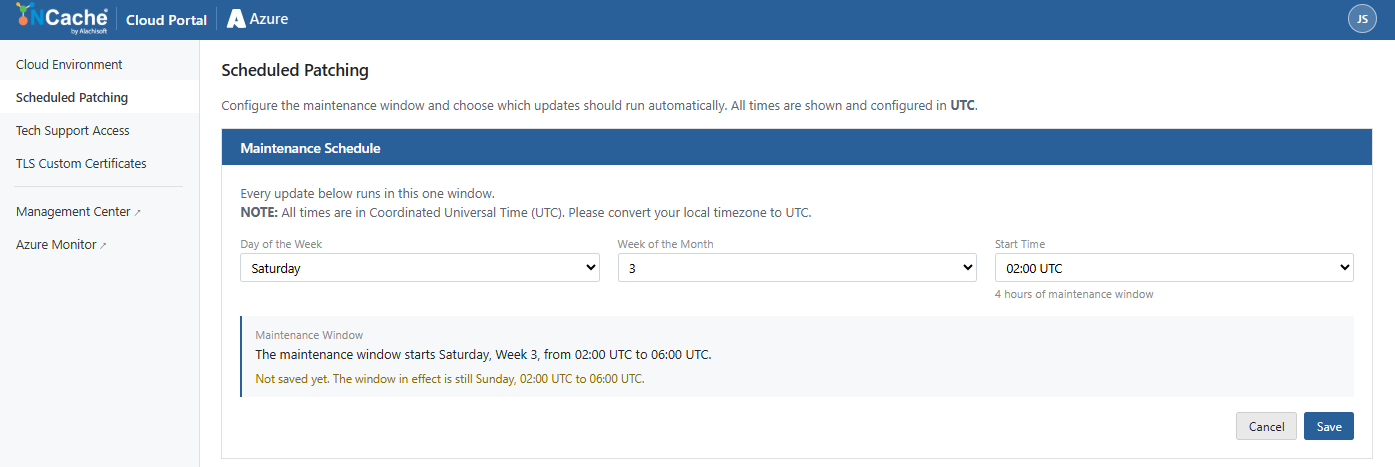
Click Save to persist the schedule or Cancel to revert changes.
Upgrade Preference
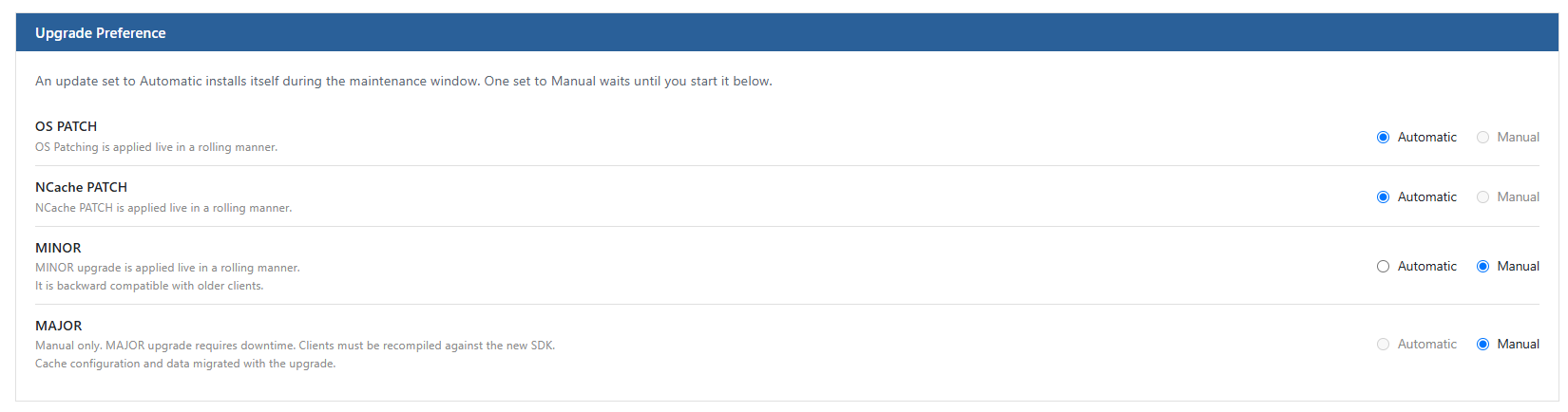
Define whether updates apply automatically inside your maintenance window or require manual execution:
Automatic: Installs automatically when the scheduled maintenance window arrives.
Manual: Postpones execution until triggered on-demand by an administrator.
Upgrade Categories
OS PATCH: Applies host-level operating system security fixes and critical patches. This process does not upgrade the core OS version. It is handled automatically in a live rolling manner and cannot be applied manually.
NCache PATCH: Deploys a new Docker container image containing service fixes. It does not alter the underlying OS version and is applied live in a rolling manner. Set to Automatic by default, but can also be manually applied on demand if preferred.
MINOR: Deploys minor version feature updates and enhancements (e.g.,
5.3.8.00to5.3.900). Applied live in a rolling manner without downtime and remains backward compatible with existing client SDKs.MAJOR: Upgrades major platform releases (e.g.,
5.xto6.x). Manual only - automatic scheduling is disabled. Major upgrades require cluster downtime, client SDK recompilation, and coordinated configuration/data migration.
Apply Upgrade Now
The Apply Upgrade Now section displays real-time version status and allows you to initiate available updates on demand without waiting for the scheduled window. Upgrade Now button is used either to trigger an available patch ahead of the maintenance window or when upgrade preference is set to Manual.
Warning
It is recommended to perform upgrades during scheduled maintenance windows or during periods of low traffic. Any upgrade initiated here starts immediately and may restart affected nodes.
Upgrade Status and Actions
The upgrade now section has the following types:
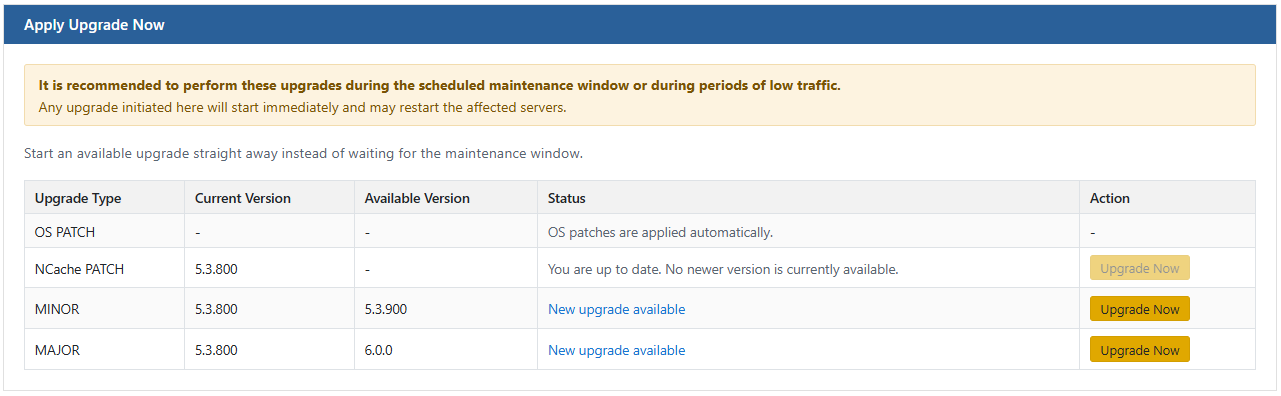
OS PATCH: Handled automatically by the system. Manual on-demand upgrades are disabled.
NCache PATCH: Shows the current version (e.g.,
5.3.800). When a new Docker image patch is available, the Upgrade Now button becomes active.MINOR: Shows the current version and target available version (e.g., current
5.3.800, available5.3.900). When a new version is released, the status indicates New upgrade available with an active Upgrade Now button. Please know that MINOR is automatic by default.
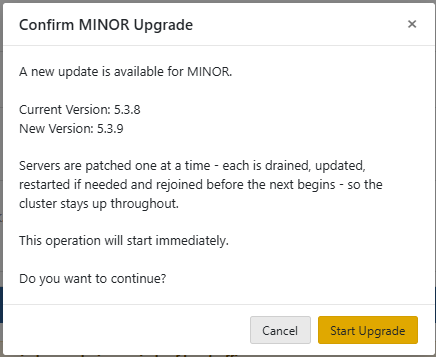
- MAJOR: Shows the installed platform version. When a major version release is ready, the status flags an available upgrade and enables the Upgrade Now button.
Note
Please note that NCache Patch, MINOR, and MAJOR can be manually upgraded.
