Entity Framework (EF) Second-level Cache Integration with NCache [Deprecated]
Entity Framework provides abstraction from relational data and presents a conceptual schema to applications, removing the need for manual persistence code. In high-transaction environments, the database often becomes a bottleneck for Application Scalability and High Availability. To solve this, NCache provides a pluggable in-memory Entity Framework Second-level Cache provider to cache query results and improve performance without requiring code changes.
Note
This feature is not supported from NCache 5.3.5 onwards.
The upsides to using NCache as a Second-level Cache in Entity Framework applications are:
- Seamless Integration: The NCache Entity Framework Cache Provider can be integrated into the application without any code change.
- Better Performance: The NCache Entity Framework Cache Provider intercepts all the database query calls and caches the query result sets. This increases the performance of applications by avoiding expensive database trips.
- Application Scalability: NCache provides a reliable shared-memory resource that allows cached data to be shared across multiple Entity Framework application instances
The caching provider can perform various functions, such as:
- Managing connections, commands, transactions, and data readers.
- Monitoring queries and commands before they execute.
The following figure shows how and where the NCache Entity Framework Provider plugs into an Entity Framework application.
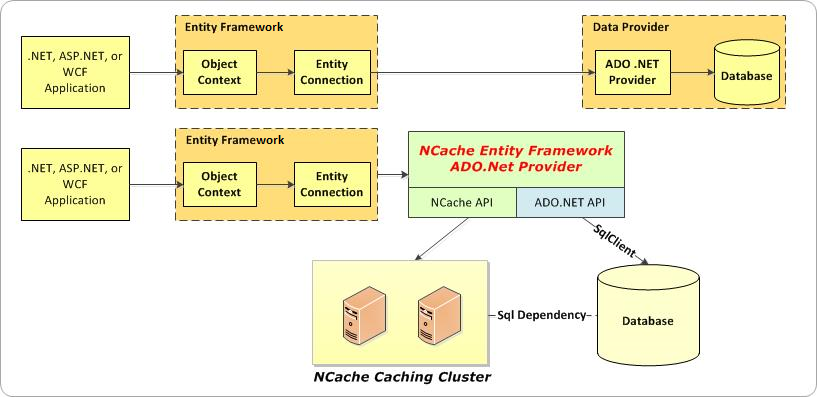
How NCache Entity Framework Integration Modes Work
There are two execution modes for the NCache Entity Framework Caching Provider:
- Analysis mode
- Caching mode
These modes are mutually exclusive, so the NCache Entity Framework Caching Provider cannot execute in both modes at the same time. It can either be in "Caching" mode or in "Analysis" mode.
Important
It is recommended to execute the Entity Framework application within the Analysis mode of the NCache Entity Framework Caching Provider to analyze which queries should be used for execution.
Analysis Mode
Analysis mode is a pass-through mode where no caching is performed; instead, the application examines the set of queries being executed the set of queries to be used. This mode also provides the following features:
- Monitor Queries: This helps to determine the number of times a query is executed by an Entity Framework application. This aids the user in filtering out the high-frequency queries for caching.
- Generate Reports: This generates a report of queries with their call counts, arranged in descending order. It also allows users to select relevant queries for caching. the user to choose relevant queries and copy them for caching.
<analysis-report>
 <query>
      <!--Call count = 12-->
      <cache-query query-text="SELECT [Extent1].[ProductID] AS [ProductID], [Extent1].[ProductName] AS [ProductName], [Extent1].[SupplierID] AS [SupplierID], [Extent1].[CategoryID] AS [CategoryID], [Extent1].[QuantityPerUnit] AS [QuantityPerUnit], [Extent1].[UnitPrice] AS [UnitPrice], [Extent1].[UnitsInStock] AS [UnitsInStock], [Extent1].[UnitsOnOrder] AS [UnitsOnOrder], [Extent1].[ReorderLevel] AS [ReorderLevel], [Extent1].[Discontinued] AS [Discontinued] FROM [dbo].[Products] AS [Extent1] WHERE 5 = [Extent1].[ProductID]"/>
      <cache-policy vary-by-cache-param="" expiration-type="Absolute" enabled="True" expiration-time="30sec" dbsyncdependency="False" resyncProviderName="EFResync"/>
    </query>
</analysis-report>
Caching Mode
This mode is designed for the actual use of NCache in Entity Framework applications. At this point, queries and their result sets are cached. Caching mode only caches those queries that are specified in the efcaching.ncconf configuration file which are given in the configuration file i.e., efcaching.ncconf.
NCache Supported Features with Entity Framework
NCache acts as a Second-level Cache for Entity Framework applications, providing the following features, which can be specified through the Entity Framework Caching config file:
Cache synchronization with database: In some cases, some data in the cache may be changed in the database without the application's involvement. Hence, you can specify the corresponding classes for the database synchronization feature of NCache. This allows NCache to monitor database changes and automatically invalidate affected cached data. If a Resync Provider is configured, invalidated data can be reloaded from the database into the cache.
Absolute Expiration: Absolute Expiration is specified separately for each cached item and is a
DateTimevalue that specifies when NCache should automatically expire the item. For Entity Framework, NCache asks you to specify an "interval" in seconds and then uses theNow + intervalformula to calculate the date-time value for Absolute Expiration.Sliding Expiration: Sliding Expiration is specified separately for each cached item and is an interval value (seconds). NCache expires the cached item if it has neither been fetched nor updated for this interval.
In This Section
Using NCache as Entity Framework (EF) Second-level Cache
Explains how to configure and use NCache as Entity Framework Second-level cache.
Entity Framework Resync Provider
Explains the Resync mechanism of NCache and how it keeps the data up to date across the cluster.
Entity Framework (EF) Caching Configuration File
Explains the changes required in efcaching.ncconf file to run the Entity Framework application in NCache.
