Stop Node for Maintenance
You can stop an NCache server node for maintenance without triggering state transfer, allowing you to perform patching or upgrading hardware/software with minimal disruption to the cluster. The server node will remain in a stopped-but-maintained state until it is restarted within the specified timeout. If not restarted within the timeout, state transfer will automatically begin. This can be done using either the NCache Management Center or the PowerShell cmdlets.
Important
You need to start your node within the time frame of the maintenance mode; failing to do so will result in the state transfer being triggered after the time of maintenance runs out.
Using the NCache Management Center
Launch the NCache Management Center by browsing to http://localhost:8251 or
<server-ip>:8251.In the left navigation bar, click on Clustered Caches. Against the cache name, click on View Details.
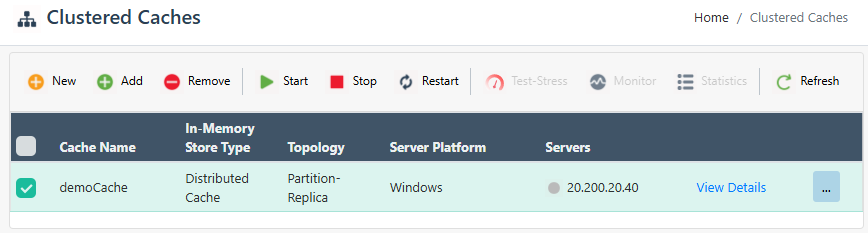
This opens up the detailed configuration page for the cache.
Under the Server Nodes tab, check the box against the server node IP.
Click on "..." against the server node IP and select Stop for Maintenance.
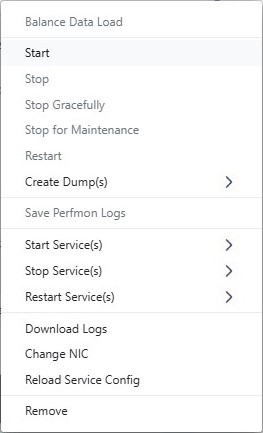
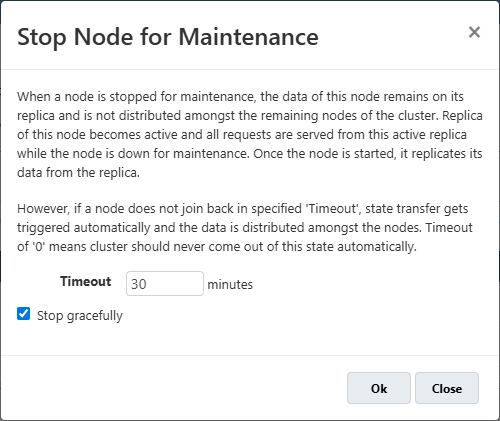
- You will receive the following prompt where you can specify the Timeout and can also choose to stop the node gracefully.
- The node status will change from Running to Stopped.
Important
No other node on the same clustered cache can be stopped during the Maintenance Mode. If you attempt to do so, it will give you an error saying "Cluster is already under maintenance".
Using PowerShell Cmdlets
- The
IsStopForMaintenanceflag of the Stop-Cache cmdlet stops a server node for maintenance. The following command stops the node 20.200.20.11 on the demoCache for maintenance for a time of 30 minutes.
Stop-Cache -Name demoCache -Server 20.200.20.11 -IsStopForMaintenance -Timeout 30
- This command stops the local server node for maintenance using security credentials.
Stop-Cache -Name demoCache -Credentials(Get-Credential john_smith)
