AWS Resources Created
When you deploy NCache Cloud via AWS CloudFormation, the stack automatically provisions and orchestrates a secure core infrastructure inside your AWS account. Below is a technical breakdown of the primary architecture components created during deployment. Please note that these are not all the resources but just the core ones.
Core Architecture Components
To find the exact AWS resources created by your NCache Cloud deployment, you can navigate to CloudFormation, click Stacks, and select your deployed stack name (e.g., production-stack). In the stack details view, click on the Resources tab. This displays a complete, itemized list of every AWS component provisioned by the template.
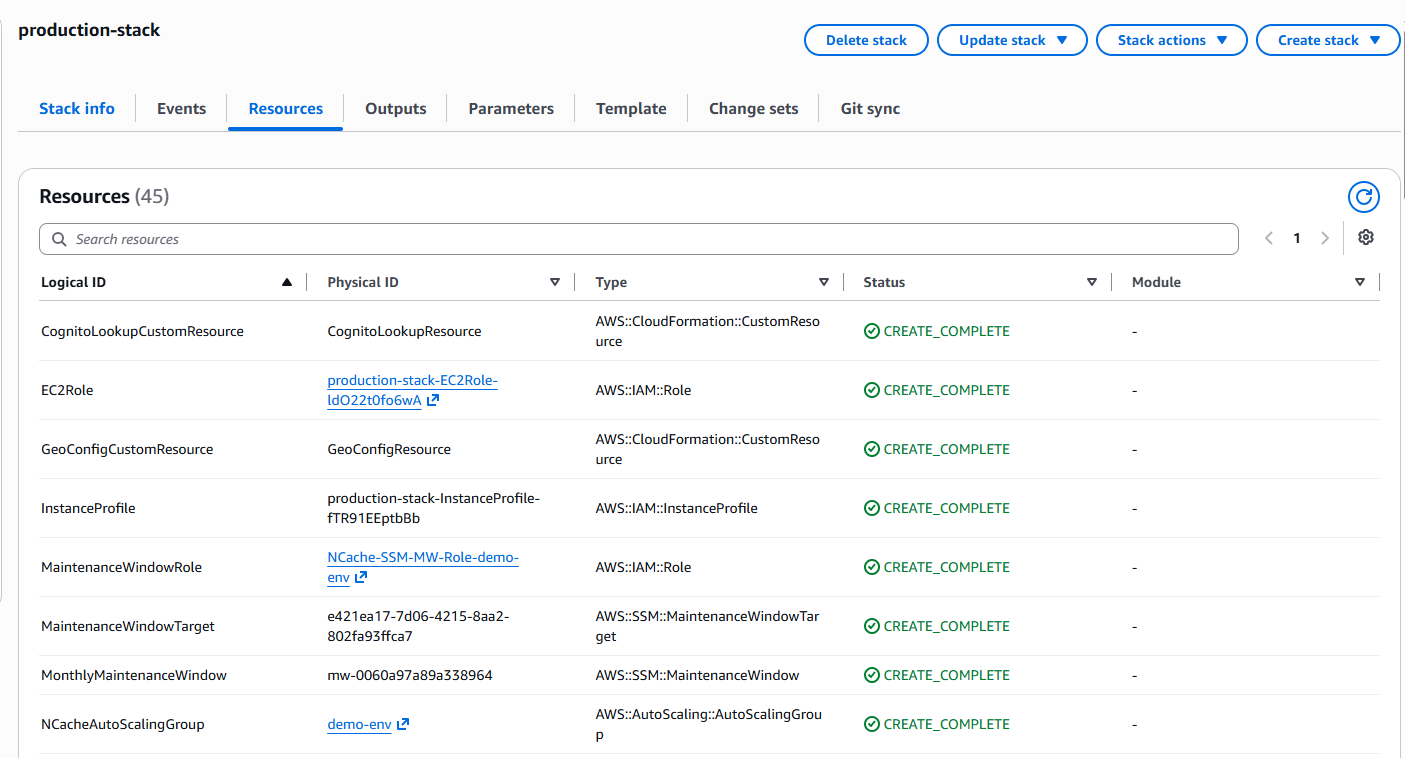
The details of the core resources are as follows:
1. Auto Scaling Group (ASG) and Host VMs
Resource Type:
AWS::AutoScaling::AutoScalingGroupWhat this is: An Auto Scaling Group (ASG) is Amazon's automated way of managing a group of identical EC2 virtual machines. Instead of creating standalone instances manually, AWS groups them under a single scaling controller (e.g., demo-env).
How it works: When your deployment finishes, this group automatically provisions the number of EC2 instances you selected. Each machine boots up with your chosen OS and instance type, runs the NCache service, and joins the cluster. When you scale your cluster from the portal, the ASG handles launching or terminating instances. It also integrates with AWS health checks to replace unhealthy nodes automatically.
2. IAM Roles and Instance Profiles
Resource Type:
AWS::IAM::RoleandAWS::IAM::InstanceProfileWhat this is: Security definitions and permission wrappers that grant your EC2 instances and maintenance workflows the necessary rights to interact with other AWS services securely.
How it works: The EC2Role provides instances with permissions to communicate with Systems Manager and CloudWatch telemetry agents without embedding long-lived credentials. The InstanceProfile acts as a container that passes this IAM role to the EC2 instances upon launch.
3. Systems Manager (SSM) Maintenance Window
Resource Type:
AWS::SSM::MaintenanceWindowWhat this is: An automated scheduling mechanism managed by AWS Systems Manager to execute recurring administrative tasks, such as operating system patches and NCache software updates.
How it works: Paired with the
MaintenanceWindowRole, this resource triggers routine rolling updates during your predefined maintenance schedule, ensuring your cluster stays patched with zero manual intervention.
4. Cognito Custom Resource
Resource Type:
AWS::CloudFormation::CustomResourceWhat this is: A CloudFormation extension component (CognitoLookupCustomResource) that interacts with Amazon Cognito during stack provisioning.
How it works: It validates and maps pre-requisite Cognito user profiles so that administrators can securely sign into the NCache Cloud Portal without username collisions across multiple deployments.
5. Load Balancer and Routing Components
Resource Type:
AWS::ElasticLoadBalancingV2::LoadBalancer,TargetGroup,Listener, andCloudFront::DistributionWhat this is: The ingress routing architecture (NCacheLoadBalancer, NCacheCloudPortalDistribution, etc.) that handles external traffic coming into your environment.
How it works: Incoming requests hit the CloudFront distribution and Application/Network Load Balancer, which securely route traffic to target groups and listeners on the proper backend ports (such as port 9900 for the management portal).
6. Network Security & WAF Rules
Resource Type:
AWS::EC2::SecurityGroup,AWS::WAFv2::WebACL, andIPSetWhat this is: Network perimeter defenses (NCacheSecurityGroup, NCacheWhitelistWebACL) that restrict incoming traffic to approved IP ranges and ports.
How it works: These resources act as virtual firewalls around your cluster and portal distributions, enforcing strict ingress rules and filtering out unauthorized access attempts at the edge.
Outputs
When your CloudFormation stack reaches the CREATE_COMPLETE status, it generates key operational endpoints, resource identifiers, and access configurations under the Outputs tab. Below is a reference of all stack outputs.
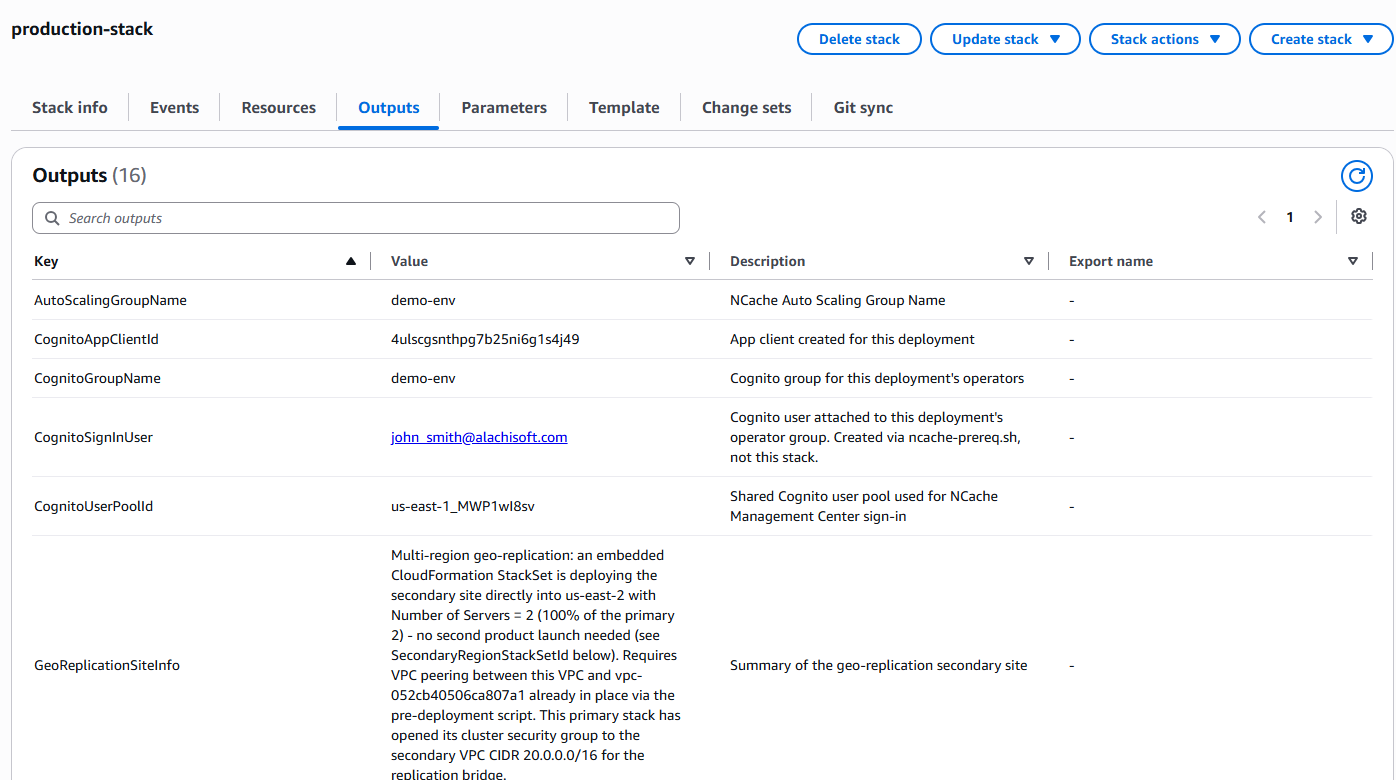
AutoScalingGroupName: The name of the Amazon Auto Scaling Group managing your cluster instances, such as demo-env.CognitoAppClientId: The Cognito application client created specifically for this deployment, such as 4ulscgsnthpb25ni6g1s4j49.CognitoGroupName: The Amazon Cognito user group assigned to operators for this deployment, such as demo-env.CognitoSignInUser: The Cognito user attached to the operator group created via the pre-requisite setup script rather than the stack, such as john_smith@alachisoft.com.CognitoUserPoolId: The shared Cognito user pool used for NCache Management Center sign-in, such as us-east-1_MWP1wl8sv.GeoReplicationSiteInfo: Summary of the multi-region geo-replication configuration detailing automated StackSet deployment into secondary regions with pre-configured VPC peering, such as a multi-region geo-replication summary and bridge configuration.InstanceCount: The number of EC2 instances launched in the stack, such as 2.NCacheDashboardUrl: Direct link to the pre-configured CloudWatch dashboard tracking host metrics and logs across all cluster nodes, such as https://us-east-1.console.aws.amazon.com/cloudwatch/....NCacheSupportIAMUser: The dedicated IAM user in NCache's own AWS account granted access if technical support is enabled, such as arn:aws:iam::418573493886:user/NCacheSupport.NCacheSupportRoleArn: The narrowly-scoped IAM role that NCache Support assumes to access your environment without root or admin credentials, such as arn:aws:iam::...:role/demo-env-NCacheSupportRole.NCacheSupportSessionDocumentName: The specific AWS Systems Manager (SSM) document NCache Support uses to initiate a session connecting to a read-only OS user, such asus-east-1-demo-env-NCacheSupportSession-....PrivateEndpoint: The Route 53 Private Hosted Zone name used for internal node and application communication within your VPC, such as demo-env.ncache.PublicMgmtUrl: The external URL used to access the NCache Cloud Portal after a few minutes of provisioning time, such as https://d32vajvnssd4r.cloudfront.net.ResolvedInstanceType: The EC2 instance type resolved internally from your selected NCache Server Plan, such as c5a.large.SecondaryInstanceCount: The number of EC2 instances deployed for the secondary geo-replication site, such as 2.SecondaryRegionStackSetId: The CloudFormation StackSet identifier responsible for deploying the secondary multi-region site, such asdemo-env-secondary-site:7e505f4b-....
AWS Health Checks
NCache instances utilize two independent health check mechanisms operating on port 9804 (http://<instance>:9804/health) to continuously monitor node availability, handle automated failovers, and trigger instance replacements when required.
Both mechanisms share identical baseline timing configurations:
Grace Period: 30 minutes after boot (health checks execute, but no automated replacement actions are triggered).
Interval: Every 30 seconds, with a 10-second timeout.
Trip: 3 consecutive failures (~90 seconds) mark an instance as Unhealthy and trigger replacement.
Recovery: A single successful response resets the failure count to 0.
1. Navigation and Health Visibility
To inspect target group health status in the AWS Management Console:
- Where to navigate: Go to your AWS EC2 Console -> expand Load Balancing on the left menu -> click Target groups -> select your environment's target group (e.g., demo-env-mgmt-tg).
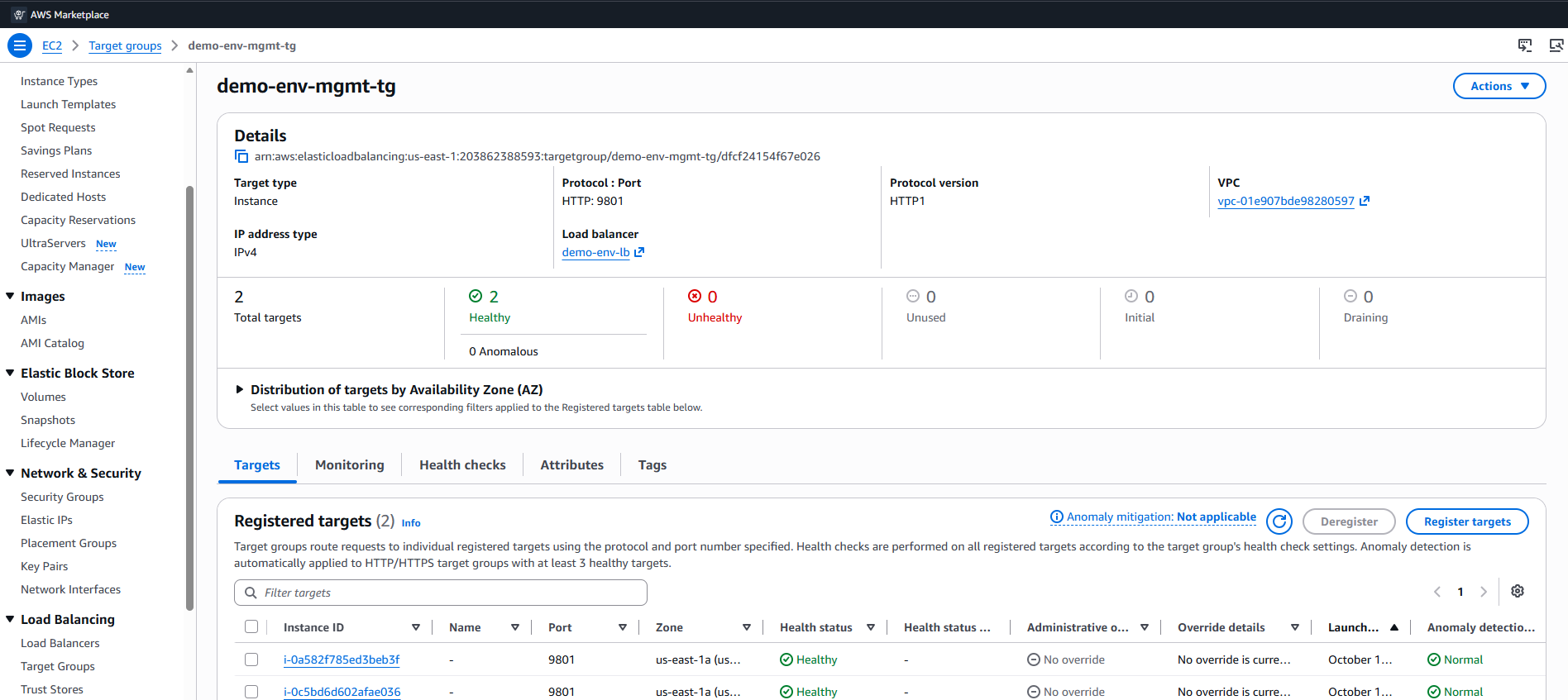
- What you see: A list of targets and health metrics. Enabling health monitoring introduces status tracking, showing real-time node health as Healthy or Unhealthy.
2. Health Probing Configuration
AWS uses load balancers and target groups as internal heartbeat monitors, periodically pinging NCache via HTTP rather than just checking VM power state. If the service fails to respond or crashes repeatedly, AWS marks the instance as Unhealthy to trigger self-healing. Click on the Health checks tab.
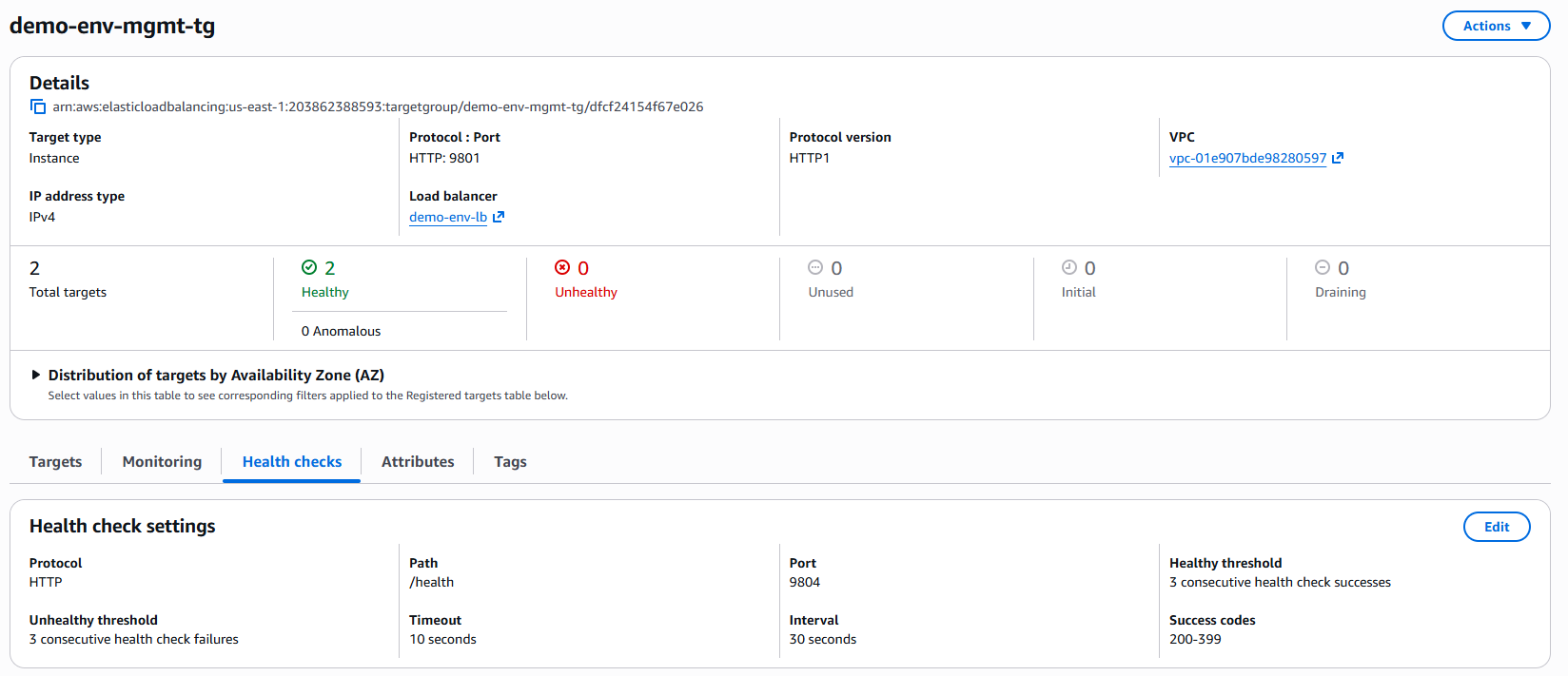
Port number (9804): The internal HTTP port opened by NCache specifically for health telemetry.
Request path (/health): The endpoint called to query if the cache service is running properly.
Interval between probes (30 sec): How often the health check pings the
/healthendpoint on each node.Unhealthy threshold (3): The number of consecutive failed pings required before marking the node as Unhealthy (ensuring temporary network hiccups don’t trigger false alarms).
3. Automatic Instance Repairs and Watchdog
ALB Health Check (Public Deployments Only): Used by AWS Application/Network Load Balancers to route client traffic and replace instances. Recovery requires 3 consecutive successes (~90 seconds) to return to a Healthy state.
Health Watchdog (All Instances, Public and Private): A native background script running every 30 seconds. It is the only mechanism that can catch a stuck NCache on private deployments without an ALB. After 3 consecutive failures, it tells AWS to mark the instance Unhealthy, which triggers replacement.
Upgrade Safety: During an active MINOR, PATCH, or MAJOR upgrade, the health watchdog remains intentionally suspended. You can verify this behavior by stopping the NCache service mid-upgrade and confirming that the instance is not incorrectly flagged as unhealthy.
