TLS Custom Certificates
The TLS Custom Certificates page allows you to supply enterprise-managed SSL/TLS certificates for end-to-end encryption across your NCache Cloud cluster. The TLS Custom Certificates page is functionally identical across both Azure and AWS deployments, as certificates are distributed directly to the certs directory across all cluster server instances regardless of the underlying cloud scaling group mechanism. Please note that this page uses the Azure Portal example.
Note
Upload a custom certificate only if your organization's compliance policy requires its own certificate authority (CA). By default, NCache provides and configures its own TLS certificate, so no manual upload is required for standard secure operations.
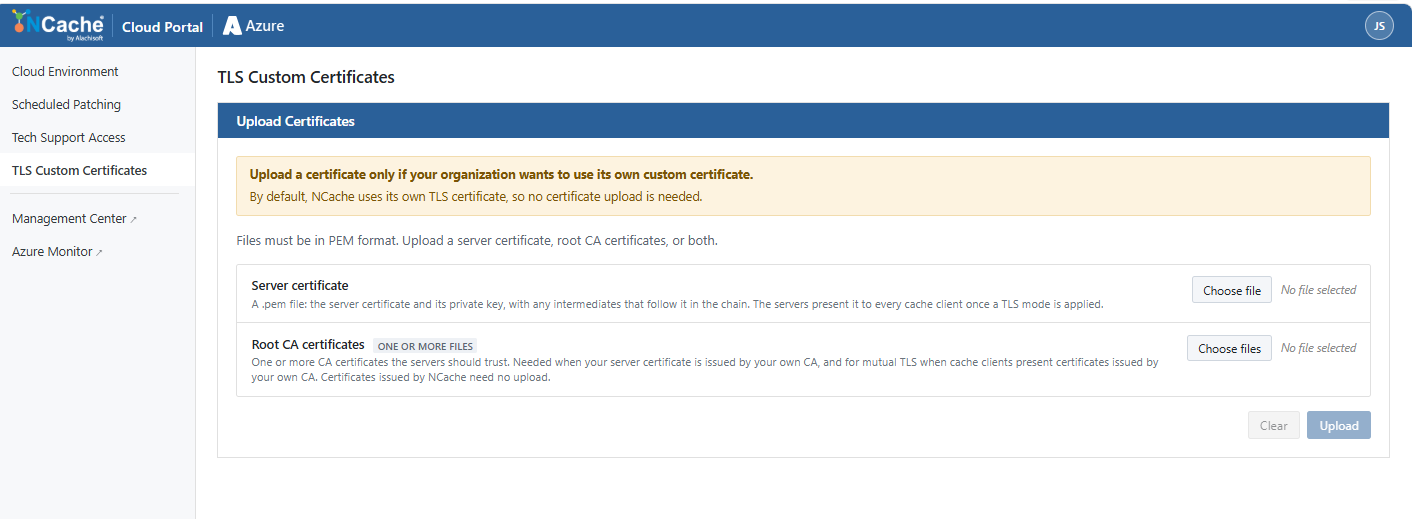
File Requirements and Deployment Scope
Format: All certificate files must be encoded in PEM format. You can upload a server certificate or root CA certificates.
Cluster Deployment: When uploaded, the certificates are written to the
certsdirectory across every NCache server in the scale set. Applying a custom certificate enforces secure encryption for standard TLS or Mutual TLS across node-to-node and client-to-node communications.
Uploading Certificates
From the left navigation menu of the NCache Cloud Portal, select TLS Custom Certificates to access the Upload Certificates section:
Server certificate (Required):
Requires a
.pemfile containing the server certificate along with its associated private key, with any intermediates that follow it in the chain.The servers present this to every cache client once a TLS mode is applied.
Click Choose file to browse and select the certificate package from your local system. Upon which you'll receive the confirmation prompt.
Root / CA certificate (Optional):
One or more CA certificates the servers should trust.
Needed when your server certificate is issued by your own CA, and for mutual TLS when cache client certificates are issued by your own CA. Certificates issued by NCache need no upload.
Click Choose file to upload the root CA file, or leave this field empty if your NCache host operating system already trusts the certificate issuer.
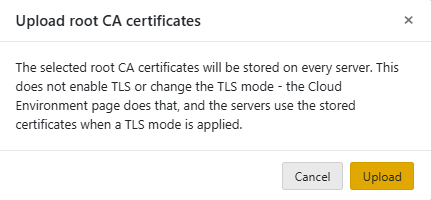
Applying Changes
Upload: Initiates validation of the PEM files and distributes the certificate chain to the
certsdirectory on all active cluster servers.Clear: Resets the form and deselects all currently chosen certificate files.
