Bridges
The NCache Bridges page in NCache Management Center displays all configured bridge caches. It provides options to create, manage, and monitor bridges.
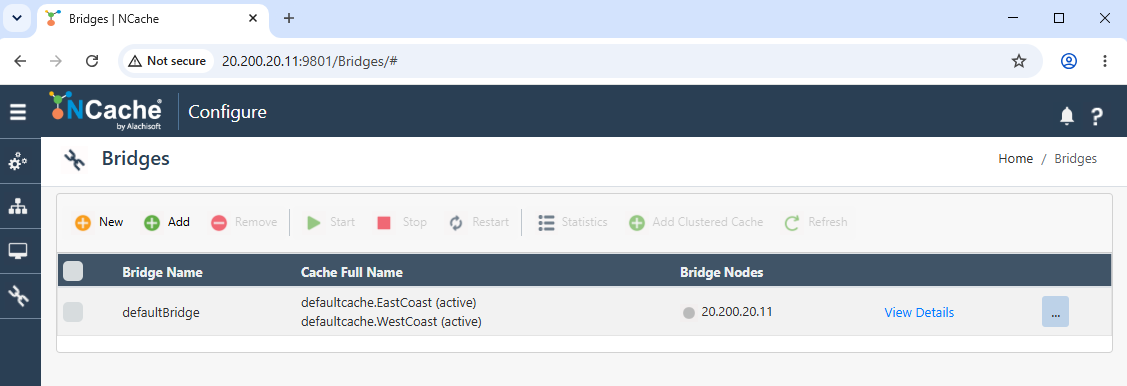
Cache List
Each row in the cache list represents a single bridge cache and provides key details:
- Bridge Name: Displays the name of the bridge cache.
- Cache Full Name: Shows the full name of the cache(s) that the bridge is associated with.
- Bridge Nodes: Lists the nodes participating in the bridge cache, showing their IP address and status.
The View Details button opens the configuration and status details of the selected bridge cache. Each cache row also provides a More Options (⋯) menu for additional cache-specific actions.
Toolbar
The toolbar at the top of the page offers several options for managing bridge caches:
| Button | Description |
|---|---|
| New | Opens the wizard to create a new bridge cache. |
| Add | Adds an existing bridge to the Management Center. |
| Remove | Removes the selected bridge cache. |
| Start | Starts the selected bridge cache. |
| Stop | Stops the selected bridge cache. |
| Restart | Restarts the selected bridge cache. |
| Statistics | Displays runtime statistics for the bridge cache. |
| Add Clustered Cache | Adds existing clustered caches to an NCache Bridge. |
| Refresh | Reloads the bridge cache list to reflect the current status. |
Note
A bridge cache must be selected from the list to enable most toolbar actions.
