Disable Client Cache on Client Nodes
NCache allows administrators to disable the Client Cache (L1 cache) on specific client nodes or across the entire cluster without permanently removing the configuration. Naturally, this is a critical management operation for performance tuning or troubleshooting. This process shifts the application's data retrieval directly to the clustered cache (L2). Therefore, disabling the Client Cache can help resolve data consistency issues during development or allow for maintenance on local resources while keeping the primary distributed cache fully operational.
Using the NCache Management Center
Launch the NCache Management Center by browsing to http://localhost:8251 or
<server-ip>:8251.In the left navigation bar, click on Clustered Caches based on the cache that has the Client Caches. Against the cache name, click on View Details.

This opens the detailed configuration page for the cache.
In the Client Nodes tab, select the Client Node IP for which the Client Cache is to be disabled.
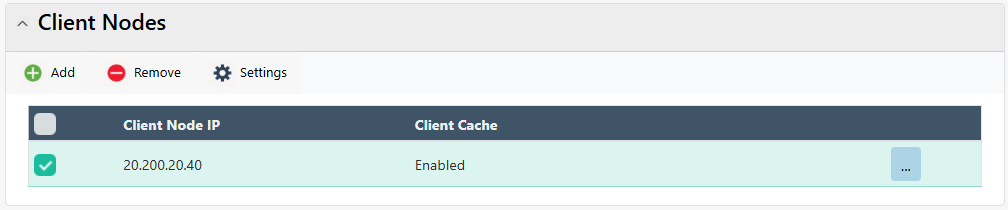
- Click on "..." against the client node IP and select the Disable Client Cache option.
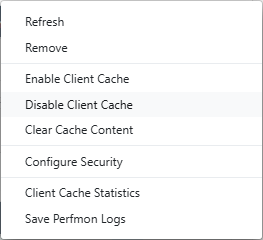
- The Client Cache status will change from Enabled to Disabled, and a success notification will be received.
See Also
Create Client Cache
Enable Client Cache on Client Nodes
Remove Client Cache
