Enable/Disable Client Cache
NCache's Client Cache (L1 Cache) is a local cache on the client computer that stores the frequently accessed data. You can enable or disable an existing Client Cache without removing its configuration. When enabled, connecting clients use the Client Cache associated with the clustered cache. When disabled, Client Cache stops on connected clients while its configuration and settings are retained.
Applications remain connected to the clustered cache when Client Cache is disabled and continue performing cache operations directly against the clustered cache (L2 Cache). When Client Cache is enabled again, connected applications that previously initialized Client Cache resume using it without reconnecting.
Note
Disabling a Client Cache is different from removing it. Disabling retains the Client Cache configuration so that it can be enabled again. Removing the Client Cache deletes its configuration from the clustered cache.
Using the NCache Management Center
You can enable or disable Client Cache directly from the Clustered Caches page or through the Client Cache settings of the clustered cache.
Enable or Disable from Client Cache Settings
Launch the NCache Management Center by browsing to http://localhost:9801 or
<server-ip>:9801.In the left navigation bar, click Clustered Caches. Against the cache that has the Client Cache, click View Details.

- This opens the detailed configuration page for the cache.
To disable Client Cache:
- In the Client Cache section, clear the Enable Client Cache checkbox.
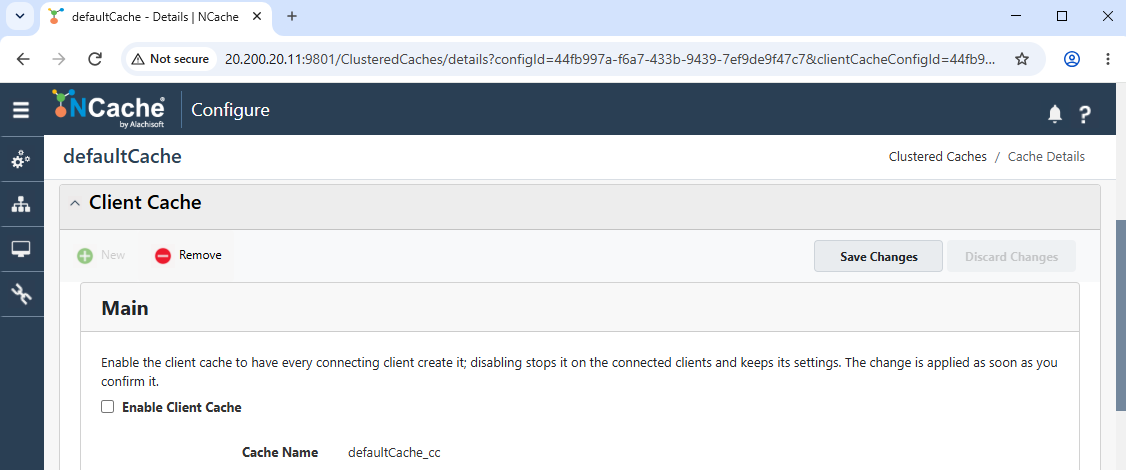
Save the Client Cache settings.
A confirmation dialog appears. Confirm the operation to disable the Client Cache.
Once confirmed, the Client Cache is disabled for connected clients while its configuration is retained. Applications remain connected to the clustered cache and continue cache operations directly against it.
Note
Disabling the Client Cache is applied to connected clients at runtime and does not require the application to reconnect.
To enable Client Cache:
- In the Client Cache section, select the Enable Client Cache checkbox.
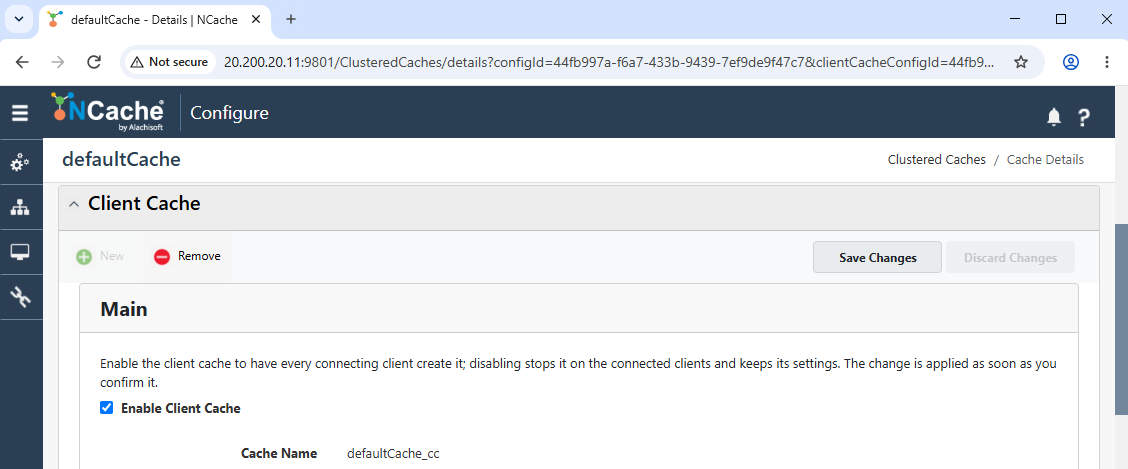
- Save the Client Cache settings.
Once enabled, the Client Cache becomes active again using the existing configuration, and connected clients resume using it without requiring the application to reconnect.
Note
Enabling the Client Cache is applied to connected clients at runtime and does not require the application to reconnect.
Enable or Disable from Clustered Caches
Launch the NCache Management Center by browsing to http://localhost:9801 or
<server-ip>:9801.In the left navigation bar, click Clustered Caches.
Against the required clustered cache, click the ... button.
To enable Client Cache:
- If Client Cache is currently disabled, select Enable Client Cache.
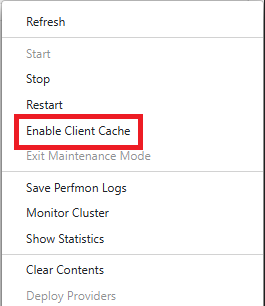
- A success notification confirms that the Client Cache has been enabled for the clustered cache. The menu option changes to Disable Client Cache.
To disable Client Cache:
- Open the ... menu against the clustered cache and select Disable Client Cache.
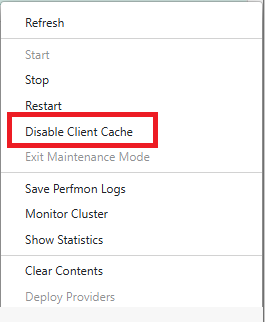
The change is applied to connected clients at runtime. Disabling Client Cache retains its configuration while connected applications continue performing cache operations directly against the clustered cache. Enabling it again makes the Client Cache active using the existing configuration, and connected applications that previously initialized Client Cache resume using it without reconnecting.
Using PowerShell
You can also enable or disable an existing Client Cache using the Update-ClientCache PowerShell cmdlet.
- The following command disables the Client Cache associated with defaultCache:
Update-ClientCache -CacheName defaultCache -EnableClientCache false
- The following command enables the Client Cache associated with defaultCache:
Update-ClientCache -CacheName defaultCache -EnableClientCache true
- The following command enables the Client Cache associated with defaultCache on server 20.200.20.11:
Update-ClientCache -CacheName defaultCache -EnableClientCache true `
                   -Server 20.200.20.11
- The following command enables the Client Cache using security credentials:
Update-ClientCache -CacheName defaultCache -EnableClientCache true `
                   -Server 20.200.20.11 -Credentials(Get-Credential john_smith)
- This command disables the Client Cache configured for defaultCache on server 20.200.20.11 using a client PEM certificate and password for mutual TLS (mTLS) authentication.
Update-ClientCache -CacheName defaultCache -Enable false `
                   -Server 20.200.20.11 -TlsCertPath "C:\certs\client.pem" `
                   -TlsCertPassword "clientKeyPassword"
Note
Enabling or disabling Client Cache through Update-ClientCache is applied at runtime and does not require the application to reconnect.
See Also
Create Regular Client Cache
Create Full-Data Client Cache
Remove Client Cache
