Azure Resources Created and Deployment Details
When you complete the NCache Cloud deployment wizard, Azure creates an isolated container called a Managed Resource Group (MRG). You do not have to create VMs, set up routing, or build security rules manually - Azure automatically deploys a complete set of interconnected cloud resources into this group. Here is what each of those resources does and why it exists:
Resources Detail
The detail of the resources is as below:
1. Virtual Machine Scale Set (VMSS) and Host VMs
Resource Type:
Microsoft.Compute/virtualMachineScaleSetsWhat this is: A Virtual Machine Scale Set (VMSS) is Azure's automated way of managing a group of identical virtual machines. Instead of creating separate standalone VMs named Server1, Server2, etc., Azure groups them under a single scale set controller (e.g., Test1).
How it works: When your deployment finishes, this scale set automatically powers on the number of virtual machines you selected (such as 2 or 3 instances like Test1_0, Test1_1). Each machine boots up with your chosen OS and hardware size (e.g., Standard_D2ls_v5), pulls the official NCache Docker container image, and starts the NCache service. When you click Add Server or Remove Server in the portal, it is this scale set that provisions new VMs or shuts them down. It also hosts the internal health agent that checks if NCache is running.
2. Private DNS Zone and Endpoints
Resource Type:
Microsoft.Network/privateDnsZones/virtualNetworkLinksWhat this is: This is a private, internal phonebook inside your Azure Virtual Network (VNet). It gives your cluster user-friendly hostnames instead of forcing your applications to remember changing IP addresses.
How it works: Azure links this private DNS zone directly to your application subnet. It creates two internal addresses for your cluster:
Endpoints Configured (1 Per Site):
Private Client Endpoint (
<env>.ncache:9800): The internal target used by client applications within the VNet to perform cache CRUD operations and data reads/writes.Private Management Endpoint (
<env>.ncache:9801): The internal management channel used by PowerShell cmdlets, APIs, and background processes for cluster orchestration.Both endpoints automatically map to the internal private IP addresses of the active VMSS cluster instances.
3. Public Management Endpoint (Azure Front Door)
Resource Type:
Microsoft.Cdn/profiles/endpointsWhat this is: Azure Front Door acts as a secure, public HTTPS reverse-proxy and gateway to your management consoles.
How it works: Your backend VMSS cache servers are locked inside a private network with no public IP addresses. To let you open the NCache Cloud Portal and Management Center from your local browser, Azure Front Door provides a single global web URL. It handles SSL encryption, checks your login credentials via Microsoft Entra ID, and safely forwards your management traffic into the cluster. Your actual cache data (port 9800) is completely blocked from Front Door so it can never be exposed to the public internet.
4. Azure Load Balancer
Resource Type:
Microsoft.Network/loadBalancersWhat this is: An internal traffic distributor sitting directly in front of the VMSS nodes.
How it works: When management traffic comes in from Front Door, or internal client traffic hits the cluster, the Load Balancer decides which VMSS instance handles the request. It constantly checks node health. If one of your NCache servers crashes or is rebooting during a maintenance window, the Load Balancer immediately stops sending traffic to that specific machine and reroutes it to the healthy nodes.
5. Network Security Group (NSG)
Resource Type:
Microsoft.Network/networkSecurityGroupsWhat this is: Perimeter network filtering and strict traffic isolation for all cluster network interfaces.
How it works: During deployment, you specified a list of allowed management IP addresses or CIDR blocks. The NSG translates that into firewall rules:
It blocks any public internet connection attempting to reach internal ports like 9800 (client data) or 9801 (management).
It permits inbound HTTPS traffic only from your whitelisted corporate IPs so external strangers cannot reach your cluster.
It permits the health probe port (9804) to operate internally so Azure can monitor whether NCache is alive.
6. Azure Automation Account and Runbook
Resource Type:
Microsoft.Automation/automationAccountsWhat this is: A serverless automation worker inside Azure designed to run scheduled scripts without requiring human intervention.
How it works: When you set up a Scheduled Patching window during deployment (for example, every Sunday at 02:00 UTC), Azure needs a way to actually trigger the update process. The Automation Account contains a pre-built PowerShell runbook that wakes up at your chosen time. It safely pulls the latest security patches or updated NCache container images and applies them to the VMSS nodes one at a time, preventing total cluster downtime.
7. VNet Peering (Multi-Region / Geo-Replication Topologies)
Resource Type:
Microsoft.Network/virtualNetworks/virtualNetworkPeeringsWhat this is: A dedicated, high-speed private connection that connects two separate Azure Virtual Networks together.
How it works: If you configure a multi-region deployment (for example, Primary in East US and Secondary in West US for disaster recovery), the two sites start in completely separate networks. Azure automatically configures VNet Peering between them. This allows NCache’s Bridge Replication service to continuously synchronize data across regions using Azure's private optical network backbone - ensuring fast replication without sending any data over the unencrypted public internet.
Parameters and Outputs
Once provisioning is complete, you can retrieve your cluster's connection strings, management URLs, and VM profiles from the Azure Portal.
In the Azure Portal, open your deployed Managed Application and select Parameters and Outputs under Settings in the left menu. Scroll to the Outputs section.
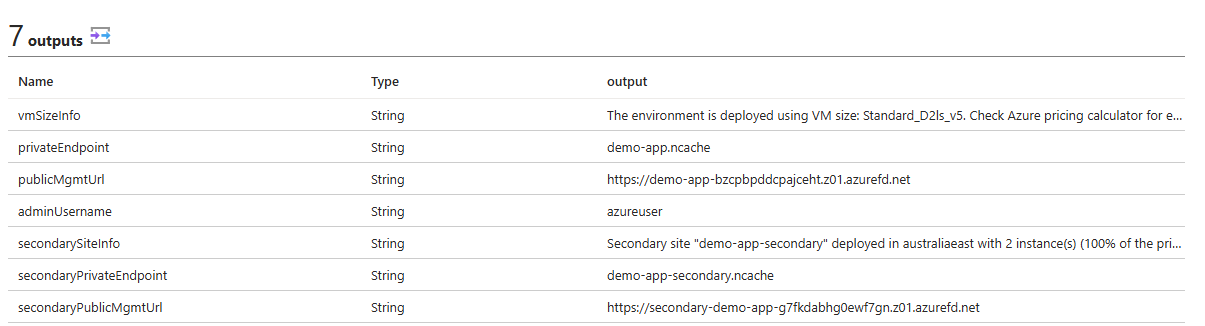
It contains important links like:
The outputs table provides all critical connection endpoints and environment details:
vmSizeInfo: Displays the active VM series and SKU (e.g.,Standard_D2ls_v5) to help evaluate resource capacity and estimate compute costs using the Azure pricing calculator.privateEndpoint: The primary internal DNS endpoint (e.g.,Test1.ncache) used by client applications within the virtual network to discover the cluster and perform cache operations.publicMgmtUrl: The primary public Azure Front Door HTTPS endpoint (e.g.,https://Test1-cmbqekdegxffeaeg.z01.azurefd.net) used strictly for web-based access to the NCache Cloud Portal and Management Center.adminUsername: The administrator username (e.g.,azureuser) configured during deployment for VM-level access.secondarySiteInfo(Present in multi-site deployments): Details regarding the secondary disaster recovery site, including site name, deployment region, instance count, and replication capacity relative to the primary site.secondaryPrivateEndpoint(Present in multi-site deployments): The internal DNS endpoint (e.g.,Test1-secondary.ncache) used for private communication and replication routing within the secondary site network.secondaryPublicMgmtUrl(Present in multi-site deployments): The public Azure Front Door HTTPS address (e.g.,https://secondary-Test1-adb2fbbvaxbdg8bx.z01.azurefd.net) providing dedicated management access to the secondary site cluster.
NCache Health Probing and Automatic Repairs in Azure VMSS
Azure Virtual Machine Scale Sets (VMSS) actively track the health of NCache nodes and automatically recover failed instances using dedicated health probes.
1. Navigation and Health Visibility
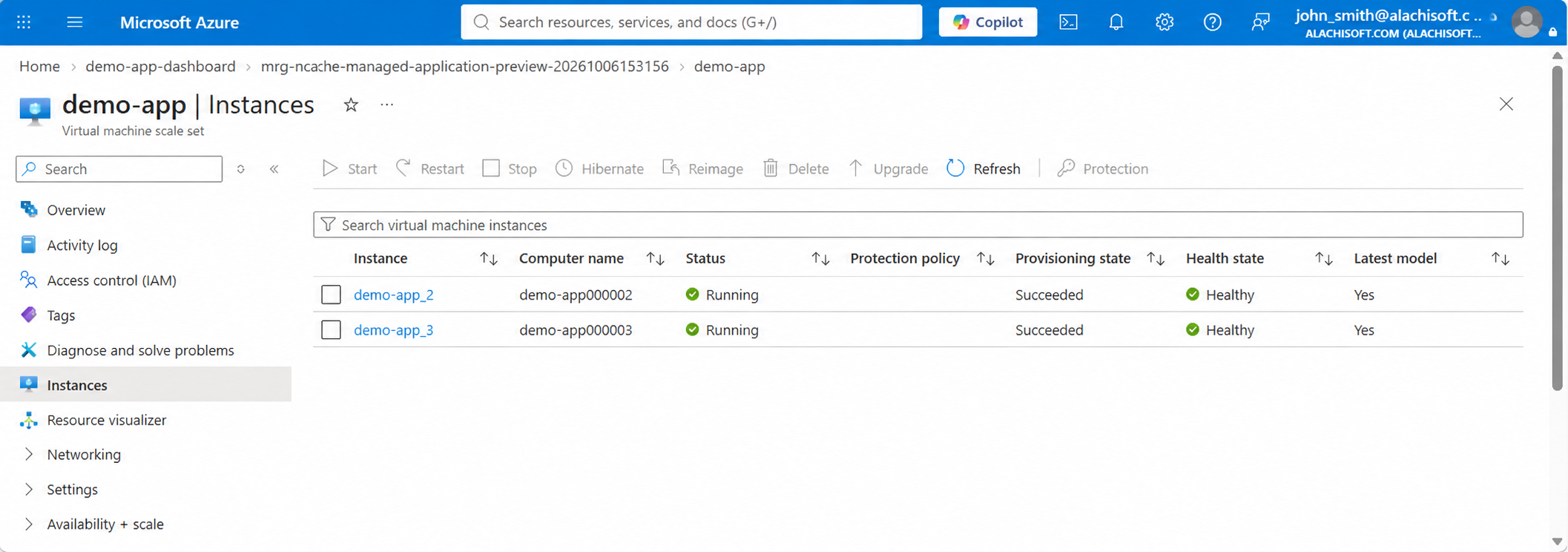
Where to navigate: Go to your Resource Group -> select the VMSS -> click Instances under on the left bar.
What you see: A list of all VMSS nodes. Enabling health monitoring introduces the Health state column, showing real-time node status as Healthy or Unhealthy.
2. Health Probing Configuration (What Each Parameter Does)
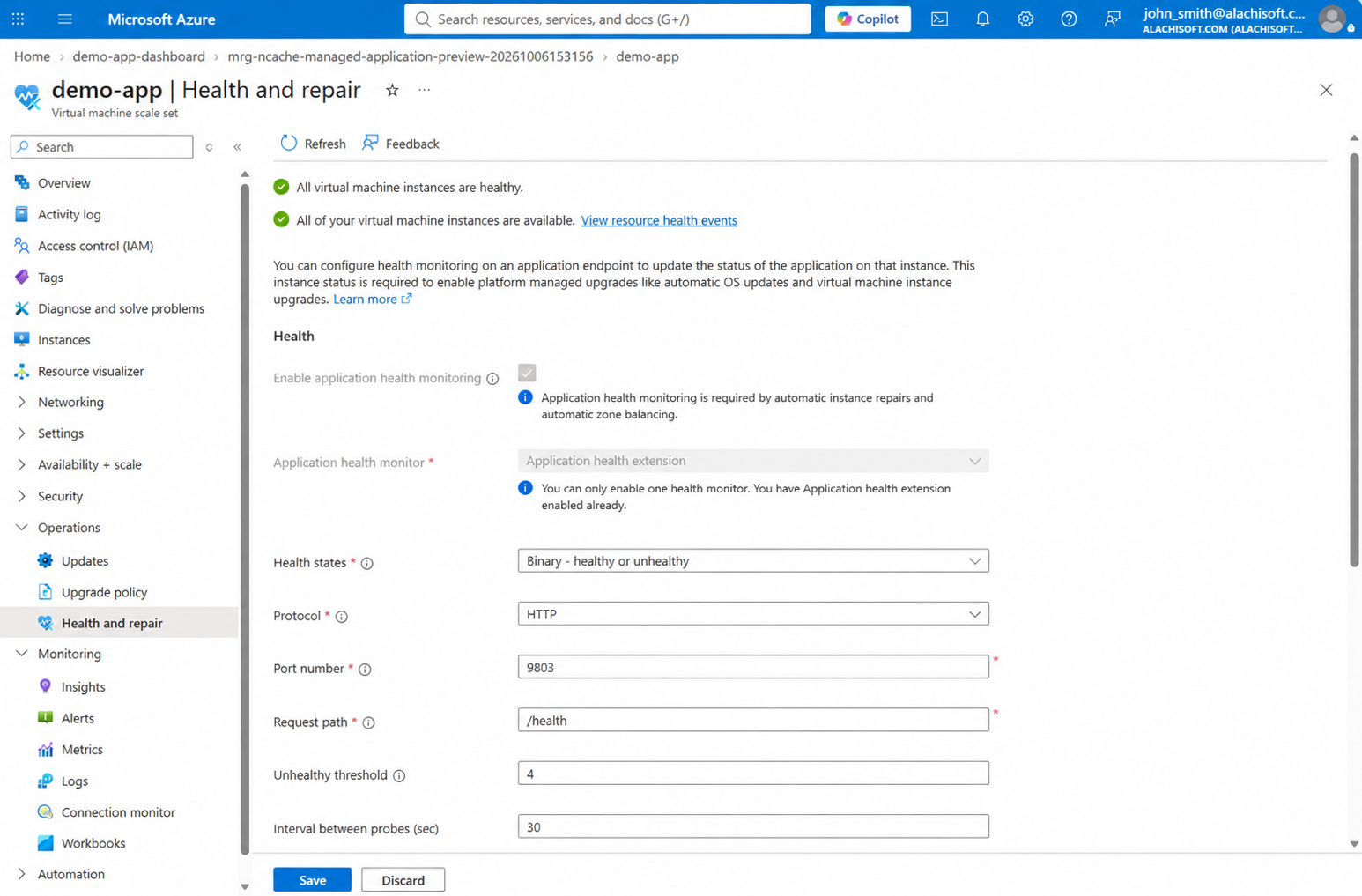
Azure uses the Application Health Extension as an internal heartbeat monitor: it periodically pings NCache via HTTP rather than just checking VM power state. If the service fails to respond or crashes repeatedly, Azure marks the instance as Unhealthy to trigger self-healing.
Under Operations -> Health and repair, Azure uses the Application Health Extension to poll NCache.
Port number (9804): The internal HTTP port opened by NCache specifically for Azure health telemetry.
Request path (/health): The endpoint Azure calls to query if the cache service is running properly.
Interval between probes (30 sec): How often Azure pings the /health endpoint on each node.
Unhealthy threshold (4): The number of consecutive failed pings required before Azure marks the node as Unhealthy (ensuring temporary network hiccups don’t trigger false alarms).
3. Automatic Instance Repairs (What Happens on Failure)
In the same Health and repair blade, scroll down to the Resiliency section.
Automatic instance repairs: If this is checked, Azure automatically detects and repairs unhealthy VMSS instances without requiring manual administrative intervention.
Repair action (Restart): Set to Restart by default, rebooting the VM instance when an NCache service fails health probes and cannot recover on its own.
Note
To update the repair action on an existing policy, you must first disable (uncheck) automatic repairs on the scale set and re-enable it with the updated action.
- Grace period (30 min): A safety buffer that pauses automatic restarts while a node boots up, applies updates, or completes cache state transfer. It prevents premature or rapid restart loops.
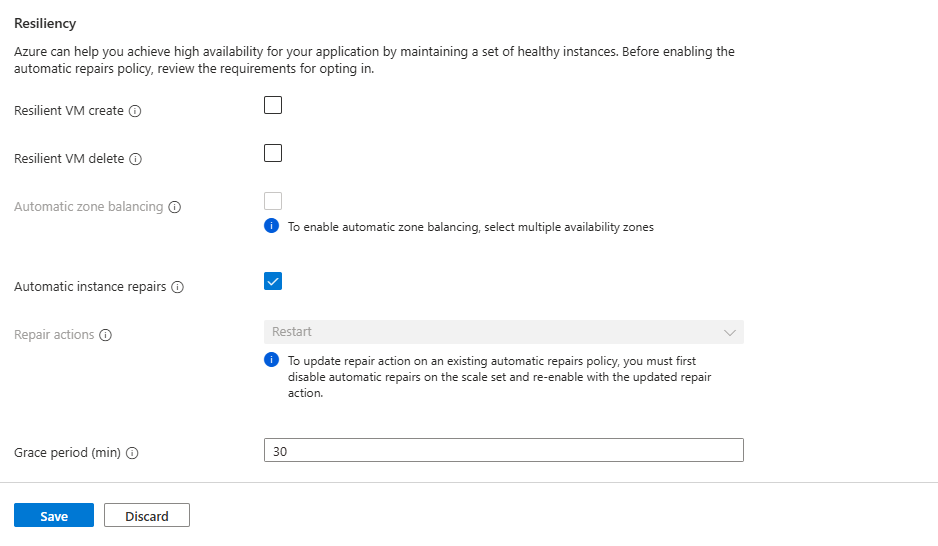
If a node stays unhealthy after 4 consecutive failed probes (2 minutes), Azure waits for the 30-minute grace period to elapse. If the node is still down, Azure triggers an automated restart.
See Also
Get From Marketplace
Azure Monitor Dashboards
NCache Cloud Portal
