NCache Management Center
The NCache Management Center is the web-based administrative console for provisioning, configuring, and maintaining your cache clusters, client nodes, security rules, and data sources.
Whether deployed on Microsoft Azure or Amazon Web Services (AWS), the Management Center delivers the exact same rich set of caching functionalities, administrative tools, and performance monitoring capabilities. While the NCache Cloud Portal governs cloud-level infrastructure (such as scaling virtual machine instances, TLS switches, scheduled patching, and technical support access), the NCache Management Center operates directly at the caching level. Please note that this page uses the Azure Portal example.
Accessing the Management Center
You can navigate directly to the Management Center from within the NCache Cloud Portal:
- In the left navigation menu of the Cloud Portal, click Management Center.
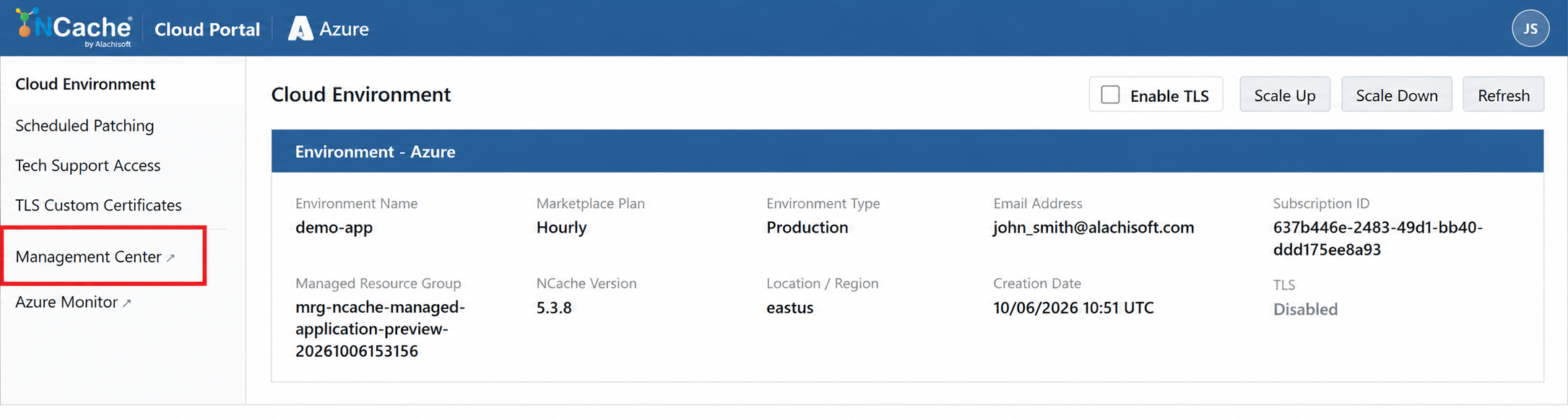
A new browser tab opens, routing through your secure public management endpoint (such as Azure Front Door or AWS CloudFront) into the running cluster environment.
The interface defaults to the Clustered Caches management view.
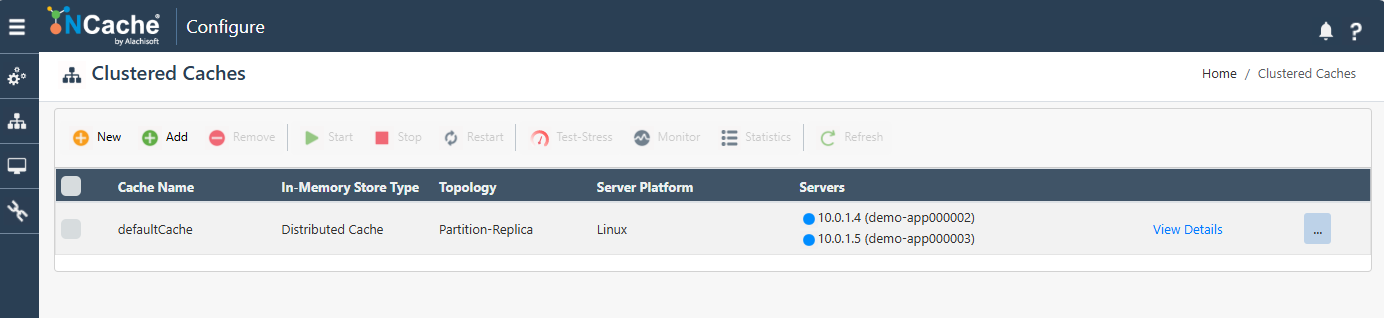
Clustered Caches Overview
Upon landing in the Management Center, the Clustered Caches blade displays all active cache configurations deployed across your environment.
Cluster Details
Cache Name: The logical identifier for the cache cluster (e.g.,
defaultCache).In-Memory Store Type: The storage engine profile powering the cache (e.g.,
Distributed Cache).Topology: The clustering scheme governing partition and backup distribution (e.g.,
Partition-Replica,Replicated, orPartitioned).Server Platform: The host operating system running the NCache container service (e.g.,
Linux).Servers: The host nodes comprising the active cache cluster, itemized by private IP address and hostname (e.g.,
10.0.1.4 (demo-app000002)and10.0.1.5 (demo-app000003)), along with license and evaluation status.View Details: Opens the comprehensive configuration blade for item-level tuning, memory caps, evictions, and backend providers.
Key Management Actions
The top action toolbar provides operational control over your caching tiers:
New / Add: Provision a brand-new cache cluster or register existing server nodes into an active cache configuration.
Remove: Deregister a server node or decommission an entire cache definition.
Start / Stop / Restart: Manage the operational state of the cache cluster across all nodes simultaneously.
Test-Stress: Generates synthetic, continuous read/write workloads against the selected cache to validate cluster throughput, resource usage, and connectivity before pushing client applications live.
Monitor: Launches real-time performance dashboards tracking request velocities, hit/miss ratios, network counters, and memory utilization.
Statistics: Displays detailed tabular metric counters and active client connection telemetry.
Next Steps
To explore configuring advanced caching features, custom server-side providers, and client bindings, refer to the following:
