Client Cache Dashboard
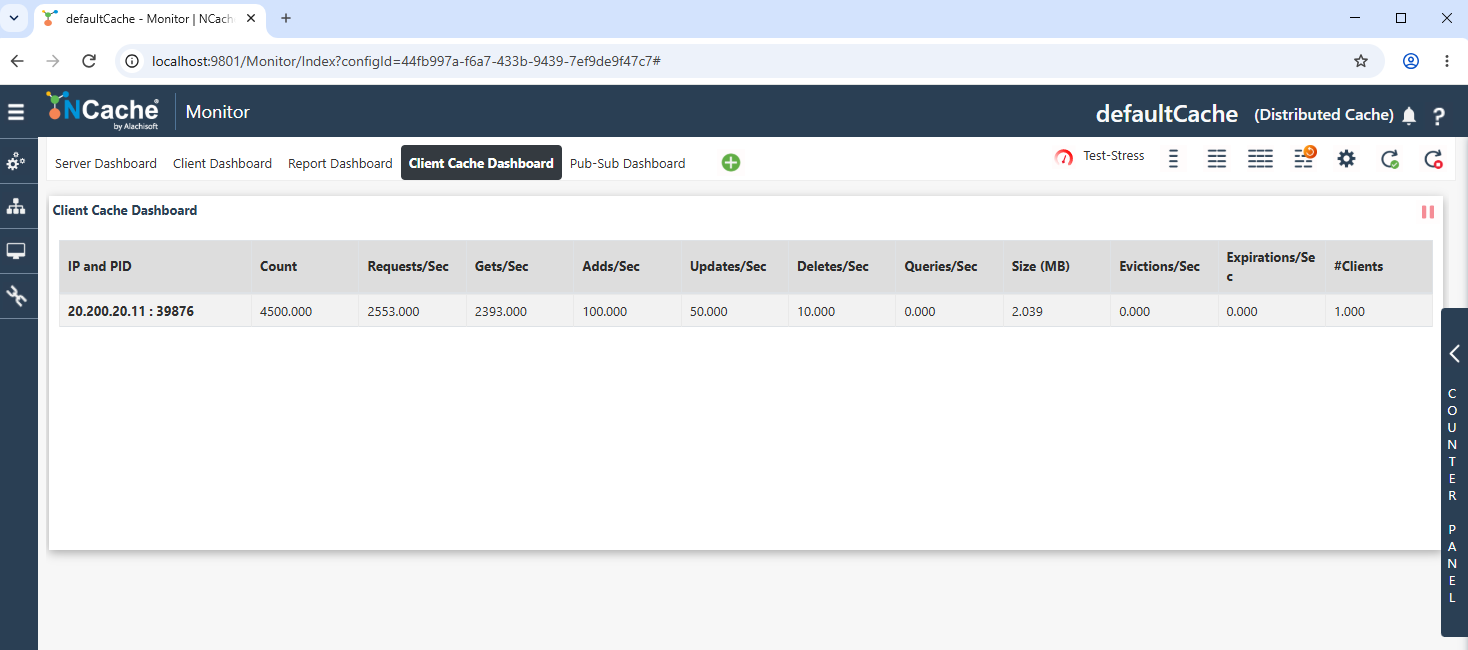
NCache provides a Client Cache Dashboard in the NCache Management Center for monitoring active Client Cache instances associated with a clustered cache. The dashboard provides runtime information about each Client Cache instance, including its client IP and process ID, item count, operation rates, cache size, eviction and expiration rates, and connected clients.
The dashboard is accessed from the Monitor section by selecting the Client Cache Dashboard tab.
Note
The dashboard navigation tabs and toolbar options behave similarly to those explained in Server Dashboard.
The Client Cache Dashboard displays a separate row for each active Client Cache instance and provides the following statistics:
- IP and PID: Displays the IP address and process ID associated with the Client Cache instance.
- Count: Displays the number of items currently stored in the Client Cache.
- Requests/Sec: Displays the number of requests processed by the Client Cache per second.
- Gets/Sec: Displays the number of get operations performed per second.
- Adds/Sec: Displays the number of add operations performed per second.
- Updates/Sec: Displays the number of update operations performed per second.
- Deletes/Sec: Displays the number of delete operations performed per second.
- Queries/Sec: Displays the number of query operations performed per second.
- Size (MB): Displays the current size of the Client Cache in megabytes.
- Evictions/Sec: Displays the number of items evicted from the Client Cache per second.
- Expirations/Sec: Displays the number of items expired from the Client Cache per second.
- #Clients: Displays the number of clients associated with the Client Cache instance.
Counter Panel
The vertical Counter Panel on the right side of the page provides access to additional monitoring counters and graphs. The tabs at the top of the panel allow switching between Server and Client counters.
See Also
Monitor NCache
Client Cache Architecture
Enable/Disable Client Cache
