Pub/Sub Messaging with NCache using .NET Application
In this video we will be looking at Pub/Sub messaging with NCache using .NET application. Pub/Sub is a messaging pattern that allows, different parts of your system to communicate with each other without being directly dependent on one another. So you have a publisher that sends messages and you have a subscriber that listens for messages. In the middle is a broker that is used to route your messages from one end to another.
This is where NCache comes in. It acts as a broker over here using the topic. As you can see here. Now this topic sits inside the NCache cache cluster and it stores your messages. It stores your publisher information, store your subscriber information, and it is also used to relay events to, either your publisher or your subscriber.
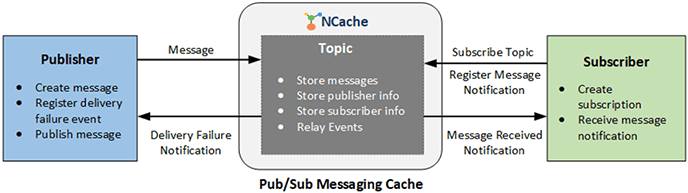
All of this, this is how, it allows your messages to be sent from one end to another without the applications actually depending on one another.
What is Pub/Sub Messaging?
- Publisher sends messages
- Subscriber listens for a message
- Broker sits in the middle, routing messages from publishers to subscribers
- Indirect & Decoupled publisher and subscriber. Easy to scale, maintain, and extend.
Topic
So, we'll first start by looking at how to actually create a topic. As you can see, we call the messaging service interface, within the cache. We call the create topic method. The only thing we pass in, of course, is the topic name. Once you create a topic, it sits inside your cache. It always exists until you delete the topic. And of course the line above here, this is how you can get the topic. Once you've already created it, you simply have to use this method call.
Create/Get Topic
String topicName = "ExampleTopic";
ITopic topic = _cache.MessagingService.GetTopic(topicName);

if (topic == null)
{
    topic = _cache.MessagingService.CreateTopic(topicName);
}
Publish Message
Publisher Overview
Delivery Option
- All - Sends the message to every subscriber.
- Any - Sends the message to only one subscriber.
Delivery Mode
- Sync - Waits for acknowledgment before sending next message.
- Async - Sends messages in the background without waiting.
- Bulk - Sends multiple messages together in a batch.
So we have a topic. The next thing we want to do is to publish a message into the topic. NCache offers a couple of different features for publishing your messages. So you can select a different delivery option. You can select all to send a message to all of the registered subscribers. And you can select any to only send a message to any one of the subscribers.
Additionally, you can select delivery mode so you can publish your messages synchronously. You can send them asynchronously, which will of course offer better performance. And finally, you can also send them in bulk, which will send you messages in a batch as opposed to one by one. And that, of course offers better performance as well. You would choose synchronously in a situation where you want, your subscriber application to receive messages in the same order it was sent from your publisher. So that's why you would opt for synchronous.
Publishing a Message
Now let's take a look at the code for publishing a message. Of course, we first have to get our ITopic, object, our topic object. We create a message object, and the parameters we pass in are the payload. So I'm passing in the a order object as a payload. And you can also pass in an expiration time for your message. And then finally we call the publish method. We provide these parameters, the message itself, the delivery option and you can also publish your message asynchronously. This third parameter over here, you can see is for the message delivery failure notification. So I'll explain that to you just in a second.
ITopic topic = cache.MessagingService.GetTopic(topicName);
Message message = new Message(new Order(), TimeSpan.FromSeconds(15));

// deliver message to all subscribers
topic.Publish(message, DeliveryOption.All, true);

// deliver message to any one subscriber
topic.Publish(message, DeliveryOption.Any, true);

// send message asynchronously
topic.PublishAsync(message, deliveryOption, true);
Message Delivery Failure
So you enable that option over there is set to true, and you also create this callback method. In this case you can see it's simply outputting a log message that it failed to deliver a message. And this line over here is how you register the event handler, okay, so you need to enable that parameter in the previous slide, you can see here. And you register the event handler via this piece of code. Then every time your message is not received by a subscriber, the publisher is notified. And then you can, using this callback, you can have your application react in a certain way or log a message.
private static void MessageDeliveryFailureNotification(object sender, MessageFailedEventArgs args) {
       Console.WriteLine("Failed to deliver message. " + args.MessageFailureReason);
   }

 // register event handler
ITopic topic = cache.MessagingService.GetTopic(topicName);
topic.MessageDeliveryFailure += MessageDeliveryFailedNotification;
Subscription
Subscription Type
- Durable - Stores messages while offline and delivers on reconnect.
- Non-Durable - Drops messages when the subscriber is offline.
Policy
- Exclusive - Allows only one active subscriber.
- Durable - Allows multiple active subscribers.
Delivery Mode
- Sync - Delivers messages sequentially, preserving order.
- Async - Delivers messages concurrently, no order guarantee.
So you can see you can have multiple publishers that are publishing a message to a certain topic. Within the topic, you can have multiple subscriptions, of which of course, you have multiple subscribers. You can see there's different kinds of subscriptions we can actually have. So there's a durable, there's a non-durable.
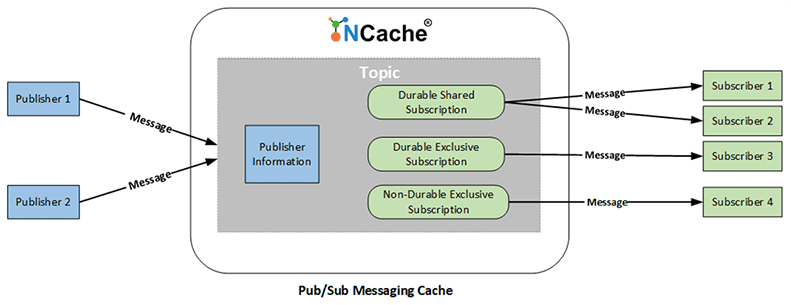
Durable Subscriptions
The the benefit of having a durable subscription is, think of it as a permanent subscription. It stores your messages even if you're a subscriber your application is offline or disconnects. It's going to store the message until it reconnects or, until the message expires.
Non-Durable Subscriptions
And contrary to that, the non-durable subscriptions, the messages are lost if your subscriber application disconnects. So think of them as temporary subscriptions.
Subscription Policy
Then you can also select the subscription policy. Exclusive only allows you to have one subscriber at Max. Shared allows you to have multiple subscribers.
So non-durable subscriptions, they are exclusive by default. You can only have one subscriber max and for durable you can select the subscription policy of course. Okay.
Delivery Mode
And finally, similar to how the publisher works, you can also have your delivery mode in synchronous or asynchronous for your subscription to process your messages, either synchronously or asynchronously. Of course one of them offers order messages and the other one offers better performance.
Creating Non-Durable Subscription
Let's take a look at how to create a non-durable subscription firstly. So you can see here of course we create a topic first and then we call the create subscription method. So this will create a non-durable subscription. And the only method parameter we pass in here, excuse me, is the message received callback. Okay. And this is what the message receive callback is. It's used to notify your subscriber when it receives the message. So in this case, it's simply outputting a message.
ITopic topic = cache.MessagingService.GetTopic(topicName);
// Create and register subscribers for the given topic
 // Message received callback has to be passed
ITopicSubscription subscription = topic.CreateSubscription(MessageReceivedCallback);


 // Used to notify the Subscriber when it receives a message
 private static void MessageReceivedCallback(object sender, MessageEventArgs args) {
      Console.WriteLine("Message received for topic " + args.TopicName);
  }
Creating Durable Subscription
And for durable subscriptions it's a little different, of course you pass in multiple parameters. So it's important to mention that durable subscriptions they are named subscriptions. You can give it a name. And non-durable subscriptions, you cannot provide a name to them. So the first parameter we're passing in to create a durable subscription is the name, we pass in the policy, shared or exclusive. We give in the message received callback and the expiration time of the subscription. Okay.
// Multiple Subscribers can subscribe to this Subscription
 SubscriptionPolicy sharedPolicy = SubscriptionPolicy.Shared;

 // Only one Subscriber allowed on this Subscription
 SubscriptionPolicy exclusivePolicy = SubscriptionPolicy.Exclusive;

 IDurableTopicSubscription subscription =
	topic.CreateDurableSubscription("ExampleSubscription",
                                		sharedPolicy,
                                		MessageReceivedCallback,
                                		TimeSpan.FromHours(1));
Publish Messages to a Topic
So, before we move on to the next slide, I want to show you the sample application I have. So of course it's a .NET application. You can see I already have the code written down. So there's four solutions here. There's the sample data, of course. That's an order. We have the order publisher. We have a primary order subscriber and a secondary order subscriber. Okay.
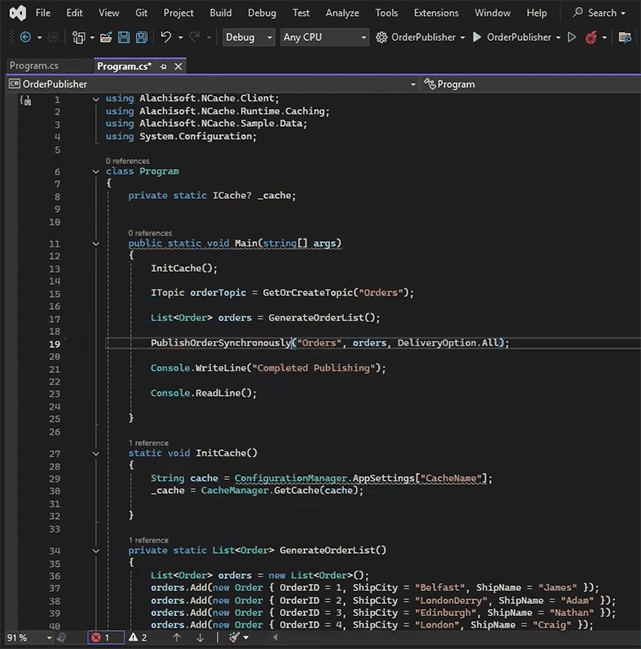
So you can see in my, in my order publisher, I have a couple of methods here. So this one publish order asynchronously. Of course we create our topic object. You register the message delivery failure, and then we iterate over all of our orders and publish them as messages. So the expiration of this message is set to 15 seconds.
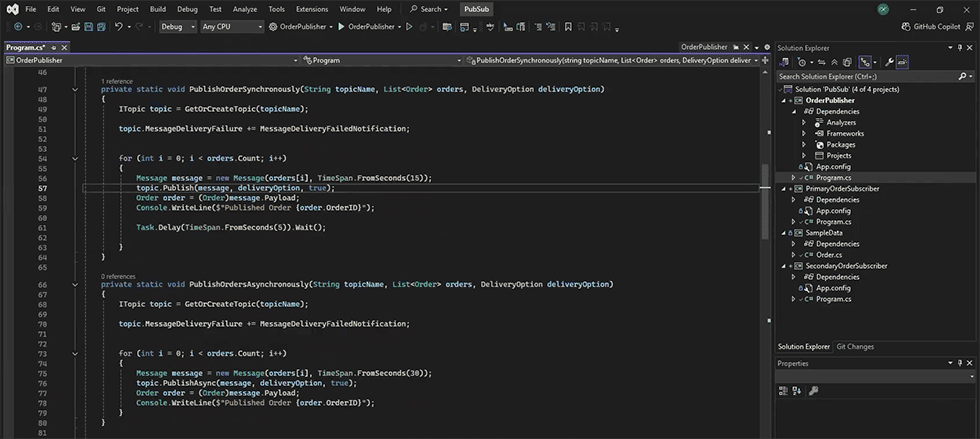
And my delivery options, in this case are set to all subscribers. Okay. And once each message is delivered, you can see I've added a delay of five seconds just for the demo purposes. And it should output each order after it sends it. So there's also the async option over here. It just call the publish async method instead. And then we have the bulk publish orders as well. Okay. So this is what my message delivery failure notification looks like. You can see it just outputs this log message "Failed to send order ID" and then it sends the order details as well, okay. So what I'm going to do is, I'm going to run this application right now without running a subscriber.
But before we do that, let us take a look at our NCache cache cluster. So I already have a cache created over here with the name of demoCache. This is a single server node. There's only one server attached to it and this is deployed on a Docker instance. So I just want to check my stats, make sure there's no data in here. Perfect. Okay. The cache is up and running. I can run my application now. I just want to try and minimize this so I can show the stats side by side.
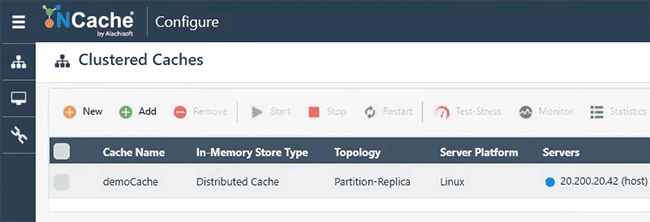
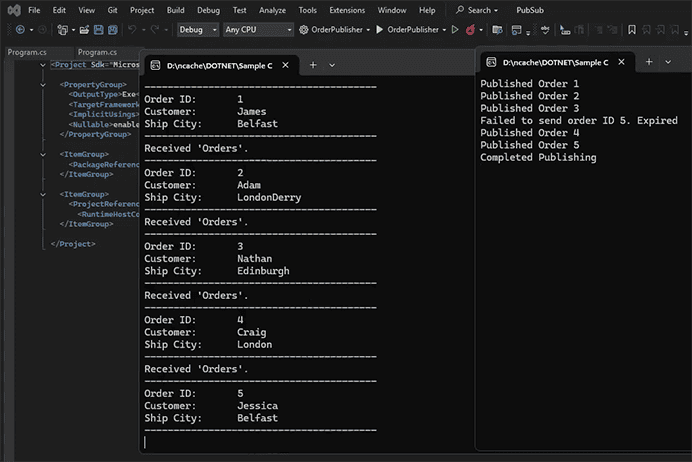
So let's run the publisher. And I'll explain what I expect to see right now, since we have no subscriber application running, it's going to create a topic in our cache. So let's first see the client is connected. It's created a topic and now it's publishing the orders one by one synchronously. And you can see the cache size is also increasing because the topic is stored inside your cache.
And since there's no subscriber application actually listening for these orders, I expect for the publisher to be notified of the message failure. So you can see it's failed to send order ID number one, just because the messages have expired. And I expect to do the same for all five of the orders. So, yeah, it's failed to send the orders. I'm just going to close this to save us some time.
Create Subscription for a Topic
The next demo I want to do is to run the subscriber application first, and then we'll run the publisher. Okay. So before we do that, let me show you what the code over here looks like. You can see I first initialize the cache here. We're getting our orders topic. We create a durable subscription with the name of order subscription. But this is just my private method. It's not the actual API call.
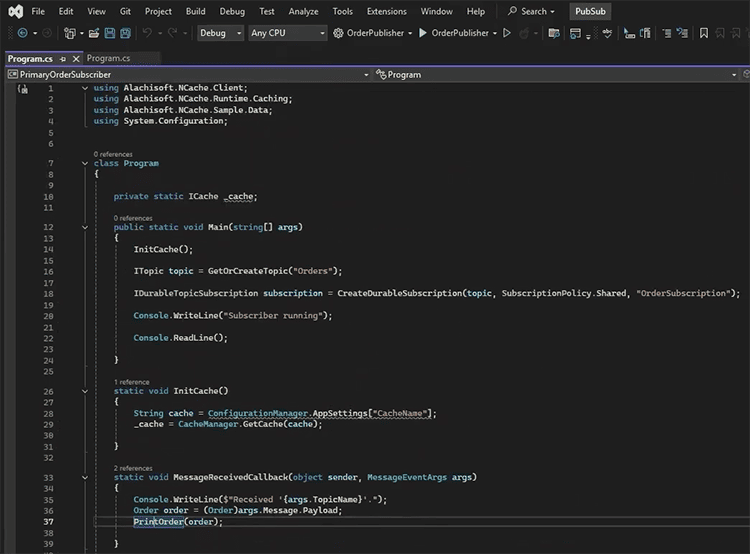
This is what the API call looks like. Okay. So we're passing in the subscription name. The policy, which I believe in this case is, shared. So you can have multiple subscribers. And we're passing in the message received callback and a time span of one hours. So the callback is simply this is what it looks like just outputs, received order and it prints the order details, as you can see here. So I'm going to run this application now, which should create my subscription. Okay. So once that is created I'm going to then run my publisher application and we'll see how this behaves.
So there's my subscriber. There's my publisher. So your order ID number one published and you can see our subscriber is receiving all the orders. And what you notice is since we were using synchronous publishing, and our subscriber application is also processing synchronously because that's what it does by default. You can see it's receiving everything in order. I believe this failed to send order ID number five is from the previous message. Since I shut down the application before I could actually send that. So we're just going to ignore that for now. But you can see everything is in order.
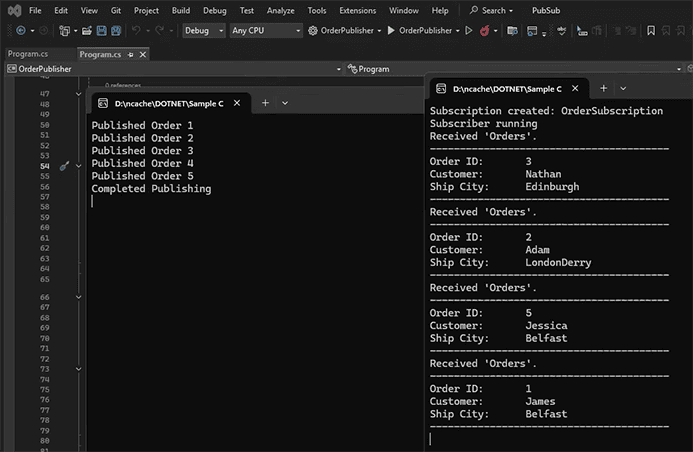
And let's try to publish our messages asynchronously now and see how this, differs in behavior. So I'm just going to change this method call to async. And I believe the parameters should be the same. I'm going to change the expiry time over here to 60 seconds just so we can, ignore the buffer delay. But what I'm going to do now is show you the difference of asynchronous and synchronous. So we'll run our subscriber application. Just make sure everything is closed. Yeah. And once that is up and running, we'll run the publisher. And what I expect to see now is obviously the subscriber application receiving all the orders. But it's not going to be in sequence. So, you can see all of our orders have been published, and, we were receiving our orders, but it is we received ordered item number three, then receive number two, and then we receive number five. And then finally we receive number five and number one. So it's not in sequence, and that's sort of the difference between async and synchronous.
So of course on the subscriber side of things let me just quickly show you. We did select synchronous mode for order processing but to make sure it fully works 100%, you need to have it sync in both your subscriber and your publisher. So this one you can see here it selects delivery mode sync by default. You need to pass this in as an extra parameter to change it from, synchronous to asynchronous. Okay.
Durable Subscriptions
So let's try something else. We're gonna see the difference between durable and non-durable subscriptions. So I'll show you first for durable subscriptions how it retains messages even if the application goes offline. Okay. So let me make sure everything is closed first. And we're going to create a durable subscription. We're going to run this application first and see. And now for publishing I'm going to change this back to synchronous for the demo. Excuse my spellings. So we're going to publish our order synchronously, and I'm going to change the expiry time to 60 seconds to avoid the buffer delay. And let's run this now. So while my publisher is publishing messages, I'm going to shut this subscriber application midway, bring it back online and see how it behaves.
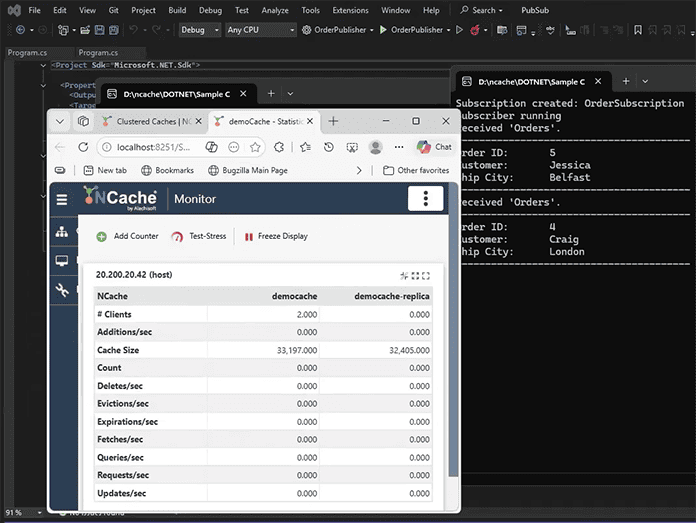
So both of them are running now. Order number one was received I'm going to shut it down. It's going to continue to publish all the orders to the topic. And I'm going to bring back the subscriber now. So keep in mind it's not going to actually create a new subscription. Since it's durable, it's just going to get back the one that currently exists. So you can see a couple of orders were published while my application was offline, and it's still able to receive them. We received already number five, and I expect it to receive three and four as well and maybe two. So order number four has been received as well. Let's quickly open our cache stats side by side as well. You can see two clients are connected. One is the subscriber application, one is the publisher. And hopefully we're able to receive the messages, before they actually expire, that's why I set a time of 60 seconds. So, should be just any second now. Of course, hopefully the messages don't actually expire. And that's order number three. Okay. Perfect.
Non-Durable Subscriptions
So I'm going to shut this down now and what we're going to do is we're going to see how the non-durable subscriptions behave in the exact same situation. So let me first show you the code for the non-durable subscription. You can see we get our create our orders topic. And then we call the create subscription method and just pass in the callback. So this is going to create a non-durable subscription.
ITopic topic = cache.MessagingService.GetTopic(topicName);
// Create and register subscribers for the given topic
 // Message received callback has to be passed
ITopicSubscription subscription = topic.CreateSubscription(MessageReceivedCallback);


 // Used to notify the Subscriber when it receives a message
 private static void MessageReceivedCallback(object sender, MessageEventArgs args) {
      Console.WriteLine("Message received for topic " + args.TopicName);
  }
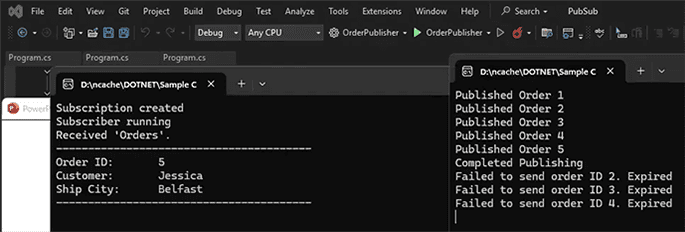
And I'm going to run this right now. And once this is running I'm going to start the publisher application. So it's up and running. It's going to receive the orders. I'm going to just shut this down, wait for a couple of orders to be published, and then we're going to rerun the subscriber. So let's rerun this now. And you can see, I think it was ordered three and four that was published while the application was offline. And it's not going to be able to receive them. Order number five it received while it was up and running. So that's why you can see it being displayed. But clearly it is not going to receive any of the other orders because those messages were lost. So I'll just, for the demo purpose, I'm going to wait for maybe ten more seconds, to show you that it does not retain the message.
Ordered Messages (Publisher's side)
So while that is happening, let me also show you how you can ensure ordered messages as well. So I explained earlier, you need to ensure your publisher is sending messages, synchronously and then you can also use a subscriber to process messages synchronously. NCache offers another feature on top of this. You can provide a sequence name along with the publish method call, and this ensures that a certain batch of your messages, are delivered in sequence. Okay. So in this piece of code, you can see here, we create a message and we publish the message with this sequence name. And we do this for the whole batch of messages. So this would ensure, of course, ordered messages as well.
ITopic topic = cache.MessagingService.GetTopic(topicName);
for (int i = 0; i < 30; i++) {
    Order order = FetchAnyOrderFromDB();
    Message message = new Message(order);

    // Specify a unique sequence name for the messages
    string sequenceName = "OrderMessages";

    // Publish message with the sequence name
    topic.Publish(message, DeliveryOption.All, sequenceName, true);
    }
Ordered Messages (Subscriber's side)
And on the subscriber side of things, I showed you earlier as well, you have to pass in delivery mode, as an additional parameter to select synchronous or asynchronous delivery mode. Okay.
ITopic topic = cache.MessagingService.GetTopic(topicName);

    // Create and register subscribers for Topic
    // Message received callback is specified
    // DeliveryMode is set to async to ensure ordered messages
    ITopicSubscription subscription = topic.CreateSubscription(MessageReceived, DeliveryMode.Sync);
So going back to the orders output, you can see the messages have expired. It's not able to receive them. So everything is pretty much working as expected.
Schedule a Demo
Guys that is it for the demo. I hope you enjoyed this video. If you want to learn more about NCache, its features, and how you can incorporate into your application, please contact us to schedule a demo. Thank you very much for watching this video.