Efficient session management is essential for providing a seamless and scalable user experience in ASP.NET Core applications. Nevertheless, traditional in-memory storage in sessions can lead to performance bottlenecks, especially in distributed environments where multiple servers need to access session data. By utilizing IDistributedCache, developers can integrate a distributed caching solution like NCache to optimize ASP.NET Core sessions, guaranteeing high availability, faster data retrieval, and improved application scalability.
Key Takeaways
Overcoming Session Volatility: Utilizing NCache as an IDistributedCache provider ensures that session data persists across server restarts and node failures, preventing the data loss common with traditional in-memory storage.
Linear Scalability in Web Farms: By moving sessions to a distributed cache, applications can scale horizontally across multiple servers without being restricted by “sticky sessions” or localized server memory.
Reduced Database Latency: NCache eliminates the performance bottlenecks associated with database-backed session storage by providing low-latency, in-memory data retrieval for session-heavy applications.
Simplified Implementation: The integration requires minimal code changes, as it utilizes the standard ASP.NET Core IDistributedCache interface and a single AddNCacheDistributedCache service registration in Program.cs.
Challenges of Session Storage in ASP.NET Core
ASP.NET Core utilizes ISession for session management, which traditionally relies on either an in-memory storage or a database. However, both approaches present challenges that can impact performance and scalability:
- Limited Scalability: In-memory session storage struggles in multi-server environments as sessions are not shared across instances.
- Database Overhead: Storing session data in a database increases latency and database load, reducing application responsiveness.
- Session Volatility: In-memory sessions are prone to lost when the server restarts, causing potential disruptions for users.
The following table provides a direct comparison of how different session storage providers handle the trade-offs between speed, data safety, and horizontal growth:
| Feature / Provider | In-Memory | SQL Server | NCache |
|---|---|---|---|
| Scalability | Limited (Single Server) | Moderate | Linear (Distributed) |
| Performance | High | Low (I/O Bound) | Extreme (In-Memory) |
| Persistence | No (Lost on Restart) | Yes | Yes (Replicated) |
Benefits of NCache IDistributedCache Provider for Session Storage
NCache, as an IDistributedCache provider for ASP.NET Core session storage, offers a range of advanced features that improve performance, reliability, and scalability:
- Sub-millisecond Latency: Utilizes in-memory caching to deliver low-latency session access, boosting application responsiveness.
- Session Persistence: session data across server restarts, mitigating data loss and enhancing user experience.
- Seamless Scalability: Distributes session storage dynamically across multiple application instances to support high-traffic workloads.
- High Availability & Failover Support: Ensures continuous session access through replication and failover mechanisms, preventing session inconsistencies.
- Intelligent DataSerialization: Features dynamic compact serialization for optimal session storage and retrieval without performance degradation.
By leveraging these features, NCache enables ASP.NET Core applications to achieve robust, efficient, and scalable session management, making it ideal for enterprise-level deployments.
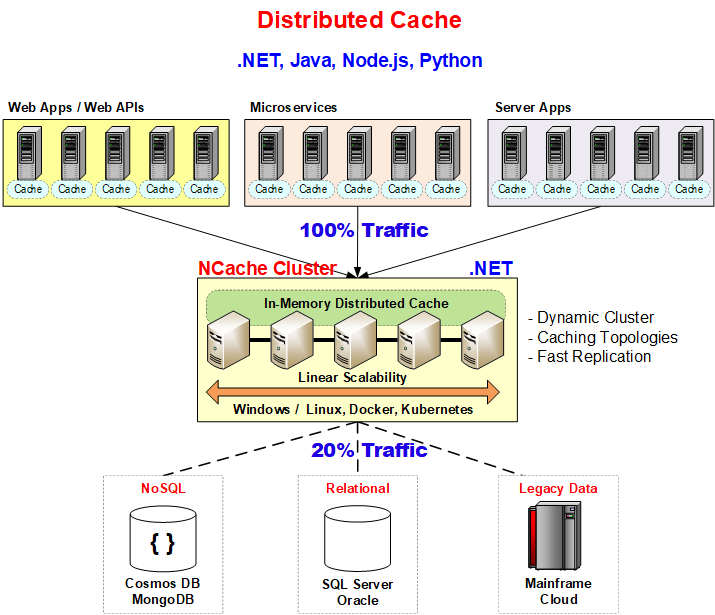
Figure 1: NCache Distributed Caching Architecture.
Configuring NCache as the IDistributedCache Provider
To enable distributed session storage using NCache, follow these steps:
- Install the NCache NuGet Package
Run the following command to add NCache to your project:
|
1 |
Install-Package NCache.Microsoft.Extensions.Caching –Version x.x.x |
- Configure NCache in Program.cs
Modify your Program.cs file to register NCache as the session provider:
|
1 2 3 4 5 6 7 8 9 10 11 12 13 |
var builder = WebApplication.CreateBuilder(args); builder.Services.AddNCacheDistributedCache(options => { options.CacheName = "demoCache"; }); builder.Services.AddSession(); var app = builder.Build(); app.UseSession(); app.MapControllers(); app.Run(); |
AddNCacheDistributedCache, ensure the CacheName matches the ID configured in your NCache Web Manager. For production environments, consider using the NCacheConfiguration section in your appsettings.json for better environment management.Using Distributed Sessions in Controllers
Once configured, you can use ASP.NET Core sessions as follows:
|
1 2 3 4 5 6 7 8 9 10 11 12 13 14 |
public class HomeController : Controller { public IActionResult Index() { // Store data in session HttpContext.Session.SetString("User", "JohnDoe"); // Retrieve session data string? user = HttpContext.Session.GetString("User"); ViewBag.User = user; return View(); } } |
Caching Complex Objects in Session
If you need to store complex objects in session, serialize them before storing:
|
1 2 3 4 5 6 7 8 9 10 11 12 |
public async Task<IActionResult> CacheProduct() { string cacheKey = "product"; Product product = new Product { Id = 1, Name = "Laptop", Price = 1200 }; var options = new DistributedCacheEntryOptions().SetSlidingExpiration(TimeSpan.FromMinutes(10)); byte[] productBytes = Encoding.UTF8.GetBytes(JsonSerializer.Serialize(product)); await HttpContext.Session.SetAsync(cacheKey, productBytes, options); return View(product); } |
Conclusion
By integrating NCache with ASP.NET Core’s IDistributedCache interface, developers can optimize session management for high-performance applications. This approach guarantees data persistence, reduces database load, and enhances application scalability. By implementing these strategies, you can ensure uninterrupted user sessions even in distributed environments, resulting in a more efficient and reliable application.
For further details, refer to:
Frequently Asked Questions (FAQ)
Q: How does NCache resolve the “Session Volatility” challenge mentioned in the article?
A: Traditional in-memory sessions are lost when a server restarts. As the article explains, NCache provides Session Persistence by storing data across a distributed cluster, ensuring user sessions remain uninterrupted even during server reboots or failures.
Q: Can I use the standard ASP.NET Core ISession interface with NCache?
A: Yes. The article demonstrates that by registering NCache as the IDistributedCache provider in Program.cs, you can continue using the standard HttpContext.Session API to store and retrieve data without changing your controller logic.
Q: What is the recommended way to handle complex objects in NCache sessions?
A: As shown in the “Caching Complex Objects” section of the article, complex objects should be serialized into a byte array (using JsonSerializer) before being stored via the SetAsync method.
Q: Why is NCache more scalable than the traditional database-backed session storage described?
A: The article notes that database storage increases latency and load. NCache provides Seamless Scalability (Linear Scalability) by dynamically distributing session storage across multiple nodes, removing the I/O bottlenecks associated with traditional databases.