Azure Cosmos DB is the new NoSQL cloud-based database solution that has gained a lot of popularity in recent times. Everyone knows that using caching with Cosmos DB boosts application performance and optimizes transaction costs by reducing trips to the database.
However, caching Cosmos DB data in a distributed cache can lead to the creation of two copies of this data, one in the database and one in the cache. If any application that does not have access to your cache directly changes this data in Cosmos DB, your cache is not aware of it. This results in your cache having an older copy of the data as compared to the database.
This stale data is a major problem in high-transaction, multi-environment applications where working with outdated data leaves a big mark on the performance. In this blog, I’ll discuss how you can continue using caching and still avoid this “stale data” problem.
Key Takeaways
Real-Time Data Consistency: NCache leverages the Azure Cosmos DB Change Feed via the NotifyExtensibleDependency feature to automatically synchronize data, ensuring the distributed cache never serves stale information.
80% Reduction in RU Costs: By offloading frequent read requests from the database to an in-memory cache, organizations can drastically reduce Azure Cosmos DB Request Unit (RU) consumption and operational expenses.
Sub-Millisecond Latency: Implementing a Read-Through Provider allows NCache to automatically fetch and store missing items directly from Cosmos DB, maintaining ultra-fast application response times.
Automated .NET Integration: Native support for the Cosmos DB SQL API centralizes synchronization logic at the cache level, eliminating the need for complex, manual cache-invalidation code in the application layer.
How to Synchronize NCache with Azure Cosmos DB for Data Consistency?
NCache is a very powerful distributed caching solution with an abundant set of powerful features. Just like any distributed cache, NCache sits between the database and the application itself and caches the data from the database to be used by the application; thus, reducing the read/write time exponentially. By offloading repeat read requests from the database to NCache, organizations can reduce Request Unit (RU) consumption by up to 80%, preventing performance bottlenecks during peak traffic. It also solves the problem of stale data (discussed earlier) by a feature known as NotifyExtensibleDependency.
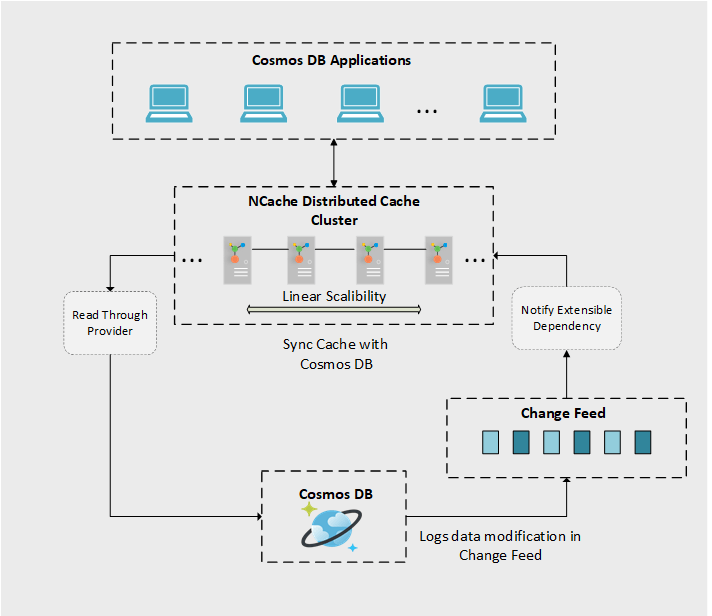
Figure 1: NCache and Azure Cosmos DB Synchronization Workflow.
Through NotifyExtensibleDependency, you can write your own custom data dependency logic in which a notification from a database (Cosmos DB in this case) is processed by NCache by making use of the Change Feed mechanism of Cosmos DB.
Any modification in the Cosmos DB can be captured using the Cosmos DB Change Feed processor logic that is integrated into the NotifyExtensibleDependency code. This is how the event handling mechanism can be used to enforce cache invalidation in response to modifications in the database content, thus ensuring that stale data does not persist in the cache.
You also have the option of using the ReadThru provider feature of NCache to further improve the performance of your Cosmos DB application. Through this feature, you can enable the cache to directly look into the database for items that don’t exist in the cache. Not only does the cache look for the requested items in the database (Cosmos DB), but also stores the requested items inside the cache upon successful discovery.
To understand the advantages of an automated synchronization provider over manual cache management, consider the following comparison:
| Feature | Manual Cache-Aside | NCache Sync (Change Feed) |
|---|---|---|
| Data Consistency | Eventual: High risk of “stale data” if DB is updated externally. | Strong/Real-Time: Cache is updated immediately via Cosmos DB Change Feed. |
| Performance Impact | Variable: Frequent “Cache Misses” lead to high DB latency. | Predictable: Near 100% cache hit rate for read-heavy workloads. |
| Cost Efficiency | Expensive: High Request Unit (RU) consumption due to repeat DB reads. | Cost-Effective: Drastically reduces RU consumption by serving data from memory. |
| Implementation | Complex: Requires custom logic in every application instance. | Simplified: Centralized provider-based synchronization at the cache level. |
| Automation | Manual: Developers must write code to invalidate or update cache. | Automated: NCache monitors the database and handles updates natively. |
NCache Details NotifiyExtensibleDependency Read Through Caching
Sync Cache with Cosmos DB: A Quick Example
For example, you are using Cosmos DB as a database for your E-Commerce store and cache frequently used data in NCache. Your store contains tens of thousands of products and on average a million transactions take place daily. NCache helps you with reducing the load on your Cosmos Database, but there is a chance that the data in the cache is going stale. As discussed above, NCache solves this problem by its NotifyExtensibleDependency feature that ensures optimal functionality of your E-Commerce store.
The following code example demonstrates the usage of the NotifyExtensibleDependency feature. In this example, a product is loaded from the database based on its ID. Then NotifyExtensibleDependency is created and registered against the fetched product. Finally, the product, in the form of CacheItem is inserted into the cache with the key specified.
Also, the CosmosDbNotificationDependency is the name of the provider which has been deployed on your cache. This provider implements the ICustomDependencyProvider interface.
|
1 2 3 4 5 6 7 8 9 10 11 12 13 14 15 16 17 18 19 20 21 22 23 |
Product product = LoadProductFromDatabase(productId); string providerName = "CosmosDbNotificationDependency"; //This is the name of your provider deployed on cache server string key = "Product#" + product.Id ; IDictionary<string, string> parameters = new Dictionary<string, string>(); parameters.Add("Key", key); parameters.Add("CacheId", "myCache"); parameters.Add("EndPoint", ""); parameters.Add("AuthKey", ""); parameters.Add("DatabaseName", "demoDatabase"); parameters.Add("MonitoredCollection", "Customers"); parameters.Add("LeaseEndPoint", ""); parameters.Add("LeaseAuthKey", ""); parameters.Add("LeaseDatabaseName", "demoDatabase"); parameters.Add("LeaseCollection", "leases"); CacheItem item = new CacheItem(product); item.Dependency = new CustomDependency(providerName, parameters); _cache.Insert(key, item); |
For further details related to the implementation, you can check out our GitHub repository.
NCache Details NotifiyExtensibleDependency Cache Operations in NCache
Using NCache Read-Through Provider with Cosmos DB for Automatic Loading
The Read-Through feature of NCache (as the name suggests) enables you to read through the cache directly into your database (Cosmos DB) when items are not found in the cache. This feature basically saves you the hassle of looking in the database for items yourself when those requested items are not found in the cache. Through this feature, not only does NCache read your database for the requested items, but also inserts them in the cache for you for quick retrievals in the future.
The following code example retrieves an item with read-through enabled, corresponding to the specified key “Product:1001” using the Get<> method.
|
1 2 3 4 5 6 7 8 9 |
// Specify the key of the item string key = "Product:1001"; // Specify the readThruOptions for read through operations var readThruOptions = new ReadThruOptions(); readThruOptions.Mode = ReadMode.ReadThru; // Retrieve the data of the corresponding item with reads thru enabled Product data = cache.Get(key, readThruOptions); |
NCache Details Read Through Caching Cache Operations in NCache
Conclusion
To sum up, NCache offers a flexible solution for synchronizing data between Cosmos DB and the cache, thereby avoiding data inconsistency. NCache, an in-memory distributed caching solution, can be an ideal medium for Cosmos DB to maintain up-to-date data for easier access and processing.
NCache Details Download NCache Cloud Deployment Options for NCache
Frequently Asked Questions (FAQ)
Q: How does NCache ensure data consistency with Azure Cosmos DB?
A: NCache ensures real-time data consistency by leveraging the Cosmos DB Change Feed. Through the NotifyExtensibleDependency feature, NCache acts as a listener to the database; whenever a document is inserted, updated, or deleted in Cosmos DB, NCache automatically synchronizes the change, preventing stale data in the distributed cache.
Q: Can NCache reduce Azure Cosmos DB Request Unit (RU) costs?
A: Yes. By serving frequently accessed data from an In-Memory Distributed Cache, NCache offloads repeat read requests from the database. This can reduce Request Unit (RU) consumption by up to 80%, significantly lowering operational costs and preventing performance bottlenecks during peak traffic periods.
Q: Does NCache support the Cosmos DB SQL API?
A: NCache provides native integration for the Cosmos DB SQL API. By implementing the ICosmosDbSyncProvider interface, developers can create a seamless link between their .NET applications and the Cosmos DB SQL container for automated synchronization.
Q: What is the benefit of using a Read-Through Provider with Cosmos DB?
A: The Read-Through Provider allows NCache to communicate directly with Cosmos DB. If a “cache miss” occurs, NCache automatically fetches the missing item from the database and stores it in the cache for future requests. This centralizes data access logic and improves application latency by ensuring the cache is always populated with the most requested data.
Q: Is the synchronization between NCache and Cosmos DB real-time?
A: Synchronization is near real-time. Because NCache utilizes the push-based Change Feed Processor mechanism rather than a pull-based polling interval, updates are typically reflected in the cache within milliseconds of the commit to the Cosmos DB container.