Real-time web applications require efficient communication between clients and servers. ASP.NET Core SignalR simplifies this communication by enabling real-time messaging. It is widely used in chat applications, collaborative editing tools, stock trading platforms, live sports updates, and IoT dashboards, where instant data updates are critical for a smooth user experience.
However, in a scenario where thousands of users are interacting in a chatroom or monitoring real-time analytics, a single server will struggle with connection management and data distribution. To overcome this bottleneck SignalR backplane is used to synchronize messages between them. This is where NCache comes in as a high-performance, distributed caching solution that ensures seamless scalability and real-time message delivery across a web farm.
Key Takeaways
Scaling Limitation: ASP.NET Core SignalR requires a backplane to handle connections across multiple servers.
The Solution: NCache serves as an in-memory distributed backplane to synchronize messages with ultra-low latency.
Benefits: NCache eliminates connection affinity issues, prevents message loss, and ensures linear scalability.
Implementation: Easy setup via NuGet packages and simple appsettings.json configuration.
What are the Challenges of Scaling SignalR with ASP.NET Core?
SignalR operates efficiently in a single-server environment, managing connections and real-time message delivery efficiently. However, when applications scale out across multiple servers, several challenges arise, some of which are described below:
- Connection Affinity Issues – SignalR uses WebSockets or other transport mechanisms to establish persistent connections. In a multi-server environment, load balancers may distribute clients across different servers, causing message synchronization issues.
- Message Loss and Inconsistency – A client connected to one server may not receive messages sent from another server since SignalR does not natively synchronize messages between multiple servers.
- Increased Latency – Without a backplane, servers have to handle messaging independently, which can lead to delays and put unnecessary strain on them.
- Performance Bottlenecks with Traditional Solutions – While SQL Server has been used as a backplane, but it introduces significant latency and struggles with high message volumes, making it an unsuitable option for real-time applications.
A distributed backplane ensures real-time message synchronization across multiple servers. Instead of each server managing its own connections, the backplane creates a shared communication channel, ensuring all connected clients receive message updates instantly. This minimizes latency, prevents message loss, and supports horizontal scalability. For high-frequency applications like financial trading and multiplayer gaming, a distributed backplane is essential for delivering consistent and reliable performance.
Why Use NCache as a SignalR Backplane?
NCache is an in-memory distributed caching solution that ensures real-time message synchronization across multiple SignalR servers. Using NCache as a distributed backplane allows web applications to scale horizontally without sacrificing real-time communication, availability, or performance.
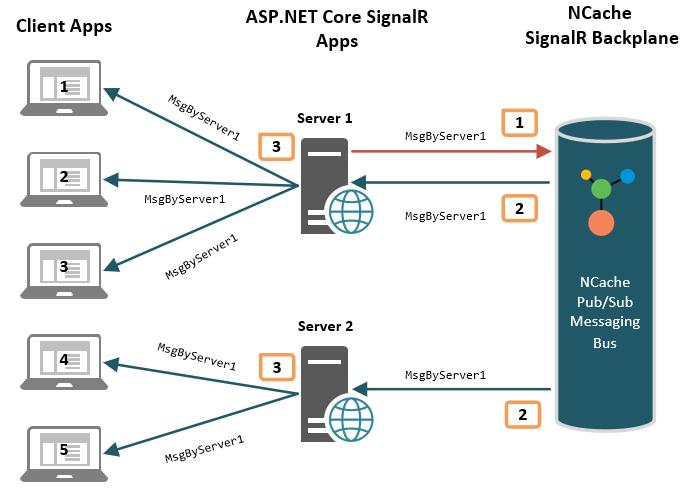
Figure 1: Architecture of NCache as a SignalR Backplane
The following characteristics of NCache makes it an ideal choice to be used as a backplane:
- Highly Performant & Scalable – NCache scales linearly, allowing seamless expansion as demand increases, while its in-memory architecture ensures ultra-low latency leading to improved performance.
- Reliable & Efficient Data Replication – For mission-critical applications like financial trading, NCache replicates data across multiple nodes to ensure resilience and prevent data loss during server failures.
- Native .NET Support – Fully compatible with .NET applications, making it a natural fit for ASP.NET Core SignalR.
- Real-Time Pub/Sub Messaging – Provides robust publish/subscribe capabilities for efficient message broadcasting across web servers.
- Optimized for SignalR Groups & Users – Supports seamless messaging to groups and targeted user connections.
- Persistent Connections & Two-Way Invocation – Maintains active connections and enables two-way method invocation between clients and servers.
- Reliable Message Transport – Combines a built-in transport layer with guaranteed message delivery, ensuring seamless and consistent communication across all connected clients.
By integrating NCache as a backplane, SignalR applications achieve real-time scalability with minimal configuration, delivering a responsive and seamless user experience.
How to Configure NCache as a SignalR Backplane
Integrating NCache with your ASP.NET Core SignalR application is straightforward and requires minimal code changes. Follow these steps to configure NCache as a SignalR backplane:
1. Install the NCache SignalR NuGet Package
Add the NCache SignalR package to your project using the following command:
|
1 |
Install-Package Alachisoft.NCache.SignalR |
2. Modify appsettings.json
Define your NCache configuration settings in appsettings.json:
|
1 2 3 4 |
{ "Cache": "demoCache" "EventKey": "Chat" } |
3. Register NCache as a SignalR Backplane
Modify Startup.cs to configure SignalR to use NCache as a backplane:
|
1 2 3 4 5 6 7 8 9 10 11 12 13 14 15 16 17 18 |
using Alachisoft.NCache.SignalR; using Microsoft.AspNetCore.SignalR; using Microsoft.Extensions.Configuration; public class Startup { public void ConfigureServices(IServiceCollection services) { string cache = Configuration["Cache"]; string eventKey = Configuration["EventKey"]; // Register SignalR services services.AddSignalR() // Configure NCache as the distributed backplane using settings from appsettings.json .AddNCache(cache, eventKey); } } |
4. Deploy and Scale
Once configured, deploy your application across multiple web servers, and NCache will automatically handle message synchronization between them.
Performance Benefits of NCache as a SignalR Backplane
Using NCache provides several performance advantages over other backplane solutions:
| Feature | NCache | SQL Server |
| Scalability | Linear scaling | Limited scaling |
| Latency | Low latency | High latency |
| Reliability | High availability | Prone to bottlenecks |
| Native .NET Support | Yes | Yes |
As shown in the table above, NCache eliminates the database bottlenecks associated with SQL Server backplanes by utilizing in-memory architecture to achieve linear scalability and lower latency.
Conclusion
To handle high traffic and ensure smooth real-time messaging across multiple servers, scaling ASP.NET Core SignalR applications efficiently is essential. NCache provides a fast, scalable, and reliable backplane eliminating bottlenecks and boosts overall performance.
By integrating NCache as a SignalR backplane, developers can achieve real-time messaging at scale with minimal configuration changes. Whether you’re building a chat application, financial trading platform, or collaborative tool, NCache ensures a seamless and highly responsive experience for your users.
For more details, refer to the official NCache documentation.
Frequently Asked Questions (FAQ)
Q: Why is a backplane necessary for scaling ASP.NET Core SignalR?
A: In a multi-server environment, a client connected to one server cannot receive messages sent from another server. A backplane acts as a centralized message bus to synchronize these messages across all servers, ensuring clients receive updates regardless of which server they are connected to.
Q: How does NCache compare to SQL Server as a SignalR backplane?
A:While SQL Server can function as a backplane, it often acts as a bottleneck due to higher latency and slower data retrieval. NCache is an in-memory distributed cache, offering linear scalability, higher reliability, and significantly lower latency for real-time messaging.
Q: Does NCache support messaging to specific SignalR Groups and Users?
A: Yes, NCache is optimized for SignalR to support seamless message broadcasting to specific groups as well as targeted connections to individual users.
Q: What configuration changes are needed to use NCache with SignalR?
A: Integration is minimal. You simply install the Alachisoft.NCache.SignalR NuGet package, define the cache name in appsettings.json, and register NCache in the Startup.cs file using the AddNCache() method.
Q: Does NCache handle connection affinity issues?
A: Yes. In a web farm where load balancers distribute clients across different servers, NCache resolves connection affinity issues by creating a shared communication channel that guarantees message delivery across the entire cluster.