Whenever we talk about providing ease of access and manipulation of objects, the subject of Object Relational Mappers (ORMs) is bound to come up. ORMs such as Entity Framework Core and NHibernate help in managing efficient mapping of Plain Old CLR Object (POCO) instances to database information, managing associations, constraints, etc.
However, using code-to-SQL functionality can lead to performance lag and even degradation, the most common cause being the N+1 problem. The folks over at StackExchange were not happy with the performance of ORMs for their infrastructure needs and came up with Dapper, a micro-ORM lightweight wrapper around ADO.NET that is extremely fast and makes object mapping to database models very easy and intuitive.
NCache Details Object-Relational Mapping Dapper
Key Takeaways
Sub-Millisecond Performance: Combining Dapper Micro-ORM with NCache eliminates database bottlenecks by replacing direct SQL roundtrips with high-speed, in-memory data access.
Automated Data Sync: Using NCache Read-Through and Write-Through providers ensures that your Dapper application stays synchronized with the database without requiring manual cache management code.
Reduced Application Overhead: Offloading data retrieval and persistence tasks to NCache “spares” the client application, significantly lowering CPU and memory consumption on the application server.
Linear Scalability: Integrating a distributed cache cluster allows Dapper-based applications to scale linearly, adding more cache nodes to handle increasing transaction volumes effortlessly.
How to Integrate Dapper Micro-ORM with NCache
Dapper is mainly a set of extension methods on the IDbConnection class and provides a façade over the often-complicated ADO.NET operations. That is a major reason for its lightweight nature and high speed. However, where you want to ensure that the data stays in memory to avoid roundtrips to the database, use NCache.
How NCache Enhances Dapper Performance and Scalability
| Feature | Dapper (Standard) | Dapper + NCache |
|---|---|---|
| Data Retrieval | Direct Database I/O (SQL) | Distributed In-Memory Speed |
| Scalability | Bound by Database Connection Pool | Linearly Scalable Cluster Nodes |
| Data Freshness | Always Live (Direct DB Query) | Automated via Sync Providers |
| Architecture | Simple 2-Tier (App to DB) | Scalable 3-Tier (App to Cache to DB) |
With a distributed cache like NCache, you can tune up the performance even more using datasource providers as shown in the figure below:
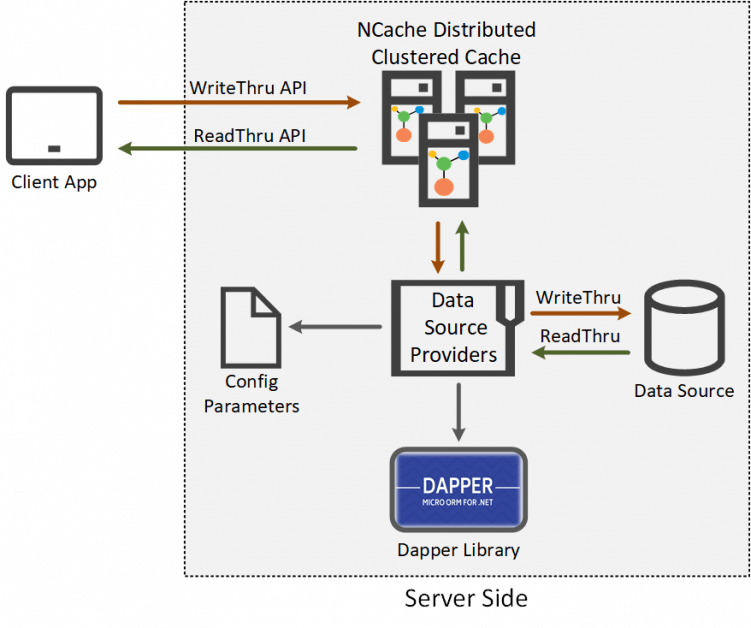
Figure 1: Dapper Micro-ORM Integration with NCache Data Source Providers
NCache Details Datasource Providers Datasource with Dapper
Implementing Third-Party Dapper with NCache Datasource Providers
Datasource Providers are the best solution whenever back-end master data source needs to be accessed for read and write purposes. These providers offload Dapper operations over to the server side.
Let’s see how my application caters Dapper libraries with Datasource Providers.
Implementing this simple Read-Through provider with Dapper libraries to read data directly from the data source using NCache and caching the results improves your application’s performance.
|
1 2 3 4 5 6 7 8 9 10 11 12 13 14 15 |
public ProviderCacheItem LoadFromSource(string key) { var customerId = key.Replace("Customer:CustomerID:", "").Trim(); var commandDefinition = new CommandDefinition($@" SELECT * FROM dbo.Customers WHERE CustomerID = @cId", new { cid = customerId }, flags: CommandFlags.NoCache); var customer = Connection.Query<Customer>(commandDefinition).FirstOrDefault(); var providerCacheItem = new ProviderCacheItem(customer) { Dependency = GetCustomerSqlDependency(customerId), ResyncOptions = new ResyncOptions(true) }; return providerCacheItem; } |
NCache Details Datasource Providers Datasource with Dapper
Similarly, to write the data directly to the datastore, NCache provides a Write-Through provider that takes the data from you and write it in the datastore while keeping a cached copy.
|
1 2 3 4 5 6 7 8 9 10 11 12 13 14 15 16 17 18 19 20 21 22 23 24 25 26 27 28 29 |
public OperationResult WriteToDataSource(WriteOperation operation) { Customer customer = null; if (operation.OperationType == WriteOperationType.Add || operation.OperationType == WriteOperationType.Update) { customer = operation.ProviderItem.GetValue<Customer>(); } if (operation.OperationType == WriteOperationType.Add) { var commandDefinition = new CommandDefinition(// INSERT sql command for customer data with customer id , customer, flags: CommandFlags.NoCache); Connection.Execute(commandDefinition); } else if (operation.OperationType == WriteOperationType.Update) { var commandDefinition = new CommandDefinition(// UPDATE sql command for customer data with customer id, customer, flags: CommandFlags.NoCache); Connection.Execute(commandDefinition); } else if (operation.OperationType == WriteOperationType.Delete) { var customerId = operation.Key.Replace("Customer:CustomerID:", "").Trim(); var commandDefinition = new CommandDefinition(// delete sql script for given customer id , new { cId = customerId }, flags: CommandFlags.NoCache); Connection.Execute(commandDefinition); } } |
NCache Details Datasource Providers Datasource with Dapper
You can find this detailed solution where NCache uses Dapper libraries to populate and read a datastore on GitHub.
I’m going to list down the benefits I noticed with the NCache-Dapper collaboration.
Benefit # 1: Automating Data Synchronization via Datasource Providers
To avoid keeping stale data in the cache, Datasource Providers together with database dependency features ensure the synchronization of the cached data and data in the database. All operations to resync the cache are done on the server side without any client involvement.
Benefit # 2: Reducing Client-Side Overhead with NCache Providers
Let’s say you want to make changes to your datastore: any schema updates, table variations, even if you change the entire datastore altogether, here’s how NCache simplifies the process for you. With NCache Datasource Providers you need not change your client application, updating the Datasource implementation would suffice.
Benefit # 3: Scaling Dapper Query Results with NCache Distributed Clusters
If your application runs in an environment where multiple instances of the application are running behind a load balancer (e.g. server farms, Kubernetes clusters) that share the cache, then this is what NCache does: If one of the instances queries the data source, the result gets stored in the distributed cache so when other instances query for the same result, they get it straight from the cache without having to make a roundtrip to the data source.
This reduces the hits to your database and, being scalable, NCache can cater to an increase in request load by simply scaling out the cluster in real-time without having to bring the cluster down.
NCache Details Datasource Providers Datasource with Dapper
To Sum it Up
Where ORMs provide you ease, they can also be heavy on your application and cause unexpected performance degradation. Dapper, however, is extremely light and gives more control to the developer who needs to have this knowledge in mind when architecting efficient queries and commands.
Now that you have something that proficient, why don’t you try using a distributed cache like NCache with it? NCache, with its in-memory and easy-to-scale functionalities, complements Dapper libraries with such precision that the results are just jaw-dropping. So, go get NCache now!
NCache Details NCache Download Edition Comparison
Frequently Asked Questions (FAQ)
Q: How does NCache act as a second-level cache for Dapper?
A: While Dapper is a lightweight Micro-ORM without a built-in caching layer, you can implement NCache as a distributed second-level cache. By wrapping your Dapper query logic with NCache API calls, you can store mapped objects in a cluster, preventing redundant SQL executions and reducing database load.
Q: What is the benefit of using the IReadThruProvider with Dapper?
A: The IReadThruProvider allows NCache to sit between your Dapper application and the database. If a query result is missing from the cache, NCache automatically uses Dapper to fetch the data from the source, populates the cache, and returns it to the application, simplifying the “Cache-Aside” logic in your code.
Q: Can NCache handle database write operations for Dapper applications?
A: Yes, through the IWriteThruProvider. When your Dapper application updates a record, NCache can synchronously or asynchronously (Write-Behind) update the backend database. This ensures that your cache and database stay in sync while offloading the persistence responsibility from the main application thread.
Q: Why is NCache preferred over local MemoryCache for Dapper-based web farms?
A: Unlike local MemoryCache, which is confined to a single server, NCache provides a linearly scalable distributed cluster. This ensures that all web servers in a load-balanced environment have access to the same cached Dapper results, maintaining data consistency across the entire application tier.