NHibernate is a popular object-relational mapping (ORM) solution for .NET applications that aims to simplify database programming. Therefore, many high-traffic applications use it. Unfortunately, these applications face database scalability bottlenecks. To tackle this issue, it provides its client applications with a caching infrastructure (an in-memory cache store) to prevent exhausting their databases with such a high request load. This type of caching includes first-level and second-level caches.
Key Takeaways
Overcomes Session Isolation: Unlike the default First Level (L1) cache, which is restricted to a single session, a distributed L2 cache shares data across all user sessions and application instances.
Enables Linear Scalability: Moving the cache to a distributed cluster allows your NHibernate application to handle increased transaction loads by adding more cache servers, rather than being limited by a single server’s resources.
Ensures Data Consistency: A distributed L2 cache synchronizes data across the entire web farm in real-time, preventing “stale data” issues that occur when using local, non-distributed caching.
Reduces Database Bottlenecks: By storing frequently accessed objects in a shared L2 tier, you can reduce database traffic by up to 90%, significantly improving overall application response times.
What are the Limitations of NHibernate First Level Cache?
NHibernate First Level cache provides a basic standalone (InProc) cache associated with the session object. This cache is limited to current sessions only. By default, it reduces the number of SQL queries on the database per session.
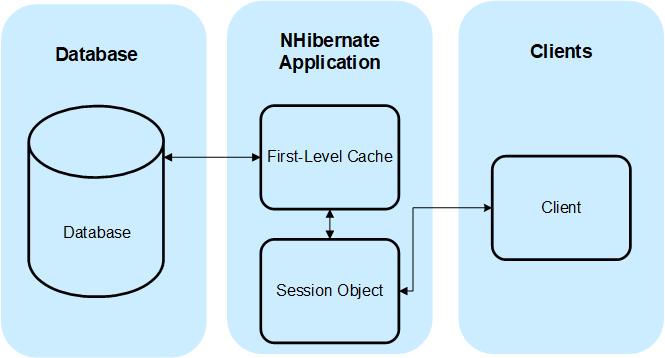
Figure 1: First-Level NHibernate Cache Workflow
However, this does have some limitations, as follows:
- Each process has an individual first-level cache not synchronized with other caches, making data integrity a struggle.
- Cache size is limited to the process memory and cannot scale.
- Recycling worker processes cause the cache to be cleared, necessitating data reloads and reducing your application performance.
Why Use a Distributed Cache for NHibernate Second Level Caching?
The NHibernate Second Level Cache exists at the Session Factory level, which means multiple user sessions can access a shared cache. Moreover, it has a pluggable architecture, allowing applications to incorporate third-party distributed caches without code changes. Therefore, you can use the relevant NCache Provider as a Second Level Cache.
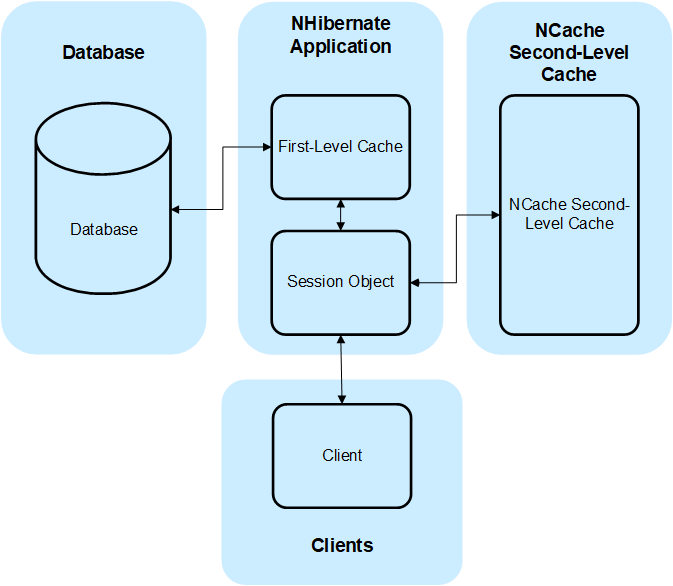
Figure 2: Second-Level NHibernate Caching with NCache
Comparison: NHibernate First Level vs. Second Level (L2) Cache
| Feature | NHibernate First Level (L1) | NHibernate Second Level (L2) – Distributed |
|---|---|---|
| Scope | Session-specific (In-process memory) | Application-wide (Shared across the cluster) |
| Lifecycle | Short-lived; disposed with the Session | Long-lived; persists across multiple sessions |
| Data Sharing | No; each session fetches its own data | Yes; data is shared across all web/app servers |
| Scalability | Limited to single server resources | Linearly scalable by adding more cache nodes |
| Database Traffic | Higher (repeated fetches per session) | Significantly lower (data stays in L2 cache) |
| Availability | Data lost if the process restarts | High availability; data is replicated across nodes |
| Configuration | Enabled by default | Requires external provider (e.g., NCache) |
You can use NCache in your NHibernate application in the following way:
Step 1: Add the following configuration in the Web.config under the <configSections> tag:
|
1 2 3 4 |
<configSections> <section name="hibernate-configuration" type="NHibernate.Cfg.ConfigurationSectionHandler, NHibernate" /> <section name="log4net" type="log4net.Config.Log4NetConfigurationSectionHandler, log4net" /> </configSections> |
Step 2: Next, install NCache NuGet package for application without NCache installation using the following commands in Package Manager Console inside Visual Studio, based on your chosen installation, i.e., Enterprise, Professional, and Open Source:
|
1 |
Install-Package NHibernate.NCache |
Step 3: Configure NCache as NHibernate’s second-level cache provider by adding the cache.provider_class property under <hibernate-configuration>.
Step 4: Enable the use of a second-level cache in the application by setting the cache.use_second_level_cache property to True as shown below.
|
1 2 3 4 5 6 |
<hibernate-configuration xmlns="urn:nhibernate-configuration-2.2"> <session-factory> <property name="cache.provider_class">Alachisoft.NCache.Integrations.NHibernate.Cache.NCacheProvider, Alachisoft.NCache.Integrations.NHibernate.Cache</property> <property name="cache.use_second_level_cache">true</property> </session-factory> </hibernate-configuration> |
Step 5: Specify Application ID for NCache NHibernate Provider in NCacheNHibernate.xml.
|
1 2 3 |
<appSettings> <add key="ncache.application_id" value="myapp" /> </appSettings> |
Step 6: Next, you can configure cacheable objects as follows:
|
1 |
<cache usage="read-write" region ="AbsoluteExpirationRegion"/> |
You can learn more about the tags used to configure cacheable objects here.
Advantages of NCache as a NHibernate Second Level Cache
Moreover, using NCache in this way has the following advantages:
- NCache synchronizes across multiple processes and servers, ensuring cache consistency and avoiding data integrity issues.
- Application process recycling does not affect the cache, as your application processes are stateless in an OutProc distributed cache.
- NCache pools the memory of all cache servers together, allowing users to add more servers to the cluster to increase cache size (by hundreds of gigabytes and even terabytes).
- Linear scalability to handle larger transaction loads as NCache scales linearly and reduces your database traffic by as much as 90%.
- NCache provides support for InProc Client Caches, i.e., a cache-on-top-of-a-cache running within your worker process, letting you boost performance within your applications.
Conclusion
Using distributed caches like NCache as NHibernate second-level caches enables you to use NHibernate and run your application in a multi-server configuration, allowing you scale your application and handle high transaction loads. Download and sign up for a fully working 30-day trial of NCache Enterprise and try it out for yourself.
Frequently Asked Questions (FAQ)
Q: Does using a distributed L2 cache require modifying my NHibernate source code?
A: No. High-performance distributed caches like NCache integrate as a plug-in provider. You only need to update your NHibernate configuration file (hibernate.cfg.xml) to enable the second-level cache and specify the NCache provider class.
Q: Can NHibernate Query Caching be used with a distributed cache?
A: Yes. When you enable a distributed L2 cache, you can also enable NHibernate Query Caching. This allows the results of expensive database queries to be stored in the distributed cluster, further reducing database load.
Q: What happens to the L2 cache if one of the cache servers fails?
A: Unlike the First Level cache or a local InProc cache, a distributed cache like NCache provides high availability through data replication. If one node fails, the data remains accessible from other nodes in the cluster, ensuring no performance degradation or data loss for the NHibernate application.
Q: Why is the First Level (L1) cache insufficient for web farms?
A: The L1 cache is “In-Process” and tied to a specific session. In a web farm, if a user’s next request is routed to a different server, the L1 cache cannot share that data. A distributed L2 cache provides a unified data store accessible by all servers in the farm.
Q: Does NCache support data synchronization with the database?
A: Yes. NCache provides features like Database Dependency, which automatically invalidates or updates cached NHibernate objects if the corresponding data changes in the SQL database, ensuring your L2 cache never stays stale.