
Achieving high performance and scalability is crucial when deploying .NET applications in cloud environments like Microsoft Azure. Moreover, implementing a distributed caching strategy can significantly enhance application responsiveness and reliability. This blog explores the concept of distributed caching in Azure, its benefits, and how to integrate it into your .NET applications, using NCache as an illustrative example.
Key Takeaways
Native .NET Performance: NCache is a 100% native .NET distributed cache, eliminating the serialization overhead and compatibility issues common with Linux-based caching alternatives in Azure.
Overcoming Scalability Bottlenecks: While traditional in-memory caching is limited to a single server, NCache provides a centralized, distributed architecture that allows .NET applications to scale linearly as user demand grows.
Reduced Database Pressure: By shifting data access from the primary database to the distributed cache, applications can significantly reduce latency and decrease the load on expensive Azure SQL resources.
High Availability & Reliability: NCache ensures that data is never lost during server failures by replicating data across multiple nodes, providing a resilient environment for mission-critical Azure applications.
Flexible Deployment in Azure: Users can choose between a fully managed SaaS (NCache Cloud) available on the Azure Marketplace or self-hosted Software on Azure VMs and Kubernetes, providing total architectural control.
What is Distributed Caching for Azure .NET Applications?
Traditional in-memory caching is limited to a single application’s memory. On the other hand, a distributed cache stores data across multiple servers, letting applications share and access data more efficiently. Essentially, distributed caching provides a centralized cache that is accessible by multiple application instances.
What are the Benefits of a Distributed Cache in Azure?
The following are the reasons why distributed caching is essential for .NET applications deployed using Microsoft Azure:
- Improved Performance: .NET applications can retrieve information faster, reducing latency and decreasing the load on primary data sources by storing frequently accessed data in a distributed cache.
- Scalability: With the increase in application load (as demand grows), it ensures scalability by distributing data across multiple nodes.
- High Availability: Ensures that the cache data is available in disaster scenarios where one or more servers may fail by replicating data across multiple servers.
Key Advantages of Distributed Caching:
| Feature | In-Memory Cache | Azure Cache for Redis | NCache (Native .NET) |
|---|---|---|---|
| Engine Runtime | Application Process | Linux-based (C++) | .NET / .NET Core |
| Object Handling | Direct Reference | Byte Array (Serialized) | Native .NET Objects |
| Serialization | Not Required | Manual / Third-party | Automatic / Provider-based |
| Clustering Strategy | None (Standalone) | Master-Slave / Cluster | Dynamic Peer-to-Peer |
| ASP.NET Session State | In-Process (Sticky) | External (Plugin) | Native Provider (Seamless) |
| Data Consistency | Absolute (Local) | Eventual / Synchronous | Configurable (Strong/Eventual) |
| Pub/Sub Support | Local Events | Standard Redis Pub/Sub | Distributed .NET Events |
| Deployment Options | Local Only | Azure PaaS | SaaS, VM, AKS, & On-Prem |
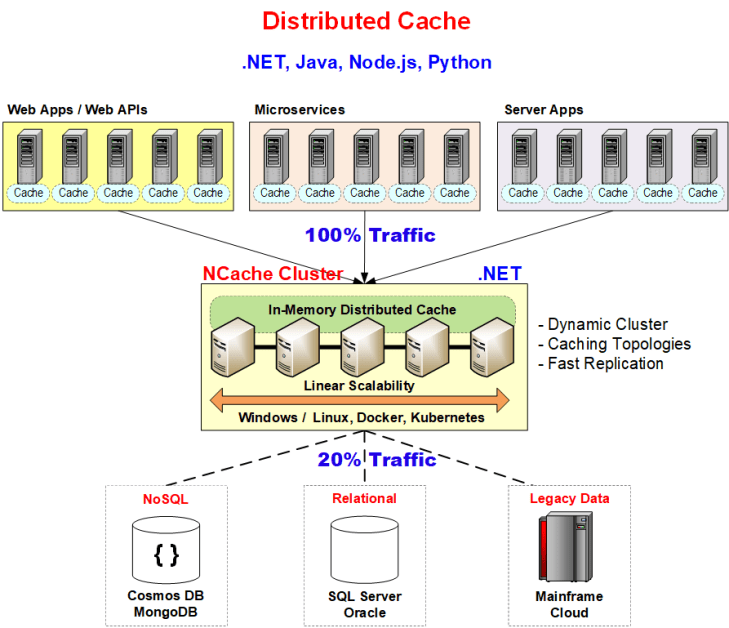
Figure 1: NCache architecture for distributed .NET data caching
Implementing Distributed Caching in Azure
Microsoft Azure offers several options for implementing distributed caching in .NET applications. However, NCache as a 100% native .NET distributed caching platform, integrates seamlessly with Azure deployments.
How do you integrate NCache with .NET on Azure?
- Choose the Deployment Model:
- NCache Cloud (SaaS): A fully managed service available through the Azure Marketplace, offering 99.99% availability. This option simplifies deployment and management, allowing you to focus on application development.
- NCache Software (Non-Hosted): Deploy NCache by installing it on Azure Virtual Machines (VMs) or using pre-configured Docker images. This model provides more control over the caching environment and is suitable for customized setups.
- Set Up NCache in Azure:
- For NCache Cloud: Subscribe to NCache Cloud through the Azure Marketplace, select the desired configuration, and deploy it within your Azure environment.
- For NCache Software: Set up Azure VMs, install NCache, and configure the cache cluster according to your application’s requirements.
- Configure Your .NET Application:
- Install NCache NuGet Package: Add the required NCache NuGet package to your .NET project.
- Configure Cache Settings: Define cache settings such as cache name, server addresses, and security credentials in your application’s configuration files.
- Implement Caching Logic: Use NCache’s API to add, retrieve, and manage cached data within your application code.
Example: Adding and Retrieving Data from NCache
|
1 2 3 4 5 6 7 8 9 10 11 12 13 14 15 16 17 18 19 20 21 22 23 24 25 26 27 28 29 30 31 32 |
using Alachisoft.NCache.Client; using Alachisoft.NCache.Runtime.Caching; using Alachisoft.NCache.Runtime.Exceptions; using System; class Program { static void Main() { // Initialize cache ICache cache = CacheManager.GetCache("myCache"); // Key-value pair to be cached string key = "Product:1001"; Product product = cache.Get(key); if (product == null) { // Fetch from database if not found in cache product = FetchFromDatabase(key); cache.Insert(key, product, new CacheItemPolicy { AbsoluteExpiration = DateTime.UtcNow.AddMinutes(10) }); } Console.WriteLine($"Retrieved from cache: {product.Name} - ${product.Price}"); } static Product FetchFromDatabase(string key) { Console.WriteLine("Fetching from database..."); return new Product { Id = 1001, Name = "Laptop", Price = 1200.00 }; } } |
In the example shown above, the application utilizes the cache-aside pattern, where it first checks if the data exists in the cache. If not, it fetches the data from the database, stores it in the cache with an expiration of 10 minutes, and then returns it to the application. This ensures that stale data is automatically removed after the specified time.
Best Practices for Distributed Caching in Azure
- Data Expiration Policies: Implement appropriate expiration policies (absolute or sliding) to ensure that the cache data is fresh, maintaining data consistency.
- Monitoring and Scaling: Monitor cache performance metrics at regular intervals and scale the cluster accordingly.
Conclusion
NCache is critical to your Azure-based .NET applications, as it significantly boosts application performance, scalability, and reliability. By offloading frequent data access operations to a distributed cache, you reduce the burden on primary data sources and ensure that your application can handle increased demand gracefully. Whether you choose a fully managed service or a self-hosted solution, NCache provides the flexibility and features needed to implement effective distributed caching in the Azure cloud environment.
Frequently Asked Questions (FAQ)
Q: How does a distributed cache differ from a standard in-memory cache in Azure?
A: Standard in-memory caching is localized to a single application instance, meaning data is not shared and is lost if that instance restarts. A distributed cache like NCache lives outside the application process, allowing multiple Azure Web Roles or VMs to pool memory into a single, shared logical capacity that persists even if individual app servers go down.
Q: Can I use NCache if my .NET application is running on Azure Kubernetes Service (AKS)?
A: Yes. NCache can be deployed as containerized pods within AKS. This allows your microservices to communicate with the cache tier over a high-speed TCP connection, maintaining the same performance benefits as a VM-based deployment while fitting into a modern DevOps workflow.
Q: What is the benefit of using a “100% Native .NET” cache in an Azure environment?
A: Most caching solutions (like Redis) are written in C++ and run on Linux. A 100% native .NET solution like NCache runs on the same CLR (Common Language Runtime) as your application. This eliminates the CPU overhead caused by complex data-type conversions and serialization between different operating systems and languages.
Q: How do I handle session management for auto-scaling Azure applications?
A: For applications that use “Auto-scaling” to add or remove instances based on traffic, NCache provides a dedicated Session State Provider. This ensures that user sessions are stored in the distributed cache tier rather than locally, so a user’s request can be handled by any available server without losing their session data.
Q: Does NCache support a managed service model in Azure?
A: Yes. You can subscribe to NCache Cloud (SaaS) directly through the Azure Marketplace. This is a fully managed service that offers 99.99% availability, allowing you to focus on your .NET code while Alachisoft handles the underlying cache infrastructure.