Businesses today are developing high-traffic ASP.NET Core web applications catering to countless concurrent users. In a clustered architecture with load-balanced application servers, several clients can access cache data. In these circumstances, race conditions (when two or more people try to view and edit the same shared data simultaneously) occur as multiple users try to access and alter the same data.
Such race conditions often cause data inconsistency and integrity issues. Moreover, this poses a risk to applications relying on real-time data accuracy. Fortunately, with NCache, businesses can leverage distributed locking mechanisms to ensure robust data consistency in a scalable in-memory caching environment.
Key Takeaways
- Race Condition Prevention: Distributed locking eliminates data inconsistencies by ensuring that multiple concurrent clients cannot modify the same cached data simultaneously.
- Optimistic Locking (Versioning): Leverages internal Item Versioning to validate data before updates. This is high-performance and ideal for environments where data contention is rare.
- Pessimistic Locking (Exclusive): Uses a LockHandle to explicitly lock an item at the source. This is best for critical data where strict consistency is more important than maximum throughput.
- Scalable Consistency: NCache provides these mechanisms across a clustered environment, ensuring that locking logic is synchronized across all cache nodes, not just a single server.
- Strategic Implementation: Choosing between the two depends on your workload. You can use Optimistic Locking for read-heavy apps to maintain speed, and Pessimistic Locking for write-heavy apps to maintain absolute integrity.
Distributed Locking for Data Consistency
With the help of NCache’s distributed locking mechanism, you can lock specific cache items during concurrent updates. This prevents race situations since only one process can modify an item at a time, ensuring data integrity.
NCache offers two types of locking:
- Optimistic Locking (Cache Item Versioning)
- Pessimistic Locking (Exclusive Locking)
Why is Distributed Locking Essential for Data Consistency?
Consider a banking application where two users access the same bank account with a balance of 30,000. One user withdraws 15,000, while the other deposits 5,000. If race conditions are not handled, the final balance may incorrectly become either 15,000 or 35,000 instead of 20,000, as expected.
Breakdown of the Race Condition:
- Time t1: User 1 fetches Bank Account with balance = 30,000
- Time t2: User 2 fetches Bank Account with balance = 30,000
- Time t3: User 1 withdraws 15,000 and updates balance = 15,000
- Time t4: User 2 deposits 5,000 and updates balance = 35,000
To prevent such scenarios, NCache’s locking mechanisms ensure that your application logic is thread-safe and that only one update is allowed at a time.
Optimistic Locking (Cache Item Versions)
Optimistic locking uses cache item versioning to manage concurrent updates. Each cached object has a version number, which increments upon every modification. Before updating a cache item, the application retrieves its version number and verifies it before saving any modifications. If another update has changed the version in the meantime, the update is rejected to maintain data integrity.
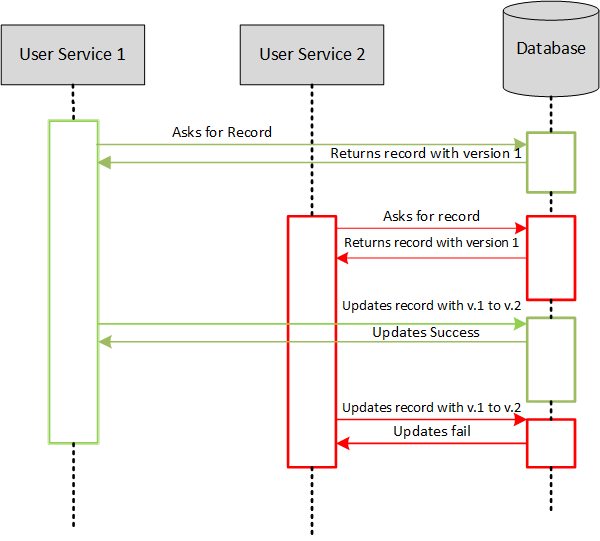
Figure 1: Optimistic Lock Sequence Diagram
Implementing Optimistic Locking in NCache
To implement optimistic locking, refer to the code sample below:
|
1 2 3 4 5 6 7 8 9 10 11 12 13 14 15 16 17 18 19 20 21 22 23 24 |
//The following C# example demonstrates version-based updates where the "Insert" operation succeeds only if the "version" matches the server-side value. using Alachisoft.NCache.Client; ICache cache = CacheManager.GetCache("myCache"); string key = "order:456"; // Retrieve item with version CacheItem cacheItem = cache.GetCacheItem(key); long version = cacheItem.Version; // Modify data Order order = (Order)cacheItem.Value; order.Status = "Shipped"; try { // Update only if the version matches cache.Insert(key, new CacheItem(order), version); Console.WriteLine("Update successful."); } catch (OperationFailedException ex) { Console.WriteLine("Optimistic lock failed: " + ex.Message); } |
Pessimistic Locking (Exclusive Locking)
Pessimistic locking prevents other users from modifying a cache item until the lock is released. This approach is beneficial in scenarios where strict control over data modification is required.
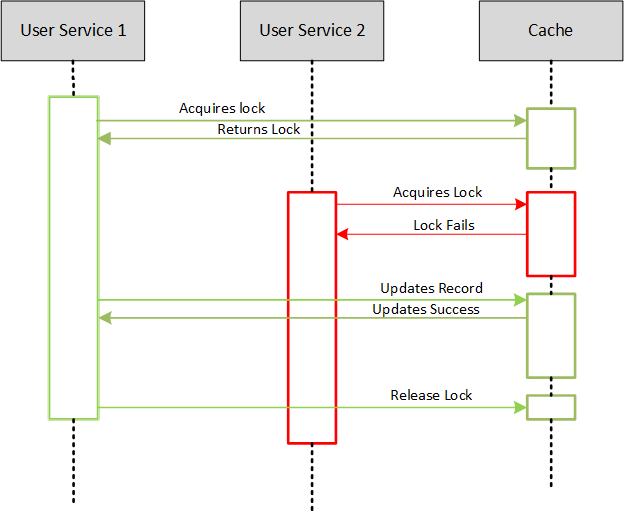
Figure 2: Pessimistic Lock Sequence Diagram
Implementing Pessimistic Locking in NCache
To implement pessimistic locking in NCache, please see the code sample below:
|
1 2 3 4 5 6 7 8 9 10 11 12 13 14 15 16 17 18 19 20 21 22 23 24 25 26 27 |
//This snippet shows how to acquire an explicit lock using "AcquireLock", ensuring no other thread can modify the item until "ReleaseLock" is called. using Alachisoft.NCache.Client; using Alachisoft.NCache.Runtime.Exceptions; ICache cache = CacheManager.GetCache("myCache"); string key = "customer:123"; LockHandle lockHandle = new LockHandle(); try { // Acquire lock with a timeout cache.AcquireLock(key, TimeSpan.FromSeconds(10), out lockHandle); // Perform operations while holding the lock Customer customer = (Customer)cache.Get(key, lockHandle); customer.Name = "Updated Name"; cache.Insert(key, new CacheItem(customer), lockHandle); } catch (LockingException ex) { Console.WriteLine("Lock acquisition failed: " + ex.Message); } finally { // Release the lock cache.ReleaseLock(key, lockHandle); } |
Lock during Get and Release Lock Upon Insert
Another pessimistic locking approach is to lock an item when fetching it and release the lock while updating the item. This ensures the fetched data remains unchanged until the update is complete.
|
1 2 3 4 5 6 7 8 9 10 11 12 13 14 15 16 17 18 19 20 21 22 23 24 25 26 27 |
using Alachisoft.NCache.Client; using Alachisoft.NCache.Runtime.Exceptions; ICache cache = CacheManager.GetCache("myCache"); string key = "product:789"; LockHandle lockHandle = new LockHandle(); try { // Lock item during Get operation Product product = (Product)cache.Get(key, TimeSpan.FromSeconds(10), out lockHandle); // Modify the product data product.Price += 10; // Update item and release the lock cache.Insert(key, new CacheItem(product), lockHandle, true); } catch (LockingException ex) { Console.WriteLine("Lock operation failed: " + ex.Message); } finally { // Ensure the lock is released if not already released cache.ReleaseLock(key, lockHandle); } |
| Feature | Optimistic Locking (Versioning) | Pessimistic Locking (Exclusive) |
| Core Mechanism | Uses Item Versioning. The system checks if the version has changed since the last fetch. | Uses LockHandle. The system grants exclusive access to a single user for a set duration. |
| Concurrency Level | High. Multiple users can read and attempt updates simultaneously without blocking. | Low. Only one user can access the item for modification; others must wait. |
| Performance Impact | Minimal. No physical locks are held on the server, ensuring maximum throughput. | Moderate to High. Can cause bottlenecks if locks are held too long or contention is high. |
| Handling Conflicts | If versions mismatch, the update fails and the application must retry (Conflict detection). | Conflicts are prevented by blocking other users until the lock is released (Conflict prevention). |
| Ideal Use Case | Read-Heavy / Low Contention. E.g., Product catalogs, user profiles, or configuration data. | Write-Heavy / High Integrity. E.g., Financial balances, inventory counts, or seat reservations. |
Conclusion
By employing NCache’s distributed locking features, developers can ensure high data consistency in distributed applications. Pessimistic Locking provides strict control for critical updates, while Optimistic Locking delivers higher performance for low-conflict scenarios. Implementing these strategies ensures data integrity, even under high concurrency workloads, keeping applications reliable and scalable.
Frequently Asked Questions (FAQ)
- What is locking in a distributed cache?
Locking in a distributed cache is a mechanism that ensures only one client can modify a cached item at a time across multiple servers, preventing concurrent update conflicts. - Why is locking important for data consistency?
Locking prevents race conditions and lost updates when multiple applications or services attempt to read or write the same cached data simultaneously. - How does distributed cache locking differ from database locking?
Distributed cache locking operates across application nodes and cache servers in memory, while database locking typically works at the storage level and may introduce higher latency. - Does using locking in a distributed cache affect performance?
Yes, locking introduces coordination overhead, so it should be used selectively for data that requires strict consistency rather than for high-throughput, read-heavy workloads.