As a developer, you must have struggled to accelerate the communication between the client and server at some point. Network overheads, delays and latency have always been of major concerns and it all comes down to one single question – How can we speed up the requests? Tons of solutions are found over the time but the answer we are focusing on here is Compression and Compact Serialization. Lucky for you, NCache provides efficient compression and dynamic compact serialization techniques (FYI, they are both different things). In this blog, we will see the need of both and how they can be used.
| Feature | Without Optimization | With NCache Optimization | Source/Logic |
|---|---|---|---|
| Object Size | Standard Serialization | Up to 10x Smaller | Explicitly stated in “Compact Data Size” section. |
| Network Latency | High Overhead | Faster Network Trips | Direct result of smaller binary payloads. |
| Memory Footprint | Uncompressed Size | Reduced via GZip & Compactness | Confirmed by the Compression Benchmark graph. |
| Code Effort | Standard Implementation | No Code Changes Required | Mentioned as a key benefit for both features. |
Key Takeaways
10x Data Reduction: Compact Serialization shrinks objects by up to 10 times compared to native serialization by stripping unnecessary metadata, drastically reducing network overhead.
Zero Code Changes: Most optimization benefits are achieved through the NCache Web Manager or config.ncconf without requiring developers to rewrite application logic.
Dual-Layer Optimization: NCache treats Serialization (network speed) and Compression (memory savings) as distinct but complementary techniques to eliminate I/O bottlenecks.
Threshold-Based Compression: Using GZip, NCache only compresses data that exceeds a specific size threshold, ensuring CPU cycles are only used when the memory/network savings are significant.
Selective Control: For complex types, the ICompactSerializable interface provides granular control, allowing developers to choose exactly which attributes are transferred over the wire.
Dynamic Compact Serialization
NCache provides support for native .NET serialization format, however, it also provides its own serialization framework called compact serialization. Compact serialization is also binary serialization but NCache provides a lot more flexibility with this serialization framework. Compact serialization does not reduce the size of the entire data, it instead only reduces the size of the data that is travelled over the network. It helps you achieve better functionality as the network trips are faster and the cost is decreased.
Now let us look at the benefits of dynamic compact serialization and how it is more flexible than the native .NET Serialization:
Compact Data Size
In NCache, binary serialized data is compact in size. When serialized, these objects sometimes become ten times smaller than their actual data sizes. The smaller the size, the faster the data travels over the network, hence amplified performance. Besides, when data is more compact, it takes up lesser space on the cache server making it memory efficient too.
Requires no Code change
To make your data compact serialized, there is no change in code required. All you have to do is, select the serializable data using management tools (NCache Web Manager or NCache PowerShell tools). NCache internally handles all the serialization of the data hence, no change in code is required.
Selective Serialization
Selective serialization means that the user has all the control over which data needs to be serialized and which data needs to be marked non-serialized. Within a class, you can select attributes to be serialized, for example, let us suppose that you want to keep the data base connection objects as non-serialized. You can simply serialize other attributes and keep the desired data non-serialized.
In order to get a fine-grained control over which data to serialize, ICompactSerializable interface is implemented. This gives you a major control on the data and selective serialization. The custom class needs the serialize/deserialize methods that are called by NCache to serialize/deserialize the objects. Look at the code example below to see how ICompactSerializable interface is implemented:
|
1 2 3 4 5 6 7 8 9 10 11 12 13 14 15 16 17 18 19 20 21 22 23 24 25 26 27 28 29 30 |
public class Customers : ICompactSerializable { private string _name; private int _id; private string _company; public Customers() { } public Customers(string customerName, int customerID, string companyName) { _name = customerName; _id = customerID; _company = companyName; } #region ICompactSerializable Members public void Deserialize(CompactReader reader) { _name = reader.ReadObject() as string; _id = reader.ReadInt32(); _company = reader.ReadObject() as string; } public void Serialize(CompactWriter writer){ writer.WriteObject(_name); writer.Write(_id); writer.Write(_company); } #endregion } |
NCache also allows registering generic classes for compact serialization. There are two ways to register generic classes i.e. either through the NCache Web Manager or through the IGenericTypeProvider interface.
Step 1: Through NCache Web Manager
You can register generic classes using NCache Web Manager as shown below:
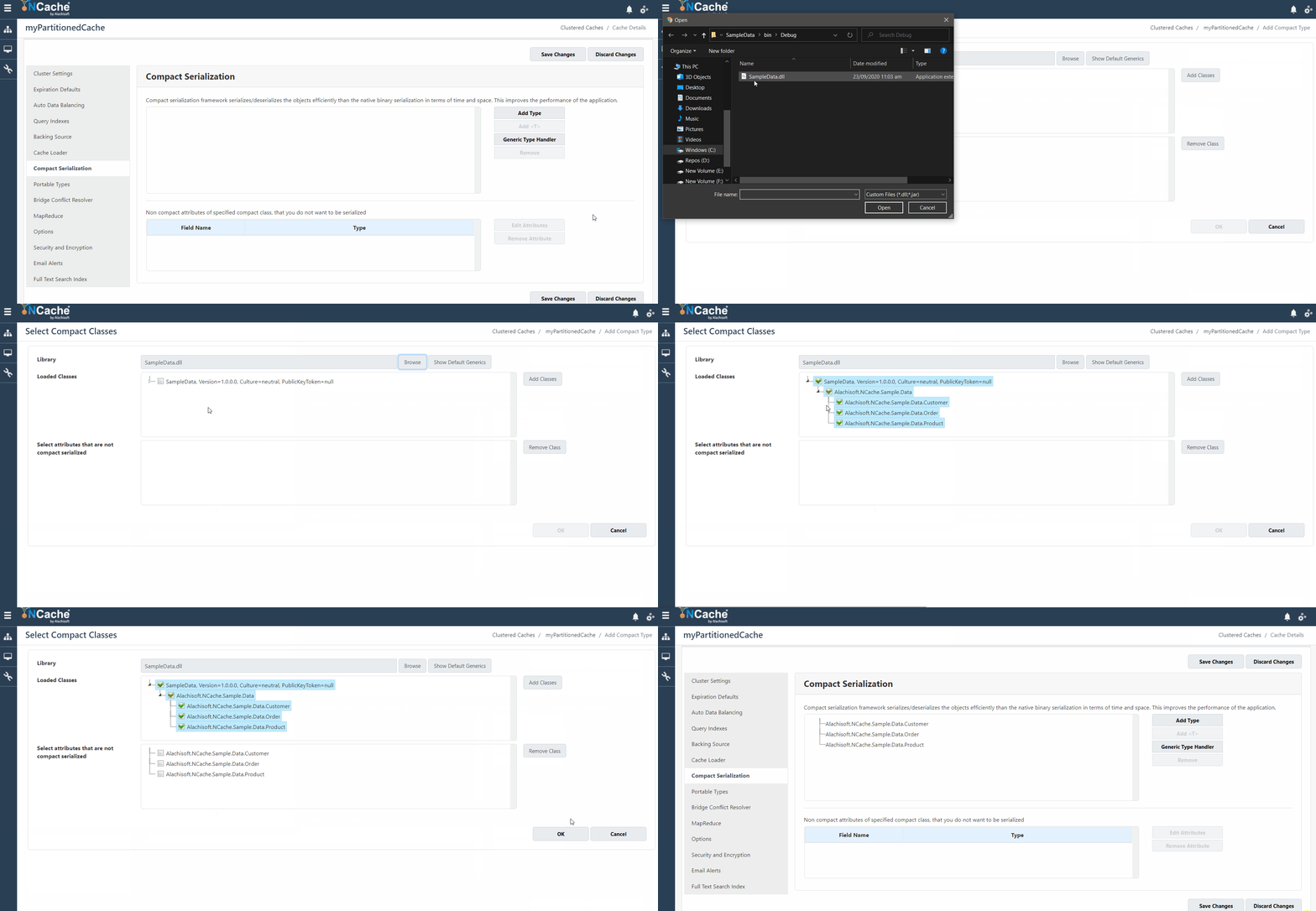
Figure1: Compact Serialization using Manager
Step 2: Through IGenericTypeProvider
To implement this, the user needs to implement GetGenericTypes method and return the desired generic types as an array.
|
1 2 3 4 5 6 7 8 9 10 11 12 13 14 15 16 17 18 19 20 21 22 |
public class CustomerPurchaseDetails<T, K, V> { // implement logic } public class CustomerPurchaseImpl : IGenericTypeProvider { Type[] types = new Type[6]; Type[] IGenericTypeProvider.GetGenericTypes() { types[0] = typeof(Dictionary<string, Customer>); types[1] = typeof(List); types[2] = typeof(CustomerPurchaseDetails<Order, Product, Customer>); types[3] = typeof(CustomerPurchaseDetails<Order, Product, int>); types[4] = typeof(CustomerPurchaseDetails<Order, string, byte>); types[5] = typeof(CustomerPurchaseDetails<string, Customer, bool>); return types; } public bool CheckIfSerializable(Type type, FieldInfo fieldInfo) { // implement logic } } |
After this, deploy this class assembly to NCache Web Manager. NCache Web Manager will register all types populated in Type array.
Compact Serialization Docs Register Generic Classes Register Non-Generic Classes
Compression
Another effective technique provided by NCache is data compression where data in compressed form is added in the cache. The greatest advantage is that compressed data takes up lesser space than the uncompressed data and saves you a lot of memory. It reduces the network cost of your read/write operations. So, what you save is network cost, time and memory efficiently by simply using compression.
NCache uses the GZip compression to compress the data. You decide a certain threshold value and for enabled compression, all the items exceeding the threshold are compressed. We compared the compressed and uncompressed data and the memory usage by each. You can see the results in the graph below. The blue line shows the memory consumption with compressed data and the orange one shows the size of the cache with uncompressed data:
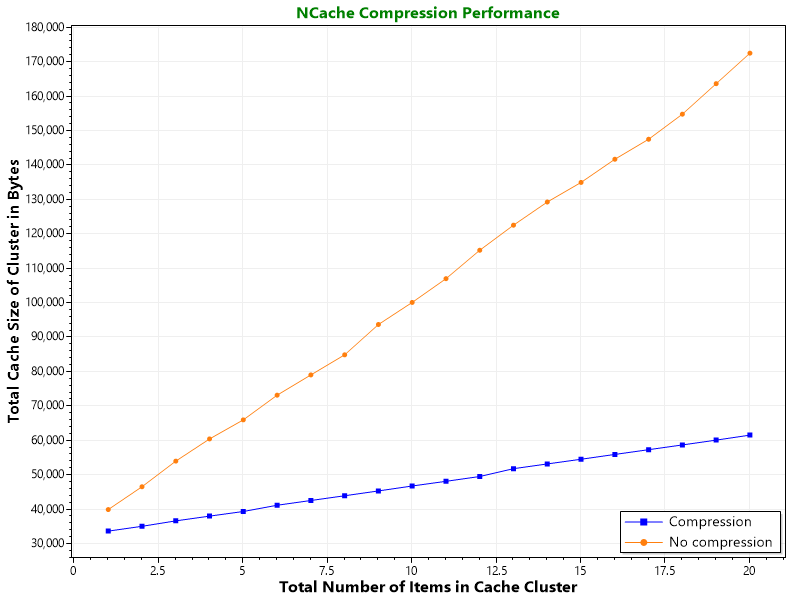
Figure 2: NCache benchmark comparing memory consumption with and without data compression.
Compression usually occurs on the client side as well as the server side given that compression is enabled on both the server and the client side.
- Client-side compression is applied on all the items that are requested by the client from the server. The server compresses the data and sends it to the client and the client decompresses it on receiving the compressed data. Similarly, for items crossing the threshold, sent by the client to the remote server, the data is sent in the compressed form.
- Server-side compression occurs for all the items exceeding the threshold and are loaded from the data source by the server-side features such as cache startup loader. These items are then compressed at NCache servers after receiving them from the data source.
Compression in NCache Docs Enable/Disable Compression
In order to use compression, all you have to do is enable compression and there are two effective ways to do so.
Method 1: Using NCahe Web Manager
The gif below shows you how to enable compression using NCache Web Manager:
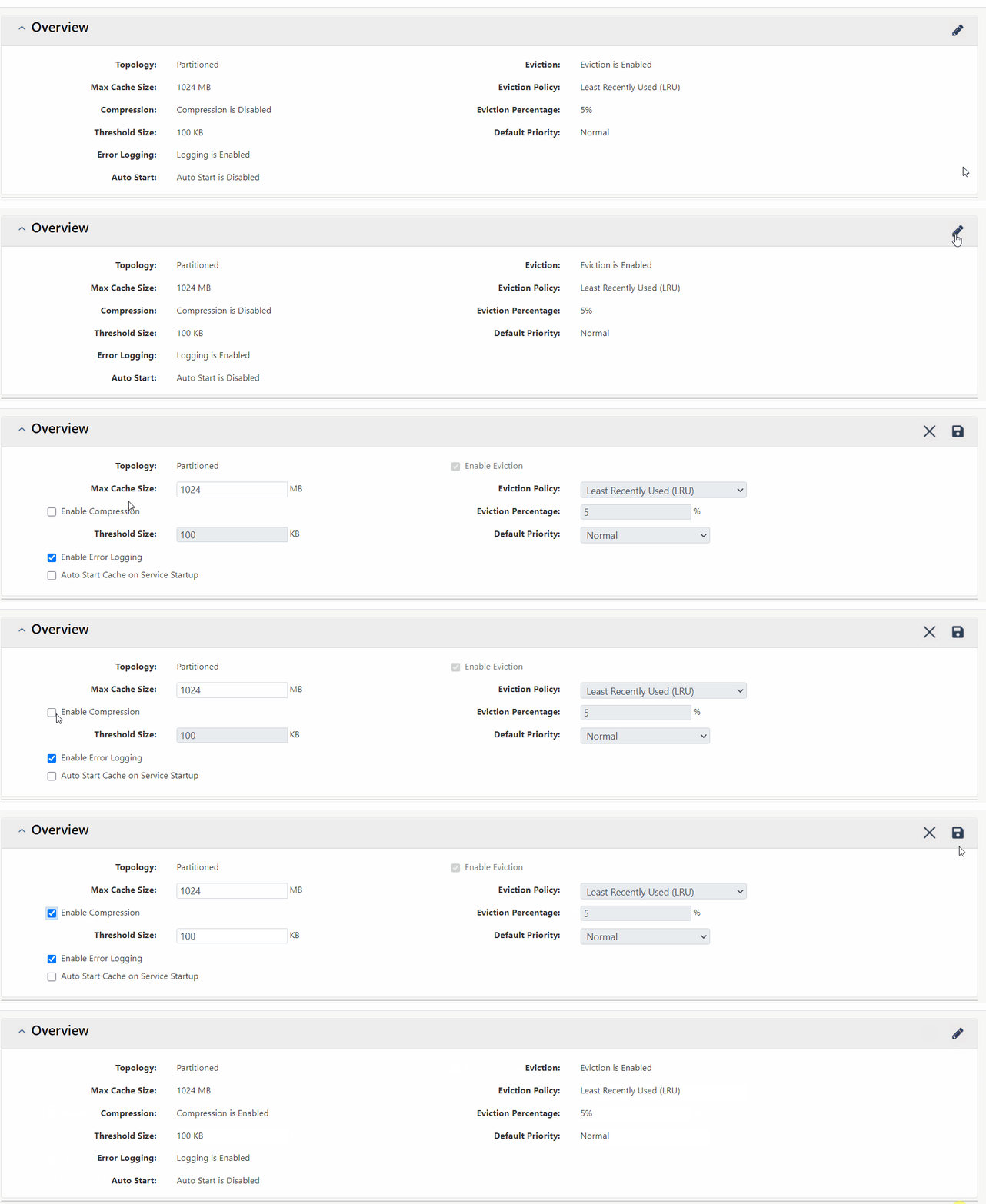
Figure 3: Enable Compression using NCache Web Manager
Method 2: Using Configuration
A configuration file installed in NCache install directory, named config.ncconf contains a tag which enables and disables compression for you. Let me show you how:
|
1 |
<compression enabled="true" threshold="500kb"/> |
The enabled tag is set true for enabling compression and false in case you want to disable compression. It also provides you the threshold tag and the data above the provided value is compressed only.
Conclusion
In conclusion, compression and compact serialization are very effective techniques for enhanced performance of your application. It is also very easy to enable these features using NCache management tools. NCache helps you achieve all this with just no code change. Please refer to NCache documentation to check out other cool NCache features.
NCache Details Download NCache Edition Comparison
Frequently Asked Questions (FAQ)
Q: What is the difference between Compact Serialization and Compression in NCache?
A: Compact Serialization is a binary framework that reduces the metadata size of objects for faster network travel, whereas Compression uses GZip to shrink the actual data payload to save physical memory and bandwidth.
Q: Does using Compact Serialization require me to modify my existing class logic?
A: No. For standard data types, you can register them via the NCache Web Manager or PowerShell tools with no code changes. Manual implementation of the ICompactSerializable interface is only necessary if you require fine-grained, selective control over specific attributes.
Q: How does NCache determine which items should be compressed?
A: NCache uses a “threshold” setting (e.g., 100 KB or 500 KB). Only items that exceed this specific size are compressed, ensuring that the system doesn’t waste CPU cycles on very small objects where the benefit would be negligible.
Q: Where does the compression and decompression process actually take place?
A: It occurs on both the client and server sides. When a client sends large data, it is compressed before it hits the network. Similarly, if the server loads data from a source (like a database), it compresses the data before storing it in the cluster.
Q: How can I register generic classes for optimization?
A: Generic classes can be registered in two ways: through the NCache Web Manager UI or by implementing the IGenericTypeProvider interface in your code to return an array of the required types.