Blazor is being adopted rapidly by organizations looking to create interactive Web UIs with .NET. It allows you to create the applications using C# instead of undergoing the hassle of JavaScript and all your server-side and client-side logic is consolidated in the .NET space.
Blazor uses the ASP.NET Core SignalR implementation for messaging between client and servers. Since it is in the same process, it cannot be scaled once the number of transactions becomes high or the client load increases on the servers. Moreover, it cannot be used as a backplane in a load balanced environment. For real-time and multi user applications, this can become a bottleneck.
Key Takeaways
Eliminates Traffic Bottlenecks: Blazor Server apps often struggle in multi-server environments; NCache solves this by acting as a shared “bridge” (backplane) that instantly synchronizes user messages across all servers.
Native .NET Performance: Because NCache is 100% .NET (unlike Redis), it integrates natively into your Blazor stack, reducing serialization overhead and keeping your application stack consistent.
Zero-Code Logic Changes: You don’t need to rewrite your application. Simply add two lines of configuration code, and NCache automatically handles the complex message routing in the background.
Ensures High Availability: By decentralizing the SignalR message bus, NCache ensures that even if one server goes down, your users’ real-time connection remains stable and responsive.
At NCache, we have been receiving requests regarding NCache support with Blazor apps. Yes, NCache can be easily integrated into your Blazor applications. A SignalR Backplane is a shared message bus that allows scaling of real-time apps. NCache implements this ASP.NET / ASP.NET Core SignalR Backplane as an in-memory distributed cache to ensure high performance and reliability. Being distributed, it can scale to handle increasing requests and does not become a bottleneck. Moreover, NCache SignalR uses powerful Pub/Sub messaging features to send messages from one web server to another. Figure 1 illustrates how NCache fits into your Blazor application as a SignalR Backplane:
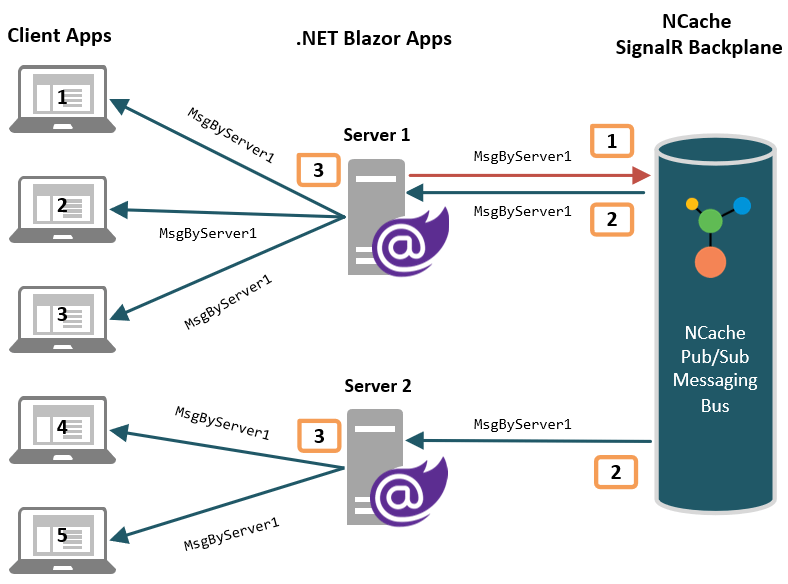
Figure 1: Using NCache as SignalR Backplane in .NET Blazor Applications
To make it simpler, we have used the Blazor SignalR sample implementation by Microsoft, and integrated NCache as a SignalR backplane in the existing application. Our running implementation for Blazor using NCache SignalR backplane is uploaded at GitHub.
Using NCache SignalR Backplane in Blazor
Integrating NCache as SignalR Backplane is very simple and barely requires any code change to your existing Blazor application.
Step 1: Create Cache
For your Blazor apps to use NCache, you need to create a cache that will act as a SignalR backplane. Download and install NCache as explained in Installation Guide. You can create and start cache using either of the following NCache management tools:
For this application, we have created a cache named “blazor” that will be used in our Blazor application. To enable these extension methods, ensure you have installed the AspNetCore.SignalR.NCache NuGet package in your project.
Step 2: Configure NCache as SignalR Backplane
In Startup.cs of your Blazor application in the BlazorSignalRApp.Server project, you need to add the following lines to configure NCache as SignalR Backplane, and that is it:
|
1 2 3 4 5 6 7 8 9 10 11 12 13 14 15 16 17 18 19 |
public void ConfigureServices(IServiceCollection services) { // 1. Register NCache as the shared SignalR Backplane services.AddSignalR().AddNCache(ncacheOptions => { ncacheOptions.CacheName = "blazor"; // Matches the cache name in NCache Web Manager ncacheOptions.ApplicationID = "chat"; }); // 2. Standard Blazor Server side services services.AddControllersWithViews(); services.AddResponseCompression(opts => { opts.MimeTypes = ResponseCompressionDefaults.MimeTypes.Concat( new[] { "application/octet-stream" }); }); } |
NCache Details Blazor App with NCache NCache SignalR Docs
Why NCache?
If your Blazor application is high traffic and running in a load-balanced multi-server web farm, then using NCache as a SignalR Backplane for your applications provides you the following benefits:
- .NET Pub/Sub Messaging: NCache is a feature-rich distributed cache and offers robust Pub/Sub messaging capabilities. SignalR Backplane uses these messaging features in NCache to send messages to other servers in the web farm.
- 100% .NET / .NET Core Cache: Being a native .NET distributed cache, NCache fits seamlessly into your ASP.NET / ASP.NET Core application stack and reduces your cost of development and maintenance.
- Extremely Fast & Scalable: NCache is in-memory, that makes it extremely fast. Its distributed nature provides linear scalability, due to which it never becomes a bottleneck for your Blazor application performance even under peak loads.
- High Availability: NCache provides peer-to-peer clustering architecture that is dynamic and self-healing and has no single point of failure.
- Support for Groups and Users: Using NCache as a SignalR backplane facilitates sending messages to SignalR groups which are collections of associated connections. Moreover, using NCache as the message bus, you can also send messages to all connections associated with a particular SignalR user.
Conclusion
Using NCache as a SignalR Backplane in your Blazor apps is a very seamless process. You only need to configure NCache as a SignalR backplane in your existing Blazor application with 2 lines of code and the rest is handled by NCache itself. With Blazor’s ease of use and NCache integration, you can guarantee a smooth experience.
NCache Details Edition Comparison NCache Download
Frequently Asked Questions (FAQ)
Q: Why does Blazor need a SignalR backplane?
A: In a multi-server environment (web farm), users connected to different servers cannot communicate with each other. A backplane acts as a bridge, instantly synchronizing messages across all servers so every user stays connected.
Q: Does this require code changes?
A: No. You do not need to rewrite your business logic or Blazor components. You only need to add a few lines of configuration in Startup.cs or Program.cs to enable the backplane.
Q: Why choose NCache over Redis for Blazor?
A: NCache is 100% native .NET, which eliminates the extra serialization overhead required by non-native stores like Redis. This keeps your entire stack within the .NET ecosystem for better performance and easier debugging.
Q: Will a backplane slow down my app?
A: Negligibly. Since NCache processes data entirely in-memory, the communication speed is ultra-fast. The tiny bit of network latency is a small trade-off for the ability to scale your app to thousands of concurrent users.