ASP.NET Core is an open-source framework used for building scalable web applications. It provides cross-platform capabilities and is quite popular with the microservices architecture. And, with the advent of .NET 6.0, it is only getting better in terms of performance and the development experience. However, certain bottlenecks still exist that hold back its true potential.
One of these bottlenecks is database read-times and this bottleneck is especially noticeable when your application has to serve hundreds of thousands of users at a time. ASP.NET Core session storage can help mitigate such issues by using in-memory data storage. However, the default session storage provider has a few limitations. These are:
- Session Loss: Sessions are lost if the application server goes down.
- Memory Limitations: Since data is stored in the memory space of the application process.
- No Session Replication: If traffic is rerouted to another server due to whatever reason, sessions are not carried over.
- Sticky Sessions: In a web farm environment, sticky sessions have to be used, which defeats the purpose of load balancing.
Fortunately for you, NCache is here to solve all these problems and more. We’ll go into further details in the following sections.
Key Takeaways
Prevents Data Loss Decouples session storage from the web server to ensure data survives application restarts or crashes.
Eliminates Sticky Sessions Allows any server to handle user requests, enabling true load balancing without traffic restrictions.
Ensures High Availability Replicates sessions across regions (WAN) so users remain connected even during data center outages.
Simplifies Implementation Integrates directly into ASP.NET Core via standard NuGet packages with just a few lines of code.
Why use distributed session storage in the first place?
By definition, HTTP is a stateless protocol, meaning information is not retained across multiple requests. A third-party mechanism is usually used to carry over information. One such mechanism is session storage. ASP.NET Core offers its session storage, which backs up data into a cache. So instead of just going directly to the database, the application will first check if it has the information stored in the cache, if yes, the application will return that information and if not, only then will the application query the database.
However, do keep in mind that session data is considered ephemeral data. The application should continue to function regardless of an empty session cache. Session data should only be used for performance optimization needs. ASP.NET Core offers two options for session caching:
Both these options are quite fast and for the most part, will get the job done. However, their default implementations have the same drawbacks. Both of them offer stand-alone caches with a single point of failure and with no option of data replication in case a server goes down. For mission-critical applications, where a huge number of users are requesting resources at the same time and loss of session data is not an option, a distributed cache is the way to go.
Why Choose NCache for Distributed Session Storage?
NCache is an open-source in-memory distributed cache developed natively in .NET and .NET Core. It can be configured to work locally as well as on some third-party hosting platforms. Moreover, NCache can be set up as a backing store for session storage with very few code changes, and due to its inherent distributed nature, the following issues will be addressed:
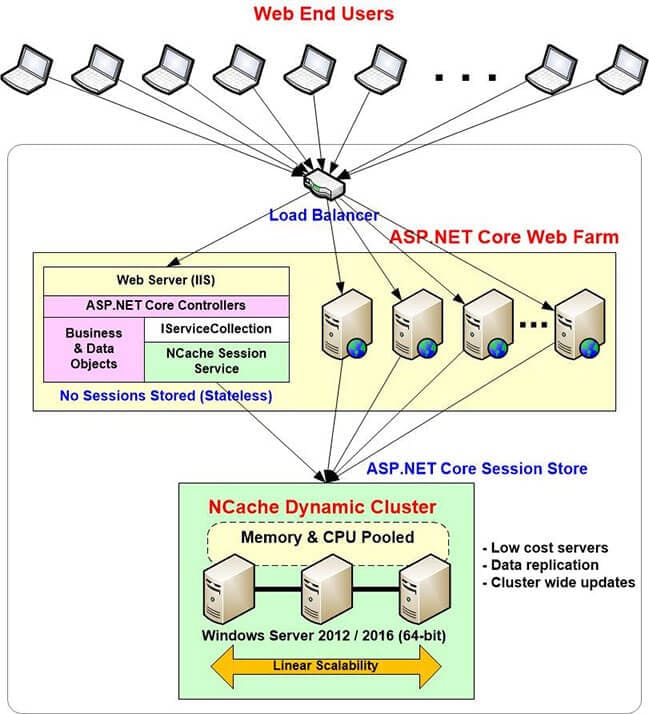
Figure 1: NCache Distributed Session Architecture for ASP.NET Core Web Farms
- Memory Limitations: The cache itself will now be in a separate process from the actual web application, so no more memory limitations.
- Better Reliability: The cache cluster can even be on a completely separate set of machines, to achieve even better reliability.
- Caching Topologies: NCache offers 4 different caching topologies. You can choose any one of them based on your requirements, whether you prioritize scalability, high availability, or data replication (at the cost of memory usage).
- Data Replication: Even if an application server goes, the session data will be kept safe.
- Multi-Region Session Storage: NCache offers Multi-Region Session Sharing as well. Sessions are replicated seamlessly across WAN. So, if users need to be rerouted to a different location, their sessions will be kept intact.
NCache offers two strategies for session storage, one is with the Session Storage Provider and the other is NCache’s implementation of IDistributedCache. In the following sections, we will go into the technical details of how NCache can aid in session storage of ASP.NET Core.
How to Configure NCache as a Session Store
Setting up NCache as a backing store for session storage is very straightforward. We will look at two approaches offered by NCache:
Method 1: Configuration via NCache Session Provider
Step 1: Install the NuGet Package For this approach, you first need to install the AspNetCore.Session.NCache NuGet package into your project.
Step 2: Update Program.cs After the package has been installed, open your Program.cs file and include the Alachisoft.NCache.Web.SessionState namespace.
Step 3: Register the Service Add NCache as a service in your services collection by inserting the following code:
|
1 2 3 4 5 6 7 8 9 10 11 12 |
var builder = WebApplication.CreateBuilder(args); builder.Services.AddControllersWithViews(); // Add NCache as the session provider builder.Services.AddNCacheSession(options => options.CacheName = "demoCache"); var app = builder.Build(); // Enable NCache session middleware app.UseNCacheSession(); app.MapDefaultControllerRoute(); app.Run(); |
And that’s it, you have successfully set up NCache as a session storage provider. For more details about NCache, you can have a look at NCache programmers guide.
Method 2: IDistributedCache Implementation
Step 1: Install the NuGet Package In case you are already using an implementation of IDistributedCache, you can go with this approach. Just install the NCache.Microsoft.Extensions.Caching NuGet package.
Step 2: Configure the Service Upon configuring services for your ASP.NET Core application, add the following code to register NCache as the distributed cache implementation:
|
1 2 3 4 5 6 7 8 |
var builder = WebApplication.CreateBuilder(args); builder.Services.AddControllersWithViews(); // Register NCache as the IDistributedCache implementation builder.Services.AddSingleton<IDistributedCache>(new NCacheDistributedCache(new CacheInitParams { CacheId = "demoCache" })); var app = builder.Build(); app.MapDefaultControllerRoute(); app.Run(); |
And voila, you can now use NCache’s implementation of IDistributedCache.
Multi-Region Session Storage using NCache
In addition to the data replication capabilities provided by the various caching topologies, NCache also offers complete session sharing between separate cache clusters. This can be very useful in situations where you have different data centers for different regions, and perhaps due to some unavoidable circumstances, you need to reroute your traffic from one region to another.
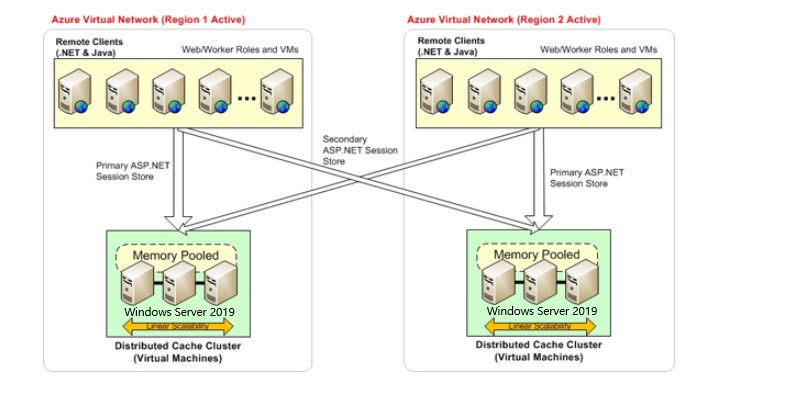
Figure 2: Multi-Region Session Sharing
You can easily set up session sharing between your different regions. The sessions from one region will be seamlessly replicated over WAN to the other regions. The session data is replicated from the primary cache to one or more secondary caches. To use multi-region session sharing you need to use the NCache session storage provider and only the following changes will be required in your Program.cs file:
|
1 2 3 4 5 6 7 8 9 10 11 12 13 14 15 16 17 18 19 20 21 |
var builder = WebApplication.CreateBuilder(args); builder.Services.AddControllersWithViews(); builder.Services.AddNCacheSession(options => { options.CacheName = "LondonCache"; options.EnableLogs = true; options.SessionAppId = "demoApp"; options.SessionOptions.IdleTimeout = TimeSpan.FromMinutes(5); options.SessionOptions.CookieName = "AspNetCore.Session"; options.EnableLocationAffinity = true; options.AffinityMapping = new [] { new CacheAffinity { CacheName = "LondonCache", CachePrefix = "LDNC" }, new CacheAffinity { CacheName = "NewYorkCache", CachePrefix = "NYKC" }, new CacheAffinity { CacheName = "TokyoCache", CachePrefix = "TKYC" } }; }); var app = builder.Build(); app.UseNCacheSession(); app.MapDefaultControllerRoute(); app.Run(); |
Note: One thing to keep in mind is that location affinity must be enabled in order to use multi-region session sharing.
The cache name specified in the configuration.CacheName field will be your primary cache, whereas all remaining caches specified in the configuration.AffinityMapping will be your secondary caches. The CachePrefix is important, as this prefix is attached to the session ID. This prefix identifies where the session data is stored. So, if a request arrives at a cache and the cache prefix is different from the prefix of the current cache, then the actual cache is contacted for the session data (if the data isn’t already present). Now that the current cache has the session data, all subsequent requests will now be served locally from this cache.
Conclusion
In this blog, we looked at why session storage is a powerful feature of ASP.NET Core and how it can drastically improve the performance of your application. We also looked into how NCache can vastly improve session storage with the help of distributed caching and if you require even better reliability, you can always opt for NCache’s multi-region session sharing feature for a top-notch user experience.
Frequently Asked Questions (FAQ)
Q: Why should I use NCache instead of the default ASP.NET Core session provider?
A: The default provider stores sessions inside the web server’s memory. If that server restarts or crashes, all session data is lost. NCache stores sessions in a separate, distributed cache layer, ensuring data persists even if the web application itself goes down.
Q: Do I need to rewrite my code to switch to NCache?
A: No, you do not need to rewrite your application logic. NCache acts as a drop-in replacement. You simply install the NuGet package and update a few lines of configuration in your Program.cs file to point to NCache.
Q: Does NCache eliminate the need for sticky sessions?
A: Yes. Because NCache creates a centralized store accessible by all servers, you don’t need to force a user to stay connected to a specific server (sticky sessions). This improves your load balancing and overall application scalability.
Q: Can NCache handle session sharing across different geographic regions?
A: Yes. NCache supports multi-region WAN replication. This means session data can be synchronized between data centers (e.g., US-East and EU-West), allowing users to failover to a different region without losing their login state or shopping cart.