In computing, a cache is a form of high-speed memory that stores data to avoid expensive database trips and optimize performance, especially for applications running on single server nodes. However, in load-balanced distributed systems, where requests are handled by multiple nodes, traditional caching can result in performance drops. In-memory distributed caches overcome these issues and offer high availability and linear scalability. Among the various distributed caching platforms available in the market, NCache stands out for its scalability and performance. One of the reasons why NCache can offer such significant performance boosts is due to its Client Cache (or cache on top of a cache) feature.
Key Takeaways
Localized Speed: Client Cache (L1) resides on the application server to provide near-instantaneous data access by eliminating network latency.
Dual Layer Architecture: The system utilizes a two-tier approach where a local L1 cache acts as a fast buffer for a larger, pooled L2 distributed cache.
Flexible Isolation Modes: Users can choose between InProc mode for maximum object-level speed or OutProc mode for efficient resource sharing across multiple applications.
Real Time Synchronization: Automated synchronization mechanisms ensure that the local L1 cache remains consistent with the L2 cluster using either Optimistic or Pessimistic notification models.
Optimized Scalability: By reducing the load on the distributed cluster, Client Cache allows the entire caching tier to scale more effectively under high-traffic conditions.
How does Client Cache work in NCache?
Distributed caches often reside on dedicated servers across the network, causing delays in data retrieval due to network trips. Fortunately, NCache’s Client Cache, a temporary storage near to the application, speeds up data access. It enhances performance by allowing multiple applications on the same client machine to share data via OutProc mode. This improves efficiency and resource utilization. Additionally, it brings frequently accessed data even closer with the InProc mode, delivering an extra performance boost.
Using the Client Cache (first-level or L1 Cache) is quite simple, requiring no code changes. It can be configured through the NCache Management Center or the NCache-supported PowerShell cmdlets. Once set up, client applications may automatically start using it. Imagine an e-commerce application that frequently accesses the product catalog and active user data. By storing this data in the Client Cache (L1 Cache) on the client machine, the application avoids unnecessary network trips to the clustered cache (L2 Cache), resulting in faster data access and improved performance.
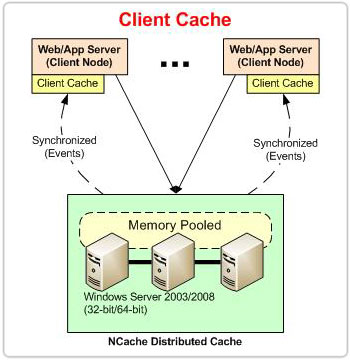
Figure 1: Architectural flow of NCache Client Cache synchronization
Data Synchronization Between the L1 and L2 Cache
To ensure that the application always receives up-to-date data, the Client Cache employs two background threads for synchronization, as detailed below.
Notification-based Thread
When data is added to the L1 Cache, it immediately registers a data change notification. The L2 Cache monitors the cache items that the L1 Cache holds and tracks any updates or removals. Upon data modification in the L2 cache, the L1 cache receives a change notification and in response, the L1 cache synchronizes itself with L2.
Polling-based Thread
This is a fallback mechanism that is triggered only when the L1-L2 communication stops due to network issues. In such cases, the L1 Cache waits for 10 seconds and then polls the L2 Cache for data changes. Upon receiving the change notifications, it synchronizes with the L2 cache.
How do InProc and OutProc Isolation Modes differ?
The Client Cache runs on the client node where your applications are deployed. Depending on your performance needs and the application architecture, you can choose between two process-level isolation modes, i.e., InProc and OutProc, as explained below.
| Feature | InProc (In-Process) | OutProc (Out-of-Process) |
|---|---|---|
| Location | Inside your application’s memory space. | In a separate process on the same node. |
| Performance | Maximum. No overhead from IPC or serialization. | High. Minimal overhead due to local IPC. |
| Data Format | Stores objects in their native form. | Stores objects in serialized form. |
| Resource Sharing | Dedicated to a single application instance. | Can be shared across multiple applications. |
| Memory Usage | High (each app instance has its own copy). | Efficient (one copy for all app instances). |
| Best Use Case | Ultra-low latency, single-app environments. | Scalable environments with multiple apps. |
InProc Mode
In InProc mode, the Client Cache runs within the application process, eliminating inter-process communication. This mode offers the most significant performance boost to the application as the data remains in object form, reducing the serialization and deserialization costs. Moreover, data is not shared between application instances, meaning each instance has its dedicated Client Cache to improve performance.
OutProc Mode
In OutProc mode, the Client Cache runs in a separate process on the client node. The communication between applications and the Client Cache occurs via TCP sockets. This mode supports data sharing, meaning multiple application instances can communicate with the same Client Cache. Therefore, data updated by one application is accessible to others, enhancing overall efficiency and consistency.
Performance-wise Comparison Of InProc and OutProc Mode
The InProc and OutProc mode performance can be compared by several factors, such as those listed below.
- Data availability: In OutProc mode, cache restarts do not result in data loss ensuring data stability. Whereas, in InProc mode, it does result in data loss, impacting data availability.
- Resource consumption: The InProc mode offers significant performance gains when resources like memory are not limited, as each Client Cache instance holds a copy of its data, increasing memory usage. The OutProc mode is more resource-efficient, it requires fewer physical resources as it supports data sharing among multiple instances.
- Speed: The InProc mode is exceptionally fast, as it operates using data present directly in memory without the need for serialization or deserialization, unlike the OutProc mode, which incurs additional overhead from these processes.
What is the Operational Flow of a Client Cache?
The Client Cache operates close to the application layer as a subset of the clustered cache, handling operations in a distributed manner.
- Key-based operations: All the key-based read operations are performed directly on the L1 Cache, while write operations (Add, Insert, Remove) are first executed on the L2 Cache and then updated to the L1 Cache. This ensures that the L1 Cache contains the most recent data for faster subsequent access.
- Data Retrieval: After fetching data, it is stored in the L1 Cache before returning it to the application, ensuring faster access the next time the same data is requested.
- Non-key-based Operations: Non-key-based read and write operations are only performed on the L2 Cache since the L1 Cache only holds the subset of the L2 Cache.
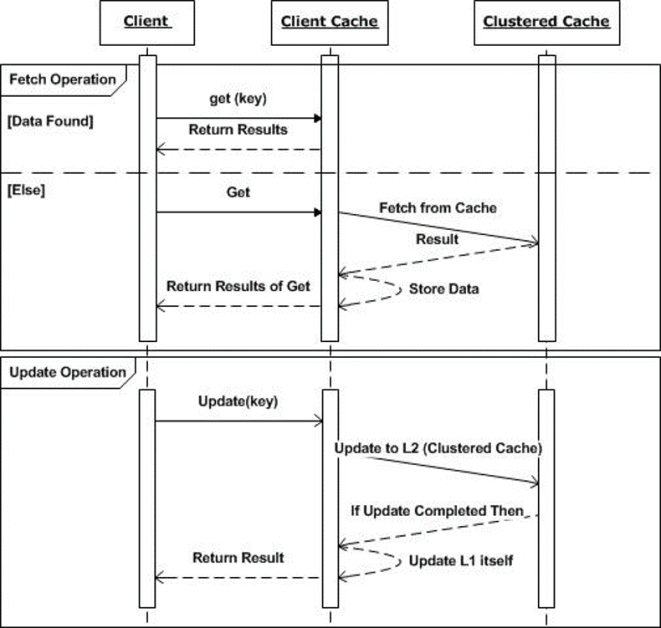
Figure 2: Sequence of read and write operations in NCache Client Cache
Synchronization Modes
While being local to your application, the Client Cache is not stand-alone. Instead, it is always synchronized with the clustered cache. This ensures that the data present within it is up-to-date. NCache offers two modes for synchronizing data between the Client Cache and the clustered cache: Optimistic and Pessimistic modes, as detailed below.
| Feature | Optimistic Synchronization | Pessimistic Synchronization |
|---|---|---|
| Mechanism | App checks if its local copy is valid before use. | The Cluster “pushes” updates to L1 immediately. |
| Latency | Slightly higher on ‘Get’ (metadata check). | Zero latency on ‘Get’ (data is always ready). |
| Network Traffic | Lower (only sends small metadata pings). | Higher (sends the actual updated objects). |
| Reliability | Good for high-read, low-write data. | Best for real-time, frequently changing data. |
| Data Freshness | Eventual (verified at time of access). | Immediate (always stays in sync with L2). |
Optimistic Mode
- The Optimistic mode is the default data synchronization mode.
- Synchronization takes place in the background and when an application requests data, it is returned to the application from the Client Cache without checking with the clustered cache, unless necessary.
Pessimistic Mode
- Whereas the applications that are more sensitive and require fresh data use Pessimistic mode for data synchronization.
- This mode ensures that when data is requested, the Client Cache verifies its version with the clustered cache before serving it, guaranteeing the latest data is retrieved.
Conclusion
In conclusion, NCache’s Client Cache seamlessly plugs in with your pre-existing distributed cache, offering a substantial performance boost, especially for more read-intensive applications. So, if you’re looking to improve application speed and efficiency, give it a try and experience its benefits firsthand.
Frequently Asked Questions (FAQ)
Q: How does a Client Cache improve application performance?
A: It functions as a “cache on top of a cache” located on the same server as your application. By storing the most frequently used data locally, it removes the need for expensive network trips to the clustered cache, significantly reducing response times.
Q: When should I choose InProc over OutProc isolation?
A: Select InProc for maximum speed when your application needs to access objects in their native form without serialization overhead. Choose OutProc if you need to share the local cache across multiple application instances on the same server to optimize memory usage.
Q: What is the difference between Optimistic and Pessimistic synchronization?
A: Optimistic synchronization checks the validity of the local data only when a “Get” operation occurs, saving network bandwidth. Pessimistic synchronization uses a “push” model where the clustered cache immediately updates the local cache as soon as data changes, ensuring the highest level of data freshness.
Q: Does using a Client Cache increase memory consumption on the app server?
A: Yes, since it maintains a local copy of the data. To manage this, you can configure a size limit for the Client Cache and set up eviction policies like Least Recently Used (LRU) to ensure it stays within your server’s available memory limits.