
Microsoft is favoring ASP.NET Core over the legacy ASP.NET and plans on making all future developments in the former. Meaning, ASP.NET is slowly becoming obsolete. Hence, developers are switching to ASP.NET Core to reap the benefits of all future updates and technologies.
But, the users who have been using ASP.NET for years can’t make this switch so smoothly. They instead switch some of their applications to ASP.NET Core rather than all of them. This configuration works for all scenarios except one, session sharing. Meaning, the users can’t use or store ASP.NET sessions in ASP.NET Core applications and vice versa.
The solution is to cache sessions in a distributed cache such as NCache and let it handle session sharing between your web applications for you.
Key Takeaways
Unified Session Store: NCache serves as a centralized interim store, allowing legacy ASP.NET (4.x) and modern ASP.NET Core applications to access the same session data simultaneously.
Serialization Bridge: The solution resolves the conflict between BinaryFormatter and System.Text.Json by utilizing NCache Compact Serialization to abstract and wrap data types for cross-platform compatibility.
Zero Logic Changes: By leveraging the NCache Session State Provider, interoperability is achieved via simple configuration (web.config and appsettings.json) rather than complex code refactoring.
Shared Identity: Consistent sharing is maintained by synchronizing the Application ID and Session Cookie Name across both environments to ensure the load balancer and cache identify the user consistently.
Share Session Data Using NCache
Session data can’t be shared between ASP.NET and ASP.NET Core applications. This is because they both serialize their session data differently and use different data structures. NCache overcomes these problems by storing session data in the cache using its serialization method and an interim data structure. Hence, allowing session data to be readable across ASP.NET and ASP.NET Core applications.
Session State Provider Comparison: Legacy vs. Core vs. NCache
| Feature | ASP.NET (Legacy) | ASP.NET Core | NCache Shared Session |
|---|---|---|---|
| Serialization | BinaryFormatter | System.Text.Json / Protobuf | NCache Compact Serialization (Interoperable) |
| Interface | HttpSessionState | ISession | NCache Session Management API |
| Provider | SessionStateStoreProvider | DistributedCache | NCache Shared Provider (Interim Store) |
| Storage Type | In-Proc / SQL Server | In-Memory / Distributed | High-Availability NCache Cluster |
Note: Serialization Compatibility
The primary hurdle in session sharing is that ASP.NET Core uses System.Text.Json while Legacy ASP.NET uses BinaryFormatter. NCache resolves this by wrapping data in its own Interim Data Structure, which abstracts the underlying serialization, allowing both frameworks to read the same object values without casting errors.
The following architecture diagram illustrates how NCache acts as a shared interim store to provide a unified session state across both environments:
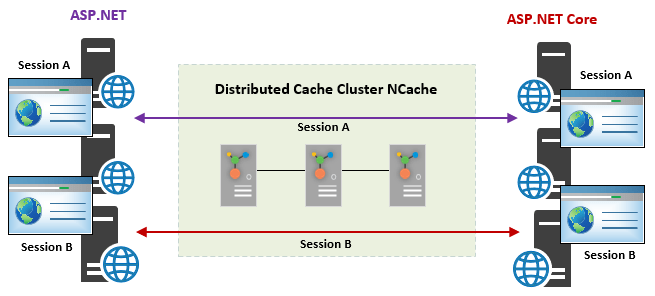
Figure 1: Session Sharing between ASP.NET and ASP.NET Core
The process to configure session sharing using NCache is also simple. All you have to do is download and install the NuGet packages NCache provides for ASP.NET and ASP.NET Core and make some changes in the configuration files. Just follow the steps below:
Install NuGet Packages for ASP.NET and ASP.NET Core
The first step is to install the respective NuGet packages that NCache provides for session sharing between ASP.NET and ASP.NET Core applications. NCache provides the AspNet.SessionState.NCache NuGet package for ASP.NET and the AspNetCore.Session.NCache NuGet package for ASP.NET Core.
Configure ASP.NET Application
Once you have installed the NuGet package for your ASP.NET application, you need to make some changes to the web.config file of your application. Under the sessionState tag, you need to ensure that the cookieName property has the same value for both ASP.NET and ASP.NET Core applications.
Under the providers tag, ensure that sessionAppId has the same value for both applications and the enableSessionSharing property has the value true. If any of these properties are missing, make sure to add them. A sample configuration has been provided below:
|
1 2 3 4 5 6 7 8 9 10 11 12 13 |
<sessionState ... customProvider="NCacheSessionProvider" cookieName="ASP.NET_CORE_SessionId" <providers> <add name="NCacheSessionProvider" type="Alachisoft.NCache.Web.SessionState.NSessionStoreProvider" enableSessionSharing="true" sessionAppId="NCacheSharedSessionApp" cacheName="myPartitionedCache" ... /> </providers> </sessionState> |
Configure ASP.NET Core Application
Once you have installed the NuGet package for your ASP.NET Core application, you need to make some changes to the appsettings.json file of your application. Just like for ASP.NET, you need to ensure that the CookieName and SessionAppId attributes have the same value for both applications and the EnableSessionSharing attribute has the value true.
After this, you must use the extension methods provided by NCache for session sharing (explained later). A sample appsettings.json file configuration is provided below:
|
1 2 3 4 5 6 7 8 9 10 11 12 13 14 15 16 17 18 19 20 |
"NCacheSettings": { "CacheName": "demoCache", //Replace "demoCache" with the name of your cache "SessionAppId": "NCacheSharedSessionApp", "EnableSessionLocking": false, "SessionLockingRetry": -1, "EnableLogs": false, "EnableDetailLogs": false, "ExceptionsEnabled": false, "OperationRetry": 0, "operationRetryInterval": 0, "EnableSessionSharing": true, // Default value is false "SessionOptions": { "CookieName": "ASP.NET_CORE_SessionId", // For session sharing the cookie name for the web applications needs to be the same. "CookieDomain": null, "CookiePath": "/", "CookieHttpOnly": "True", "IdleTimeout": "20", "CookieSecure": "None" } } |
NCache Extension Methods for Session Sharing
NCache provides extension methods for the ASP.NET Core session interface that supports adding and fetching custom objects and automatically handles the serialization/deserialization of objects for you. This takes away the need to use binary/JSON converters or write code to serialize/deserialize data at the client end.
If the user wants to enable session sharing between ASP.NET Core and ASP.NET applications, they must use these extension methods to store and retrieve their session data. NCache can only deserialize and serialize objects between the user’s ASP.NET Core and ASP.NET sessions if they use these extension methods.
The following code example adds a custom object into the ASP.NET Core session using the Set method provided by the NCache extension method for ASP.NET Core.
|
1 2 3 4 5 |
string key = "ProductID:1001"; Product customObejct = GetProduct(1001); // Add custom object to session with against key HttpContext.Session.Set(key, customObject); |
The following code example fetches a custom object from an ASP.NET Core session using the TryGetValue method provided by the NCache extension methods for ASP.NET Core:
|
1 2 3 4 |
string key = "ProductID:1001"; // Fetch custom object against key it was added against ("ProductID:1001") HttpContext.Session.TryGetValue(key, out customObject); |
Why is NCache the best solution for cross-framework session management?
No other caching vendor or otherwise provides this feature of session sharing between ASP.NET and ASP.NET Core applications, only NCache provides this feature. Not only that but NCache has also made its configuration very simple and non-invasive.
The user just has to install the respective NuGet packages, make changes in the respective configuration files (web.config for ASP.NET and appsettings.json for ASP.NET Core), and use the extension methods provided by NCache to store/retrieve their sessions. Users of both these web frameworks can greatly benefit from this feature and share their session data across both frameworks seamlessly.
Conclusion
Like session sharing, NCache also provides many other rich, efficient, and easy to configure and use features for all of its users. Session sharing is just among the other features that are unique to NCache and don’t exist anywhere else on the market. Don’t believe me? Download NCache now and check them out for yourself!
Frequently Asked Questions (FAQ)
Q: How do I ensure the Session ID remains consistent across both apps?
A: To share sessions, both applications must identify the user via the same token. You must configure both apps to use the same Session Cookie Name (e.g., “ASP.NET_SessionId”) and ensure they share the same Root Domain so the browser sends the cookie to both the legacy and core endpoints.
Q: What happens if I store a custom object in the session?
A: For custom objects to be shared, the class must be defined in a shared class library referenced by both projects. Additionally, the class should be configured for NCache Compact Serialization to ensure the data can be hydrated correctly regardless of which framework is reading it.
Q: Does session sharing impact application performance?
A: Using NCache as a distributed provider typically offers better performance than SQL Server-based session state. To further optimize, you can enable Client Cache (L1 Cache) on your web servers, which keeps frequently accessed session data local to the application, reducing network trips to the cache cluster.
Q: How do I handle different Application IDs?
A: NCache requires a single, matching Application ID to be defined in both the web.config (Legacy) and the NCacheSettings (Core). If these IDs do not match, NCache will treat the requests as belonging to two separate applications, and the session data will not be shared.
Q: Can I use this for phased migration to the cloud?
A: Yes. This is a primary use case. By using NCache as the centralized session store, you can route a portion of your traffic to the new ASP.NET Core microservices while the rest stays on the legacy monolith. Users can move between the two versions without losing their login state or cart data.






Great blog! It’s useful content for all .NET core developers.
Thanks for sharing!