ASP.NET is the foremost choice among software developers looking to create high-traffic web applications. The ASP.NET application tier can handle thousands of users and millions of requests daily due to its scalable nature. Such high-traffic applications are usually deployed in load-balanced web farms where load balancers distribute user requests across multiple web servers. While the ASP.NET application tier performs exceptionally well during high transactional loads, such applications face critical scalability bottlenecks in other areas. These ASP.NET performance bottlenecks can slow down applications, potentially even bringing them to a halt during peak business hours.
Key Takeaways
Database Scalability: While web servers scale linearly, relational databases often become a primary bottleneck under high transaction loads.
Session Storage Limits: Default options like InProc restrict web farm scalability, while SQL Server storage introduces latency due to BLOB serialization.
View State Bloat: Large View State strings sent to the client increase bandwidth usage, slow down response times, and pose security risks.
Redundant Processing: Repeatedly executing pages for unchanged data wastes CPU and memory resources.
The Solution: Implementing an In-Memory Distributed Cache like NCache resolves these bottlenecks by offloading storage and reducing database trips by 85-90%.
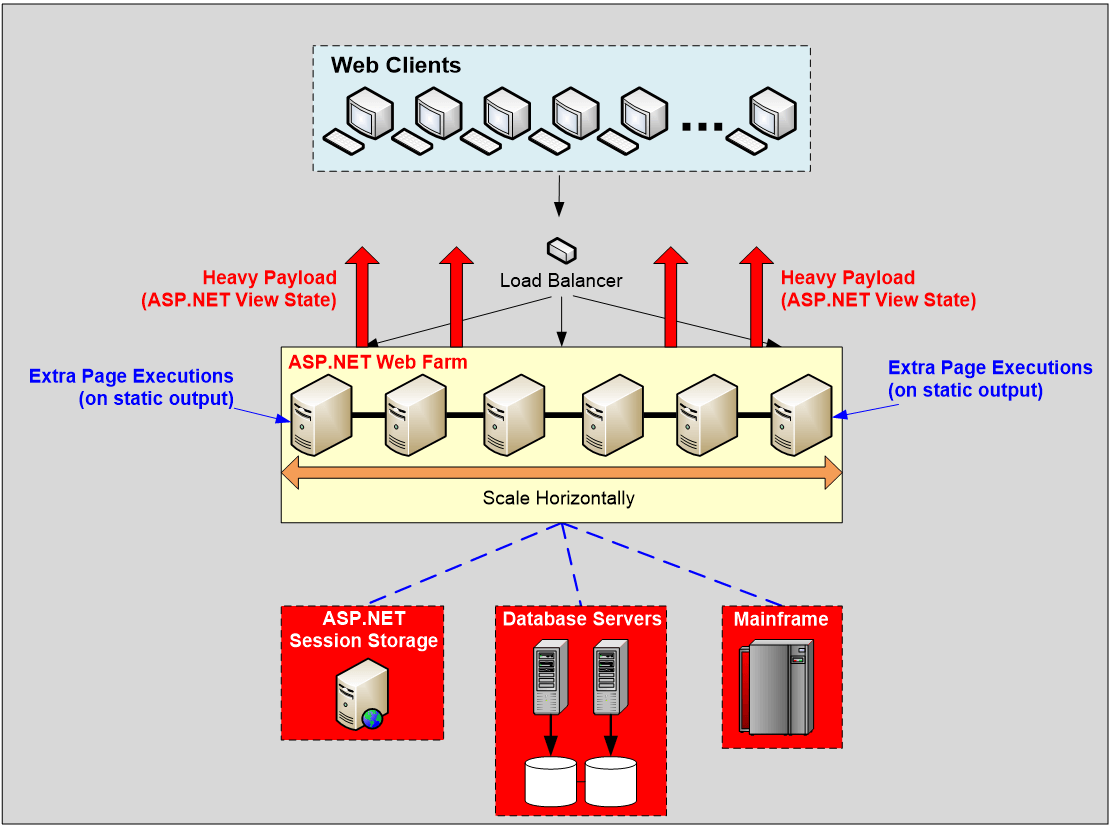
Figure: Four Performance Bottlenecks in ASP.NET Applications
Potential Performance Bottlenecks
These four ASP.NET performance bottlenecks are described below:
Database Bottleneck
In a load-balanced web farm, you can add more web servers to allow for linear scalability as transaction load increases. Unfortunately, this approach doesn’t work with the database tier (SQL Server, Oracle, etc.), which is not as scalable. Therefore, regardless of the additional web servers, the database will slow down and eventually crash, making it the most critical performance bottleneck your application will likely encounter.
ASP.NET Session State Storage Bottleneck
Storing ASP.NET Session States is essential, however, it can become a significant bottleneck. Recognizing the severity of such issues, Microsoft offers users three possible solutions. Regrettably, these solutions come with their limitations, as discussed below.
- InProc: This option restricts you to a single worker process per web server, which is less than ideal for multi-processor or multicore environments where multiple worker processes are preferred.
- Load-balanced Web Farm: InProc setups require sticky sessions to ensure user requests go to the same web server that created the session, even if others are idle.
- SQL Server: Using SQL Server for ASP.NET Session State storage isn’t optimal because it stores sessions as BLOBs, which SQL Server doesn’t handle efficiently, leading to performance degradation.
ASP.NET View State Bottleneck
The ASP.NET View State mechanism stores data from web controls on the server and sends it to the browser for postbacks. However, View State can grow to hundreds of kilobytes, leading to significant performance issues with large forms or frequent postbacks. This increases bandwidth usage, costs, and poses security risks if confidential data is sent. To mitigate these challenges, caching the View State on web servers and sending only a small token to the browser is a more efficient and secure solution, eliminating the need to transmit large amounts of data.
Needless Page Execution
Many times, ASP.NET pages generate the same output across multiple requests if the underlying data remains unchanged. However, the page continues to execute, wasting memory and CPU resources not to mention, the unnecessary database calls. This repeated query execution degrades performance.
The Solution: In-Memory Distributed Cache
The ideal solution to all these ASP.NET performance problems is to incorporate an In-Memory Distributed Cache in your ASP.NET and ASP.NET Core applications. NCache, a leading open-source distributed cache for .NET, offers effective solutions for overcoming these four major bottlenecks. Let’s quickly discuss how NCache addresses these challenges.
Application Data Caching
NCache allows you to cache your application data (read-only reference and the frequently changing transactional data) to reduce those expensive database trips. Unlike a database, NCache never becomes a bottleneck because it is a distributed cache and scales linearly.
NCache builds a cluster of cache servers and allows you to add more servers to the cluster as your transaction load increases. The following sample implements the Cache-Aside Pattern, ensuring data is only fetched from the database if it is missing from the cache:
|
1 2 3 4 5 6 7 8 9 10 11 |
string customerKey = $"Customer:ALFKI"; Customer customer = FetchCustomerFromDB(customerKey); // Get customer from database if not found in cache if (customer == null) { // Get customer from database customer = FetchCustomerFromDB("ALFKI"); cache.Add(customerKey, customer); } // Item added in cache successfully |
Configuring Distributed Session State
NCache also lets you store your ASP.NET Sessions in the cache. This is a much faster in-memory store than your other storage options. To provide reliability, NCache replicates your sessions on multiple servers. So, if a server crashes, there will be no loss of session data. The nice thing about ASP.NET Session State storage in NCache is that there is no programming effort, and you can plug it in seamlessly through a web.config change. The following web.config XML snippet demonstrates how to register the NCacheSessionProvider to enable high-availability session storage without code changes:
|
1 2 3 4 5 6 7 8 9 10 11 12 13 14 15 16 |
<sessionState cookieless ="false" regenerateExpiredSessionId="true" mode="Custom" customProvider="NCacheSessionProvider" timeout="60" sessionIDManagerType="Alachisoft.NCache.Web.SessionStateManagement.CustomSessionIdManager, Alachisoft.NCache.SessionStateManagement"> <providers> <add name ="NCacheSessionProvider" type="Alachisoft.NCache.Web.SessionState.NSessionStoreProvider" sessionAppId="demoApp" cacheName="demoCache" writeExceptionsToEventLog="false" asyncSession="false" enableLogs="false"/> </providers> </sessionState> |
Configuring View State Caching
NCache lets you cache your ASP.NET View State on the web server by only sending an identifier key to the browser. During postback, NCache fetches the View State results by intercepting the identifier key through its HTTP Handler. This View State is then sent to your ASP.NET page. This approach significantly speeds up your ASP.NET application and reduces bandwidth wastage. To learn how to cache ASP.NET View State in a distributed cache, please refer to this blog.
Additionally, NCache enables grouping ASP.NET View State with a specific session, ensuring that the View State expires automatically when the session does. The View State and session can reside on either separate caches or the same cache, by setting expireViewstateWithSession to True. Use the following configuration to enable View State Caching and group it with sessions, ensuring data is automatically cleared when the user session expires:
|
1 2 3 4 5 6 7 8 9 10 11 12 13 14 15 |
<ncContentOptimization> <settings enableMinification="false" enableViewstateCaching="true" groupedViewStateWithSessions="true" viewstateThreshold="1" cacheUriMapping="true" enableTrace="true" expireViewstateWithSession="true" sessionCacheName="demoSessionCache" sessionAppId="demoApp"> <cacheSettings cacheName="demoCache"> <expiration type="None" duration="0" > </cacheSettings> </settings> </ncContentOptimization> |
Using ASP.NET Output Cache
To prevent unnecessary ASP.NET page executions, ASP.NET offers an Output Cache framework for single-server and single-worker configurations. Additionally, NCache, ensures that pages expire when the associated database values are updated. To register NCache as the ASP.NET Output Cache provider, add it as the default provider in the Web.config file of your application under the <system.web> section, like this:
|
1 2 3 4 5 6 7 8 9 10 11 12 13 14 |
// caching section group <caching> <outputCache defaultProvider ="NOutputCacheProvider"> <providers> <add name="NOutputCacheProvider" type= "Alachisoft.NCache.OutputCacheProvider.NOutputCacheProvider, Alachisoft.NCache.OutputCacheProvider, Version=x.x.x.x, Culture=neutral, PublicKeyToken=cff5926ed6a53769" cacheName="demoCache" exceptionsEnabled="false" enableDetailLogs="false" enableLogs="true" writeExceptionsToEventLog="false"/>" </providers> </outputCache> </caching> |
Next, you need to add the OutputCache tag to pages with the output you want to cache, as shown below:
|
1 |
<%@ OutputCache VaryByParam="ID" Duration="300"> |
Conclusion
In short, NCache provides users with a powerful in-memory distributed caching solution to address key performance bottlenecks with ease. Its linear scalability, straightforward view state configuration, and seamless integration make it an ideal choice for enhancing the performance of your .NET applications.
Frequently Asked Questions (FAQ)
Q: What are the most critical ASP.NET performance bottlenecks?
A: The four most common bottlenecks in high-traffic applications are database scalability limits, inefficient Session State storage, bloated View State data, and redundant page execution.
Q: Why is SQL Server inefficient for ASP.NET Session State?
A: SQL Server is not optimized for session storage because it stores sessions as BLOBs (Binary Large Objects). This requires expensive serialization and deserialization processes, leading to performance degradation compared to in-memory storage.
Q: How does caching fix ASP.NET View State issues?
A: A distributed cache stores the heavy View State payload on the server and sends only a small, unique identifier token to the user’s browser. This significantly reduces bandwidth usage and improves page load speeds.
Q: How can I stop needless ASP.NET page execution?
A: You can use an Output Cache provider (like NCache) to cache the generated output of a page. This ensures the page is only re-executed when the underlying data in the database actually changes, saving CPU resources.