Azure Cosmos DB is a fully managed NoSQL database provided by Microsoft Azure. It is popular for the high data availability, scalability, and low-latency access it offers. However, such frequent database access can lead to performance bottlenecks and increased costs, as Azure charges users for each database transaction. Caching is essential to optimize performance and reduce costs. This article explores how NCache an open-source, in-memory, distributed caching solution can be integrated with this database in .NET 8 applications.
Key Takeaways
- Reduce Costs: Caching reduces Azure Cosmos DB Request Units (RUs) by serving reads from memory.
- Improve Latency: In-memory caching with NCache provides microsecond latency compared to Cosmos DB’s millisecond response.
- Scalability: Offloads read traffic from the database, allowing better throughput during peak loads.
Why Caching is Needed for Azure Cosmos DB
Latency and Cost Challenges: Azure Cosmos DB’s distributed nature can add latency, and large query volumes incur high RU (database transaction) costs.
Performance and Scalability: NCache optimizes performance by minimizing database trips, saving costs, and enhancing scalability.
High Availability: NCache provides high availability, loads the workload efficiently, and speeds up response times by providing frequently accessed data from memory.
Client Cache: NCache’s Client Cache, which can execute InProc on the application server, also enhances speed by avoiding network travel for cached data.
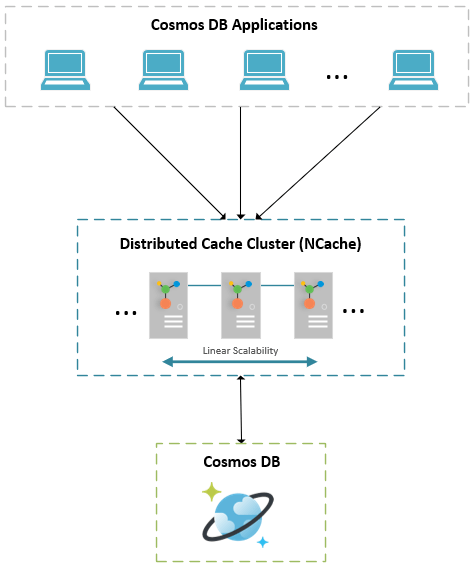
Figure: NCache Distributed Caching Architecture with Azure Cosmos DB
How to Implement Caching with Azure Cosmos DB (.NET 8)?
Below is an optimized approach to implementing NCache with this database in .NET 8. This example assumes an application that retrieves customer data and caches it to optimize performance. However, please ensure you have Azure Cosmos DB and NCache (Open Source or Enterprise) installed and set up before proceeding. You will also require .NET 8 SDK, and Azure SDK for .NET.
Caching a Single Cosmos DB Item
The following code snippet shows how to cache a single Customer record from Azure Cosmos DB using NCache.
|
1 2 3 4 5 6 7 8 9 10 11 12 13 14 15 16 17 18 19 20 21 22 23 24 25 26 27 28 29 30 31 32 33 34 35 36 37 38 39 40 41 42 43 44 45 46 |
using Alachisoft.NCache.Client; using Alachisoft.NCache.Runtime.Caching; using Microsoft.Azure.Cosmos; using System; using System.Threading.Tasks; class Program { private static readonly string cosmosConnectionString = ""; private static readonly string cacheName = "myClusteredCache"; static async Task Main(string[] args) { string customerId = "ALFKI"; string cacheKey = $"Customer:{customerId}"; ICache cache = CacheManager.GetCache(cacheName); var cachedCustomer = cache.Get(cacheKey); if (cachedCustomer == null) { Console.WriteLine("Cache miss. Fetching from Cosmos DB..."); var client = new CosmosClient(cosmosConnectionString); var container = client.GetContainer("Northwind", "Customer"); PartitionKey partitionKey = new PartitionKey("Seattle"); var itemResponse = await container.ReadItemAsync(customerId, partitionKey); cachedCustomer = itemResponse.Resource; var cacheItem = new CacheItem(cachedCustomer) { Expiration = new Expiration(ExpirationType.Absolute, TimeSpan.FromMinutes(10)) }; cache.Insert(cacheKey, cacheItem); Console.WriteLine("Customer data cached successfully."); } else { Console.WriteLine("Cache hit! Fetching from NCache..."); } } } |
Caching a Collection of Database Items
Caching multiple database records improves efficiency when querying large datasets. Below is an optimized method to cache a list of customers from the database.
|
1 2 3 4 5 6 7 8 9 10 11 12 13 14 15 16 17 18 19 20 21 22 23 24 25 26 27 |
string key = "CustomersFromGermany"; IDistributedList germanCustomers = cache.DataTypeManager.GetList(key); if (germanCustomers == null) { var container = cosmosClient.GetContainer("Northwind", "Customer"); var query = new QueryDefinition("SELECT * FROM Customers c WHERE c.Country = 'Germany'"); var feedIterator = container.GetItemQueryIterator(query); var attributes = new DataTypeAttributes() { Expiration = new Expiration(ExpirationType.Absolute, TimeSpan.FromMinutes(10)) }; germanCustomers = cache.DataTypeManager.CreateList(key, attributes); while (feedIterator.HasMoreResults) { var response = await feedIterator.ReadNextAsync(); foreach (var customer in response.Resource) { germanCustomers.Add(customer); } } } |
NCache Deployment in Azure
You can deploy NCache in Azure using multiple methods:
- NCache Cloud: Fully managed caching solution available in Azure Marketplace.
- Virtual Machines: Deploy NCache manually on Azure VMs for on-premises-like control.
- Azure Kubernetes Service (AKS): Run NCache in containers for a scalable architecture.
- Azure App Service: Host NCache as part of a PaaS deployment.
For more details on NCache Azure Deployment, visit NCache Documentation.
Conclusion
Integrating NCache with Azure Cosmos DB improves performance, lowers costs, provides low-latency, and high-availability. With distributed lists, bulk operations, and tag-based caching, NCache best handles caching for .NET 8 applications. For e-commerce, IoT, or AI-powered analytics, it provides a scalable, and efficient caching solution.
Frequently Asked Questions (FAQ)
Q: Does Azure Cosmos DB have a built-in cache?
A: Azure Cosmos DB has an integrated cache, but it is limited to specific workloads (like point reads). An external distributed cache like NCache offers more control, complex data types, and synchronization across different regions.
Q: How does caching save money on Azure Cosmos DB?
A: Cosmos DB charges based on Request Units (RUs). By serving frequent read requests from NCache instead of the database, you consume fewer RUs, lowering your monthly bill.
Q: Can NCache sync data with Cosmos DB?
A: Yes, NCache supports cache synchronization to automatically invalidate or update cached items when data changes in the Cosmos DB backend.