MongoDB is a popular NoSQL database, particularly for modern .NET applications. However, it is still disk-based, which might lead to performance issues in situations with significant traffic, despite its flexibility, scalability, and powerful querying capabilities. This is where NCache, a distributed in-memory caching solution, comes in.
Introducing NCache as a caching layer for MongoDB allows .NET applications to drastically reduce database queries, enhance response times, and manage high transaction volumes efficiently. This article explains how to integrate NCache with MongoDB, best practices for caching query results, and strategies to keep the cache and database in sync.
This guide explains when to cache MongoDB data, what data should not be cached, and how .NET applications can safely keep cache and database in sync. It is especially useful for read-heavy APIs, dashboards, and high-traffic microservices. In short: MongoDB remains the system of record, while NCache serves as a high-speed, in-memory read layer.
Key Takeaways
- MongoDB is disk-based, which often becomes a performance bottleneck for high-traffic .NET applications. This is where an in-memory caching layer significantly reduces load on the database.
- NCache acts as an in-memory distributed cache for MongoDB, allowing frequently accessed data to be served from the cache instead of the database, resulting in faster performance and improved scalability.
- The Client Cache in NCache provides InProc speeds for the application because it sits inside the application process and yet stays synchronized with the distributed cache.
- The Cache-Aside pattern is commonly used with MongoDB, where the application first checks NCache for data and then goes to MongoDB only if the data is not found in cache.
- MongoDB Change Streams can be used to keep the cache data in-sync, enabling real-time cache updates whenever documents are inserted, updated, or deleted in MongoDB.
- NCache allows SQL-style querying on cached MongoDB data, making it possible to filter and search cached objects more intelligently without querying MongoDB directly.
- Caching entire collections or individual documents from it depends on access patterns: bulk caching improves batch reads, while item-level caching with tags enables fine-grained control and selective invalidation.
- NCache is well-suited for .NET applications using MongoDB, offering native .NET object caching and server-side caching features such as Read-Through and Write-Behind.
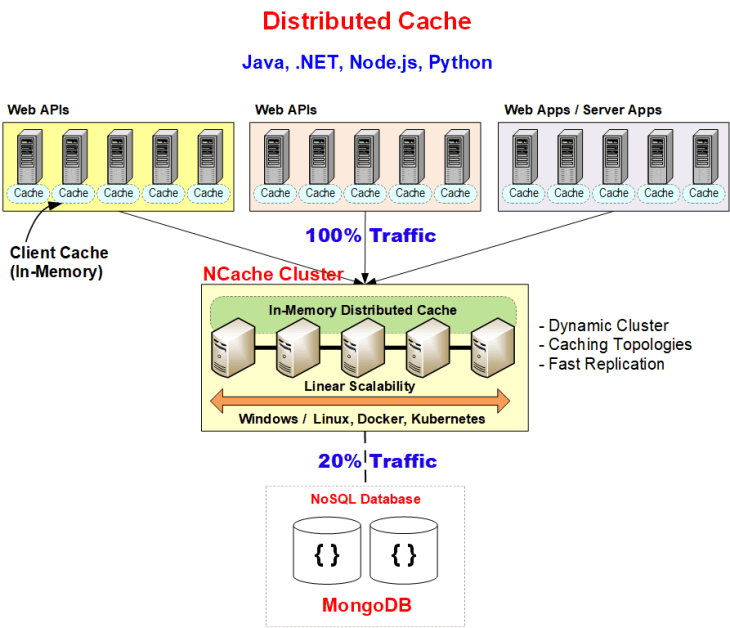
Figure: Distributed Cache using MongoDB
Why Caching Is Critical for MongoDB Performance?
It is beneficial to .NET applications for the following reasons:
- Flexible Document-Based Storage: This simplifies data organization due to its schemaless design.
- Distributed Architecture: Enables replication and partitioning for scalability.
- Indexes & Aggregation Framework: Makes complex queries efficient.
- Change Streams: Captures real-time data modifications via Change Streams.
MongoDB Performance Bottlenecks
It has the following performance issues:
- Read/Write Latency & Disk I/O Overhead: Since MongoDB is a disk-based database, frequent read and write operations lead to higher latency compared to in-memory solutions. Disk I/O overhead increases as data volume grows, impacting response times and overall system performance.
- Large Dataset Queries: With increasing dataset size, query execution time increases because it takes longer to scan and process more documents. Indexes are useful in this regard but are not always enough, particularly when filtering or aggregating large volumes of data.
- Scalability Challenges: Although it has built-in support for horizontal scaling using sharding, dealing with huge clusters may present replicational, load-balancing, and networking complexities. Performance optimization becomes critical as traffic volume rises.
- High Latency for Frequently Accessed Data: Queries for frequently accessed data can lead to performance degradation if they repeatedly hit the database instead of being served from a faster storage layer. This causes a boost in resource utilization and delays in response times.
Benefits of Using NCache with MongoDB
NCache, an in-memory distributed cache, is the best option for your MongoDB application:
- In-Memory Performance: NCache is a 100% in-memory caching solution, eliminating disk I/O and ensuring ultra-low latency for faster data retrieval.
- Client Cache (InProc Speed): Resides on the application server inside the application process, minimizing network calls and ensuring rapid access.
- Linear Scalability: Dynamically scales out by adding cache servers as data load grows, preventing bottlenecks and ensuring high performance.
- High Availability: Ensures uninterrupted access with automatic replication and failover, keeping the cache operational even during server failures.
Architecture: How Caching Works in MongoDB with NCache
NCache seamlessly fits into your application due to its dynamic architecture:
- Supports Read-Through and Write-Through caching to reduce direct database queries.
- Integrates seamlessly with .NET 8 and cloud environments (Azure, AWS, Kubernetes).
Step-by-Step: Implement MongoDB Caching with NCache
You can easily implement MongoDB caching with NCache as demonstrated below:
Caching Query Results in MongoDB
|
1 2 3 4 5 6 7 8 9 10 11 12 13 14 15 16 17 18 19 |
ICache cache = CacheManager.GetCache("MongoDBCache"); string cacheKey = "Customer:EINSTEIN"; Customer customer = cache.Get<Customer>(cacheKey); if (customer == null) { var collection = new MongoClient("mongodb://your-mongodb-url") .GetDatabase("ECommerceDB") .GetCollection<Customer>("Customers"); customer = await collection.Find(x => x.Id == "EINSTEIN").FirstOrDefaultAsync(); if (customer != null) { cache.Insert(cacheKey, new CacheItem(customer) { Expiration = new Expiration(ExpirationType.Absolute, TimeSpan.FromMinutes(5)) }); } } |
Caching MongoDB Collection as a Single Item
You can easily cache MongoDB collections. Storing an entire collection as a single cache item allows for quick retrieval in one operation, reducing cache lookups and improving batch processing or UI rendering performance.
|
1 2 3 4 5 6 7 8 9 10 |
var customersInGermany = await collection.Find(x => x.Country == "Germany").ToListAsync(); if (customersInGermany.Count > 0) { ICache cache = CacheManager.GetCache("MongoDBCache"); var cacheItem = new CacheItem(customersInGermany) { Expiration = new Expiration(ExpirationType.Absolute, TimeSpan.FromMinutes(10)) }; cache.Insert("Customers:Germany", cacheItem); } |
Caching MongoDB Collection Items Separately
You can easily cache MongoDB collections. Storing each item separately ensures individual access while using tags to group related items, making bulk retrieval faster and improving query performance.
|
1 2 3 4 5 6 7 8 9 |
foreach (var customer in customersInGermany) { var cacheItem = new CacheItem(customer) { Tags = new Tag[] { new Tag("Customer:Country:Germany") }, Expiration = new Expiration(ExpirationType.Absolute, TimeSpan.FromMinutes(10)) }; cache.Insert($"Customer:CustomerID:{customer.Id}", cacheItem); } |
Keep Cache and Database in Sync by Using Change Streams
To ensure data consistency between MongoDB and the cache, change streams allow for real-time synchronization by detecting inserts, updates, and deletes. Whenever data changes, NCache can remove or update the corresponding cache entry, preventing stale data issues.
|
1 2 3 4 5 6 7 8 9 |
var pipeline = new EmptyPipelineDefinition<ChangeStreamDocument<Customer>>() .Match("{ operationType: { $in: ['insert', 'update', 'replace', 'delete'] } }"); var cursor = collection.Watch(pipeline); await cursor.ForEachAsync(change => { string cacheKey = $"Customer:CustomerID:{change.FullDocument.Id}"; cache.Remove(cacheKey); }); |
Querying Cached Data in NCache
NCache allows users to query cached data using SQL queries, reducing database load while improving application performance. Indexed queries enable faster lookups and filtering on cached objects.
|
1 2 3 4 5 6 7 8 9 10 11 12 13 14 15 16 |
// Connect to NCache ICache cache = CacheManager.GetCache("MongoDBCache"); // Define NCache search query string query = "SELECT * FROM Models.Customer WHERE Country = ?"; var queryCommand = new QueryCommand(query); queryCommand.Parameters.Add("Country", "Germany"); // Execute query on cache ICacheReader reader = cache.SearchService.ExecuteReader(queryCommand); while (reader.Read()) { string contactName = reader.GetValue<string>("ContactName"); Console.WriteLine($"Contact Name: {contactName}"); } |
How to Configure NCache for MongoDB?
To configure NCache for MongoDB, follow the steps below:
A. Install NCache Client
To install the NCache client in a .NET application, use NuGet to add the required package:
|
1 |
Install-Package Alachisoft.NCache.SDK |
Once installed, configure your application to use NCache for caching data.
B. Install NCache Server
To install NCache Server on Linux:
|
1 2 3 |
docker pull alachisoft/ncache:latest docker run -d --name ncache-server --network host alachisoft/ncache:latest docker exec -it ncache-server ncache service start |
C. Configure NCache for MongoDB
To integrate MongoDB with NCache, follow these steps:
- Create and Configure Cache:
|
1 2 |
New-Cache -Name MongoDBCache -Size 1024 -Topology PartitionReplica -Server 192.168.1.2 Add-Node -CacheName MongoDBCache -Server 192.168.1.3 |
- Modify .NET Application to Use NCache:
|
1 2 3 4 5 6 7 8 9 10 11 12 |
ICache cache = CacheManager.GetCache("MongoDBCache"); var collection = new MongoClient("mongodb://your-mongodb-url") .GetDatabase("ECommerceDB") .GetCollection<Customer>("Customers"); var customer = await collection.Find(x => x.Id == "EINSTEIN").FirstOrDefaultAsync(); if (customer != null) { cache.Insert("Customer:EINSTEIN", new CacheItem(customer) { Expiration = new Expiration(ExpirationType.Absolute, TimeSpan.FromMinutes(10)) }); } |
Conclusion
Using NCache with MongoDB enhances application performance by reducing database load, improving response times, and ensuring real-time data consistency. By leveraging in-memory caching, applications benefit from faster data access, lower latency, and seamless scalability. NCache’s distributed architecture provides high availability and ensures fault tolerance, making it an ideal choice for modern, high-traffic .NET applications utilizing MongoDB.
Frequently Asked Questions (FAQ)
Q: Why use NCache if MongoDB is already scalable?
A: While MongoDB scales well, disk I/O eventually becomes a bottleneck. NCache offloads read-heavy traffic to memory, which is significantly faster, allowing the database to focus on write operations and complex queries.
Q: How does the cache stay in sync with the database?
A: As detailed in Section 6, NCache can leverage MongoDB Change Streams to listen for real-time updates in the database and invalidate or update cached items accordingly, ensuring data consistency.
Q: Can I use SQL with MongoDB data?
A: You cannot run SQL on MongoDB directly, but once the objects are inside NCache, you can use NCache’s SQL querying capabilities to search and filter data using standard SQL syntax.
Q: Is NCache better than Redis for .NET MongoDB applications?
A: NCache is often preferred in .NET environments because it is 100% native .NET, whereas Redis is Linux-based. This means NCache fits seamlessly into the Visual Studio ecosystem, offers better serialization for complex .NET objects, and allows you to run server-side .NET code (like Read-Through/Write-Behind providers) directly on the cache nodes, which Redis cannot do natively.
Q: Do I need to convert MongoDB BSON documents before caching?
A: Yes. NCache stores native .NET objects, not BSON documents. You should deserialize your MongoDB BSON data into standard .NET classes (POCOs) before inserting them into the cache. This allows you to leverage NCache’s SQL querying and indexing features, which work on object attributes, not raw BSON bytes.
Q: Can NCache automatically write data to MongoDB?
A: Yes. While this guide focused on the “Cache-Aside” pattern (where your app manually updates the DB), NCache supports Write-Through and Write-Behind providers. These allow you to hand off the write operation to NCache, which then updates MongoDB synchronously (Write-Through) or asynchronously (Write-Behind) in the background, further improving application latency.
Q: What happens if the NCache cluster goes down?
A: Your application will gracefully degrade but continue to function. Because the standard “Cache-Aside” pattern includes a fallback logic (if cache is null -> fetch from DB), your application will simply start hitting MongoDB directly. Performance will drop to non-cached levels, but no data will be lost and the application will remain online.