
With data caching being the primary objective of most distributed caches, it stands to reason that a cache is of no use without basic CRUD operations. Essentially, since the cache is a key-value store, these key-based CRUD operations (Create, Remove, Update, Delete) make your cache easy to access and use. To this end, since NCache has been widely adopted for its distributed data caching ability, linear scalability, and high availability, it provides comprehensive CRUD APIs (in .NET, Java, Node.js, and Python) to perform such operations. This blog explores these API and demonstrates how easily you can use them in an e-commerce scenario.
Key Takeaways:
Differentiated Write Logic: NCache distinguishes between Add (for new items only) and Insert (for updates or additions), providing precise control over how data is stored in the cache cluster.
Reduced Network Latency: Bulk Operations allow for the manipulation of multiple items in a single request, significantly decreasing the I/O overhead compared to individual atomic calls.
Non-Blocking Performance: Asynchronous Operations enable the application to perform CRUD tasks in the background, ensuring the main application thread remains responsive and unblocked.
In-Memory Efficiency: By utilizing these CRUD operations, applications can minimize expensive database trips, leveraging NCache as a high-performance distributed temporary data store.
Basic CRUD Operations
As previously discussed, the fundamental aim of a cache is to serve as a temporary data store for your application. Essentially, this means whatever you require a particular data item, you check the cache instead of making a database trip. This is particularly useful for frequently used data, significantly improving application performance. NCache CRUD operations provide a high-performance interface for managing distributed data, allowing for synchronous and asynchronous manipulation of key-value pairs to eliminate database bottlenecks. With that in mind, let discuss the various options you have at your disposal:
| API | Description | Syntax |
| Add | Adds new data to the cache. | Add(key, value) |
| Insert | Updates the value if the key already exists in the cache or adds the item as new otherwise. | Insert(key, value) |
| Remove | Removes the specified key from the cache and returns the value. | Remove(key) |
| Get | Retrieves the value of provided key. | Get(key) |
Moreover, NCache also allows you to cache data with metadata, JSON objects, data structures, and more. Additionally, NCache supports both synchronous and asynchronous operations. Synchronous operations are generally used when you have to ensure that the operation you performed is completed before you proceed further. In other words, such operations are sequential. On the other hand, Asynchronous operations are more flexible and performed in the background while the control is sent back to the client immediately.
In such cases, it is important to note that all NCache SDK client objects and APIs are thread-safe and independent of each other. This ensures that reusing client instances is always safe, even across threads.
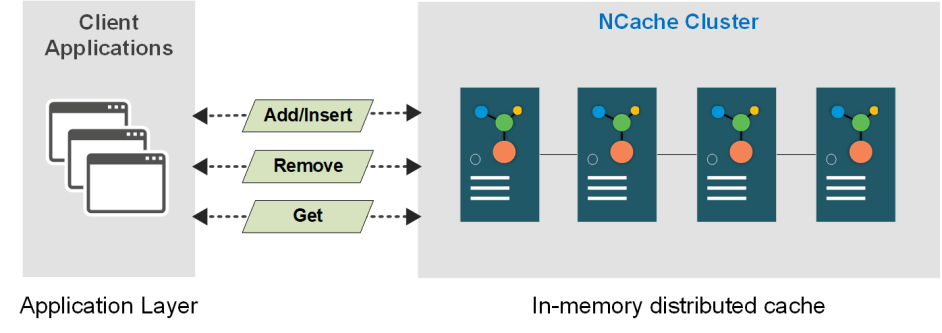
Figure 1: Architectural flow of basic CRUD operations in an NCache distributed cluster.
Types of Operations in NCache
The following section details the different kinds of data caching operations available in NCache.
Atomic (Synchronous) Operations
All operations performed on a single key-value pair are categorized as atomic operations. Such operations, therefore, require one cache call per item. For example, if you have an e-commerce application, and you want to add a new product to the cache, fetch and update its value, and then remove it from the cache. This is how simply you can do it with NCache CRUD APIs.
|
1 2 3 4 5 6 7 8 9 10 11 12 13 14 15 16 17 18 19 20 |
// Precondition: Cache is already connected // Get product from database string productKey = $"Product:{product.ProductID}"; Product product = GetProductFromDB(productKey); // Add item in the cache. Add can be replaced with Insert depending on your requirement. cache.Add(productKey, product); // Retrieve cached item from the cache // Retrieve the Customer object Product retrievedItem = cache.Get(productKey); // Update the price of retrieved product retrievedItem.Price = 500; cache.Insert(productkey, retrievedItem); // Remove item from the cache cache.Remove(productKey); |
However, it is important to note that the same key cannot be added again if it already exists in the cache. For that, you can use Insert which overwrites the value for the existing key.
Atomic (Asynchronous) Operations
Asynchronous operations are more flexible and performed in the background while the control is sent back to the client immediately. You can use this functionality in your e-commerce application to the fullest when performing less critical operations like updating the description of a product.
NCache supports multiple asynchronous overloads to perform atomic operations. Let’s see how you can use AddAsync, InsertAsync, and RemoveAsync APIs to add, update and remove your application’s data asynchronously.
|
1 2 3 4 5 6 7 8 9 10 11 12 13 14 15 16 17 18 19 20 |
// Pre-condition: Cache is already connected // Get product from database var product = GetProductFromDB(1001); string key = $"Product:{product.ProductID}"; // Add item in the cache. AddAsync can be replaced with InsertAsync depending on your requirement. Task task = cache.AddAsync(key, product); // Wait before fetching data // Retrieve cached item from the cache var retrievedItem = cache.Get(key); // Update the price of retrieved product retrievedItem.Price = 500; // Add Product object to cache cache.InsertAsync(key, retrievedItem); // Remove item from the cache cache.RemoveAsync(key); |
Bulk Operations
Since you may need to perform multiple operations simultaneously in your application, NCache allows you to perform CRUD operations on a chunk of data in one call. These operations are designed to achieve better performance as they reduce network calls to the remote server by getting the most done in a single cache call.
For instance, if you want to add, update or delete 100 product items in the cache, you can do so via a single bulk call to add, update or remove these items instead of calling the relevant APIs 100 times. Let’s see how you can use a single bulk call to achieve this.
|
1 2 3 4 5 6 7 8 9 10 11 12 13 14 15 16 17 18 19 20 21 22 |
// Precondition: Cache is already connected // Get products from database Product[] products = FetchProductsFromDB(); IDictionary<string, CacheItem> dictionary = new Dictionary<string, CacheItem>(); foreach (var prod in products) { string key = $"Product:{prod.ProductID}"; var cacheItem = new CacheItem(prod); dictionary.Add(key, cacheItem); } // Inserting items in the cache IDictionary result = cache.InsertBulk(dictionary); // Retrieve items in bulk IDictionary<string, Product> retrievedItems = cache.GetBulk(keys); // Perform business logic here // Remove a chunk of keys from the cache cache.RemoveBulk(keys); |
The following table highlights the architectural advantages of using NCache’s distributed in-memory provider over traditional relational storage for managing sessions in a multi-region Azure environment.
| Operation | Use Case | Existing Key Behavior | Network Impact |
|---|---|---|---|
| Add | Initial data seeding. | Fails (Throws Exception/Returns False). | Low (Single Item). |
| Insert | Upserting/Updating records. | Overwrites existing value. | Low (Single Item). |
| Get | Individual record retrieval. | Returns null if not found. | Low (Single Item). |
| Remove | Explicit cache clearing. | Does nothing if key is missing. | Low (Single Item). |
| Bulk Operations | Mass data migration/sync. | Handles multiple keys. | Optimized (Groups requests). |
| Async Operations | Background tasks/UI responsiveness. | Non-blocking execution. | Minimal (Background). |
Conclusion
Since you are now familiar with basic CRUD operations supported by NCache, you can easily start using them to enhance the performance of your distributed applications. The operations you once performed with your database can now be easily replicated to your cache enhancing user experience due to significantly reduced response time. Moreover, you can check out the NCache’s more advanced features today for your web apps, microservices, libraries, and console applications.
Frequently Asked Questions (FAQ)
Q: What happens if I use the Add method on a key that already exists in the cache?
A: The Add operation is designed strictly for new data. If the key already exists, the operation will fail (returning false or throwing an exception), ensuring that existing cache data is not accidentally overwritten.
Q: How does the Remove method behave if the specified key is not found?
A: The Remove operation is “silent” in its failure. If you attempt to delete a key that does not exist or has already expired, NCache will complete the call without taking action or throwing an error, maintaining application stability.
Q: What is the return value of the Get operation when a cache miss occurs?
A: When you attempt to retrieve a key that is not present in the cache, the Get method returns null. This allows developers to implement “if-null” logic to fetch the data from the primary database and repopulate the cache.
Q: Are NCache CRUD operations executed on a single node or across the cluster?
A: While the code is executed via a single client instance, NCache handles the distribution logic internally. Depending on your caching topology, the CRUD operation is automatically routed to the correct node containing that specific data key.