
Python is a popular open-source language known for its dynamic typing and high-level built-in data structures. It is suited well for Rapid Application Development, data analysis, and automation, due to high-level built-in data structures along with dynamic binding and typing. However, as Python applications scale up in size, they tend to experience performance issues that are often due to database load and resource contention.
NCache, a powerful in-memory distributed cache, addresses these problems by keeping frequently accessed data in memory and improves application scalability and performance. It reduces strain on databases while providing fast data retrieval. NCache was initially developed with support for .NET applications but has since expanded to support Java, Node.js, and Python clients. This allows Python applications to utilize advanced caching features like data replication, high availability, partitioning, expiration policies, and advanced querying.
Key Takeaways
Boosted Scalability: NCache acts as an in-memory distributed cache for Python, removing database bottlenecks to ensure applications scale linearly under high traffic.
Enterprise-Grade Features: Unlike basic caching, NCache offers advanced capabilities like SQL querying, data expiration policies (absolute & sliding), and item grouping directly within Python.
High Availability: The clustered architecture ensures zero data loss and continuous uptime through intelligent data replication and partitioning across multiple nodes.
Cross-Platform Deployment: NCache fully supports both Windows and Linux environments, with ready-to-use Docker images for rapid local development and production setup.
Seamless Integration: The client is easily installed via pip install ncache-client and utilizes standard cache-aside patterns for adding, updating, and retrieving data.
Why Use Distributed Caching in Python Applications?
Distributed caching is a performance technique that involves storing frequently accessed data across various in-memory nodes, enabling fast information retrieval without the need to repeat queries to a backend database. This strategy has numerous advantages:
- Reduced Latency & Faster Performance: Using in-memory caching cuts down the need for costly database queries, hence quicker response times.
- Scalability: Unlike single-node caching solutions, a distributed cache can grow horizontally by including more nodes, guaranteeing constant access and efficiently handling more workloads.
- High Availability & Fault Tolerance: Distributed caches maintain data accessibility by replicating it across various nodes, safeguarding against data loss in the event of a node failure.
- Efficient Load Balancing: With capabilities such as partitioning and replication, distributed caching optimizes load distribution among multiple cache servers.
- Reduced Database Load: By storing frequently accessed data, distributed caching alleviates database contention, thereby enhancing overall system performance.
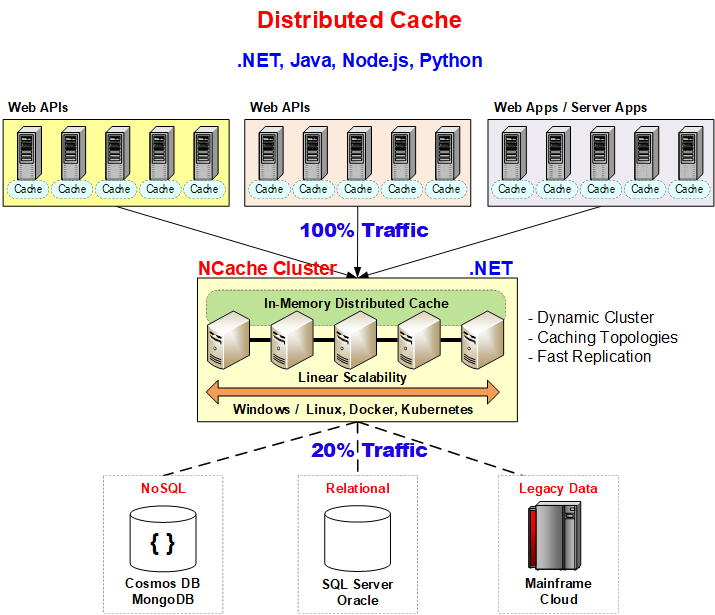
Figure: Distributed cache.
Real-World Use Cases
Below are some key applications where NCache can be used to optimize performance and enhance scalability:
- E-commerce Platforms: By caching product catalogs, shopping carts, and customer session data to offer fast access without many database queries, e-commerce platforms improve user experience.
- Content Delivery Networks (CDNs): By caching media files, static assets, and regularly accessed contents to cut latency and enhance website performance.
- Big Data & Analytics: By storing preparatory datasets, real-time analytics outputs, intermediate computation results, and other data to accelerate data handling.
- Real-Time Financial Systems: By caching stock prices, currency exchange rates, and user portfolios to deliver immediate updates and minimize transactional delays.
- IoT & Smart Devices: By storing sensor data at the edge before synchronization with cloud services, which reduces bandwidth consumption and enhances response times in distributed systems.
Setting Up NCache for Python Applications
To incorporate NCache into a Python application, make sure you have Python version 3.7 or later installed. Follow these steps to begin:
Step 1: Installing NCache
NCache is available for Windows and Linux. Refer to the official installation guide for step-by-step instructions.
Scenario 1: Installing Cache Server on a Developer Workstation
For local development, you can run an NCache server using Docker on your workstation:
|
1 |
docker run --name ncache itd --network host alachisoft/ncache:latest |
This command pulls and starts the NCache server container locally. Ensure Docker is installed and running before executing the command.
Scenario 2: Setting Up a 2-Node Cache Cluster on Dedicated Servers
Setting up a 2-node cache cluster ensures high availability and fault tolerance, especially in production or testing environments. Run the following command on each dedicated server:
|
1 2 |
docker run -d --name ncache-node1 --net=host alachisoft/ncache docker run -d --name ncache-node2 --net=host alachisoft/ncache |
Once both cache servers are operational, set up clustering using the NCache management tools or command-line utilities. This setup ensures data replication and high availability, preventing single points of failure.
Step 2: Creating a Clustered Cache
To enhance performance and ensure data redundancy; it is advised to establish a clustered cache. An optimal configuration consists of two nodes, as a single-node cache does not offer replication and lacks high availability.
A clustered cache enables several cache servers to collaborate, effectively distributing data and ensuring that cached information remains accessible even if one node fails, thanks to replication. This configuration mitigates bottlenecks and improves scalability, fault tolerance, and load balancing.
To create a clustered cache, you need to:
- Start NCache on each cache server (as outlined in the installation steps).
- Use the NCache Management Center or command-line tools to create a new clustered cache instance.
- Add multiple cache servers (nodes) to the cluster.
- Ensure the cache is started and properly configured before connecting the Python client.
Once the clustered cache is set up, it can handle distributed data efficiently, allowing multiple applications to interact with the cache without performance degradation.
Step 3: Installing & Configuring the Python Client
Next, import the necessary modules and connect to the cache. Use the following Python code to initialize the NCache client:
|
1 |
pip install ncache-client |
Next, import the necessary modules and connect to the cache:
|
1 2 3 4 5 6 7 |
import ncache # Specify the cache name cache_name = "demoCache" # Connect to cache cache = ncache.CacheManager.get_cache(cache_name) |
Once connected, the Python application can utilize NCache’s caching features to optimize performance.
Basic Cache Operations in Python
You can perform basic operations in your Python application using NCache as follows:
Adding Data to the Cache
The add method uses the cache-aside pattern, that is, first looking in the cache and only going to the database if the data is not in the cache. If it finds nothing in the cache, it retrieves the data from the database and stores it in the cache with an absolute expiration policy for cleaning old unused data.
|
1 2 3 4 5 6 7 8 9 10 11 12 13 14 15 16 17 18 19 |
# Generate a unique cache key key = "Product:1001" # Try retrieving the product from cache product = cache.get(key, Product) if product is None: # Fetch product from database if not found in cache product = fetch_product_from_db(1001) # Create cache item with absolute expiration cache_item = ncache.CacheItem(product) cache_item.set_expiration(ncache.Expiration.absolute(datetime.timedelta(minutes=30))) # Add product to cache with expiration policy cache.add(key, cache_item) # Use the retrieved product print("Product Retrieved:", product) |
Updating/Inserting Data in the Cache
The insert method follows the cache-aside pattern, where the application updates the data in the database first and then updates the cache accordingly. Additionally, absolute expiration can be applied to ensure the cached item is removed after a set duration.
|
1 2 3 4 5 6 7 8 9 10 11 12 13 14 15 16 |
# Generate a unique cache key key = "Product:1001" # Fetch and update the product in the database product = fetch_product_from_db(1001) updated_product = update_product_in_db(product) # Create cache item with absolute expiration cache_item = ncache.CacheItem(updated_product) cache_item.set_expiration(ncache.Expiration.absolute(datetime.timedelta(minutes=30))) # Update cache with new product data cache.insert(key, cache_item) # Use the updated product print("Product Updated:", updated_product) |
Retrieving Data from the Cache
To retrieve multiple objects at once, use the get_bulk method.
|
1 2 3 4 5 6 7 8 9 |
# Define keys for bulk retrieval keys = ["Product:1001", "Product:1002", "Product:1003"] # Retrieve multiple products from cache retrieved_products = cache.get_bulk(keys) # Process retrieved products for key, product in retrieved_products.items(): print(f"Retrieved {key}: {product}") |
Removing Data from the Cache
To delete multiple objects at once, use the remove_bulk method.
|
1 2 3 4 5 6 7 |
# Define keys for bulk removal keys = ["Product:1001", "Product:1002", "Product:1003"] # Remove multiple products from cache cache.remove_bulk(keys) print("Products removed from cache.") |
Advanced Caching Features
NCache provides advanced data search capabilities, allowing developers to retrieve data using:
- Groups: Logically group related cache items.
- Tags: Assign simple keywords to cache items for easy retrieval.
- Named Tags: Associate multiple keywords with cached objects for better filtering.
- SQL Queries: Use structured queries to filter cache data efficiently.
- Sliding Expiration: Extends item lifespan based on access frequency.
- Absolute Expiration: Automatically removes an item after a defined period.
- Least Recently Used (LRU) Eviction: Automatically removes least accessed items when the cache reaches its capacity.
Conclusion
Scaling Python programs, improving reaction times, and lessening database load are possible with distributed caching. NCache provides a high-quality, feature-rich solution that enhances availability, reliability, and application performance. Integrating NCache with your Python applications enables effective management of high traffic loads, and fault tolerance through replication and partitioning, and lowers operational expenses by reducing direct database queries. Get NCache now to boost your Python programs using quick, dependable, and scalable distributed caching.
Frequently Asked Questions (FAQ)
Q: What are the prerequisites for using the NCache Python client?
A: To use NCache with Python, you must have Python version 3.7 or later installed. Additionally, you need access to an NCache server cluster (available on Windows, Linux, or via Docker) to store the cached data.
Q: How do I install the NCache library for my Python application?
A: You can install the client library using the standard Python package manager with the command pip install ncache-client. Once installed, you can import the ncache module to connect to your cache cluster.
Q: Does NCache for Python support bulk operations?
A: Yes, the NCache Python client supports bulk operations to improve network efficiency. You can use methods like get_bulk to retrieve multiple items and remove_bulk to delete multiple keys in a single API call.
Q: Can I use NCache on Linux for Python development?
A: Yes, NCache is fully compatible with Linux. You can deploy the NCache server on Linux machines or run it as a Docker container (alachisoft/ncache) to support Python applications running in Linux environments.
